Meta Boost Post Invalid Call to Action Type: Fix the Error
Last updated: August 27, 2026
If Meta shows "Invalid Call to Action Type" while you boost a Facebook post, record the exact message before changing anything. Save the error text or code, the campaign objective, the post type, the selected button, the destination, and whether the error appeared in the Boost Post flow or Ads Manager. Meta changes its interfaces, and those details determine which check matters.
There is no single fix for every version of this error. Work through these checks in order.
Fix Meta's Boost Post "Invalid Call to Action Type" Error
1. Re-select a CTA that the current setup offers
Open the boost or ad again and check the call-to-action selector. If the saved button is no longer offered, choose a currently available button or remove the button, save, and add a supported option again.
Meta defines the CTA as a typed value, and its Marketing API documentation says that not every CTA type can be used for every ad. Meta directs advertisers to its Ads Guide to check availability for the campaign objective. That makes a stale or incompatible CTA type the first thing to rule out. Meta: Call to Action reference · Meta Ads Guide
2. Check the campaign objective and post format together
Confirm that the objective still matches the action you want, then check whether the selected post or creative format is available for that objective in Meta's Ads Guide. If the CTA disappears when you change the objective or format, do not force the old combination. Use a combination that Meta currently offers. Meta: Call to Action reference · Meta Ads Guide
Keep the objective aligned with the campaign's actual job. Changing an objective only to expose a preferred button can also change delivery and optimization.
3. Check the destination and share type
Open the destination in a private browser window and confirm that it loads without requiring your Facebook session. Then return to the ad setup and re-select the destination in the field Meta provides for that format.
For link-ad creative, Meta documents a CTA link value and requires it to match the creative's link URL. Meta also documents destination-specific CTA fields rather than one destination shape that works everywhere. A mismatched creative link or unsupported destination configuration therefore needs to be corrected in the ad setup, not worked around with a different-looking URL. Meta: CTA value reference
Public reports also mention invalid share or destination types. Those reports are useful clues, but Meta's public documentation does not support one universal list for every Boost Post interface and account. Treat the options shown in your current setup and the Ads Guide as authoritative.
4. Confirm Page and ad-account access
Check that you are working from the intended Page and ad account and that your account has the Facebook access or task access needed to create and manage ads for that Page. Meta documents Page task permissions such as ADVERTISE and MANAGE; the exact controls shown to you depend on the Page and business setup. Meta: Page access token reference
If another person can create the ad with the same post and settings, compare Page, business, and ad-account access before changing the creative.
5. Recreate the promotion in Ads Manager
If the Boost Post flow keeps the invalid CTA after you re-select a supported combination, create a new ad in Ads Manager instead of repeatedly editing the failed boost. Rebuild the objective, Page identity, post or creative, destination, and CTA from clean selections.
This is a troubleshooting fallback, not a Meta-documented guarantee. It helps distinguish a saved Boost Post configuration from a combination that Meta currently rejects. Do not keep submitting duplicate ads after one clean recreation fails.
6. Treat a temporary Meta problem as the last branch
If the same supported setup fails in both Boost Post and Ads Manager, capture the exact error, time, Page and ad-account IDs, objective, post type, CTA, and destination field. Check Meta's status information and retry once later without changing several variables. If it still fails, use Meta Business Help or your available support channel and include that context. Meta Business Help Center
Meta does not publish a reliable waiting period or promise that this error will clear by itself. Do not describe the problem as transient unless the same unchanged setup later succeeds or Meta confirms an incident.
Once the ad can be created, continue with the broader CTA checks below. A technically valid button can still point to a broken page, load poorly on mobile, or use tracking that does not match the campaign.
Don't Use This Facebook Ads CTA!
Improve a Facebook CTA After the Error Is Fixed
After Meta accepts the CTA, check the destination, mobile experience, permissions, and measurement. These checks solve a different problem: whether a valid button works clearly and reliably for the people who see it.
Wrong CTA Button Type
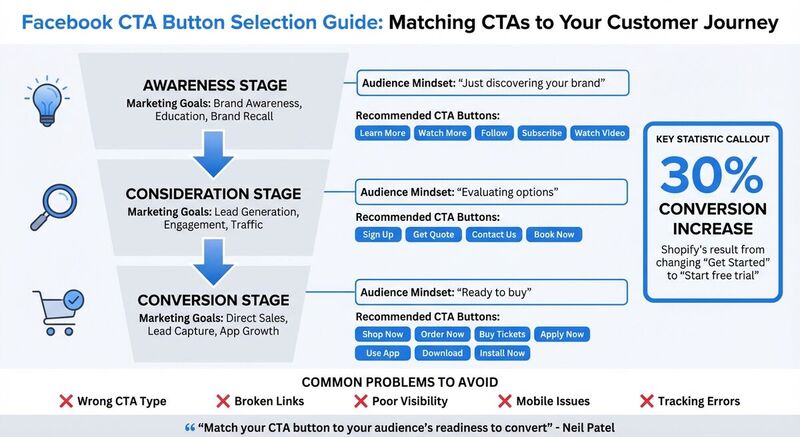
Choosing the wrong type of CTA button can create a disconnect with your audience. For example, using a "Shop Now" button for someone who's just discovering your brand can feel pushy, while showing a "Learn More" button to someone ready to buy might leave money on the table.
To complicate things, Meta limits which buttons are available based on your chosen ad objective. If you pick the wrong objective, you might not even see the button that fits your campaign's goals. For instance, the "Donate Now" button only becomes available under specific objectives, like Leads or Awareness, and requires additional setup for payment enrollment [4].
A small wording change can matter when it removes doubt. "Start free trial" is more specific than "Get Started" because it tells the user what happens next. That is the kind of CTA change worth testing.
| Marketing Goal | Recommended CTA Button | Funnel Stage |
|---|---|---|
| Brand Awareness | Learn More, Watch More, Follow | Top of Funnel (Awareness) |
| Lead Generation | Sign Up, Get Quote, Contact Us | Middle of Funnel (Consideration) |
| Direct Sales | Shop Now, Order Now, Buy Tickets | Bottom of Funnel (Conversion) |
| App Growth | Use App, Download, Install Now | Conversion/Action |
Broken or Non-Working Links
Broken links or URLs that lead to the wrong destination can destroy user trust and derail your campaign. To avoid high bounce rates, make sure your CTA leads users to a specific and relevant page. Accurate linking keeps users engaged and reduces drop-offs.
Poor Button Placement or Visibility
Where you place your CTA button matters - a lot. Buttons buried in cluttered layouts or positioned below the fold often go unnoticed. If your button isn't the most visually dominant element on the page, clicks will suffer.
To boost performance, ensure your CTA button is prominently placed and visually distinct from surrounding elements.
Mobile Optimization Problems
With most Facebook users browsing on mobile devices, failing to optimize CTA buttons for smartphones can tank your conversions. Small buttons, distorted layouts, or slow-loading pages are common culprits [7][8].
To avoid these issues, keep your CTA text short - ideally 5 to 6 words - so it displays properly on smaller screens. Also, ensure your landing pages are fast and mobile-friendly.
Tracking and Analytics Setup Issues
You can't improve what you can't measure. If you skip setting up the Meta Pixel or UTM parameters, you'll miss out on critical insights for tracking conversions and optimizing campaigns [4].
A common error is the "no promotion object found" issue, which happens when the Meta Pixel isn't installed or selected during ad set creation [4]. Missing roles or permissions can also block proper tracking setup [4]. Without these tools, you're essentially flying blind.
| Common Error Code | Likely Cause | Recommended Fix |
|---|---|---|
| 1815563 / 2446433 | Unsupported URL or lack of Page permissions | Check Page roles; ensure URL is an external site or valid Facebook link [4] |
| 1885029 | Pages don't match between Ad Set and Ad | Ensure the Page selected in "Conversion" matches the "Identity" [4] |
| 1815430 / 1487790 | No promotion object found | Install or select the Meta Pixel during ad set creation [4] |
| 1815952 | Unsupported ad format for objective | Change the objective or use a compatible post type (e.g., single image) [4] |
How to Fix Facebook CTA Button Problems
Here are practical ways to tackle issues with Facebook CTA buttons and improve their performance.
Choose the Right CTA Button
Your CTA button should align with where your audience is in the customer journey. For example:
- Awareness-stage users prefer low-pressure options like "Learn More" or "Watch Video."
- Consideration-stage users respond well to buttons like "Contact Us" or "Get Quote."
- Conversion-stage users need direct action buttons, such as "Shop Now" or "Order Now" [9][1].
Meta's streamlined ad objectives - Awareness, Traffic, Engagement, Leads, App Promotion, and Sales - determine which buttons are available for your campaign [1].
Using action-oriented verbs like "Shop," "Call," or "Email" can make your CTAs clearer [2]. Urgency can help when it is true. If the offer does not expire, do not fake it.
Small changes are worth testing, but test one variable at a time. Otherwise you will not know whether the button text, landing page, creative, or audience caused the result.
| Funnel Stage | Business Goal | Recommended CTA Buttons |
|---|---|---|
| Awareness | Brand recall, education | Learn More, Watch Video, Follow, Subscribe |
| Consideration | Engagement, traffic | Book Now, Contact Us, Get Quote, Sign Up |
| Conversion | Sales, lead capture | Shop Now, Order Now, Buy Tickets, Apply Now |
Test and Update Links Regularly
Broken links can hurt trust and kill conversions. Before launching a campaign, use Facebook's "Test Button" feature to ensure your CTA directs users to the correct destination [4].
Use the destination field offered for the selected objective and format, then confirm the saved URL opens outside your Facebook session.
Also check that your account has the Facebook or task access required for the Page and ad account.
Test links before launch and after destination changes. Broken links frustrate users and waste ad spend.
Improve Button Placement and Design
Place your CTA button where it's immediately visible - usually near the top or center of your ad creative, close to the headline [10][3]. Buttons hidden below the fold or buried in cluttered layouts are often missed.
Make your button visually stand out. Use contrasting colors to draw attention, and ensure it's the most dominant element on the page.
Make Buttons Mobile-Friendly
Design buttons that are easy to tap on mobile devices. Ensure they're large enough, with proper spacing between elements, to avoid accidental clicks [3]. Use Scalable Vector Graphics (SVG) for icons and images so they look sharp on high-resolution screens [3].
Adopt a fluid grid system for your landing pages so buttons and content adjust to different screen sizes [3]. Keep your CTA text short - ideally 5 to 6 words - so it displays well on smaller screens.
Always test your buttons on actual mobile devices before launching. A design that looks great on desktop might not work as well on a smartphone. Check that buttons are easy to tap, load quickly, and lead to mobile-optimized landing pages.
Once your buttons are optimized for mobile, track their performance and refine your strategy as needed.
Set Up Tracking and Analytics
To measure the effectiveness of your CTAs, install the Meta Pixel on your website [4]. Make sure to select the Pixel during ad set creation to avoid errors like "no promotion object found" [4].
Use UTM parameters in your destination URLs to track traffic sources. Stick to consistent naming conventions so you can easily compare campaign performance.
Double-check your Page roles and permissions before setting up tracking. Missing roles can block proper configuration [4]. Also, ensure the Page selected under "Conversion" matches the "Identity" to avoid tracking issues [4].
Run A/B tests to fine-tune your CTAs. Experiment with single variables like button color, size, placement, or text (e.g., "Sign Up" vs. "Learn More") [1][3]. Test one element at a time to understand what drives improvements. Choose a test window before launch and keep it long enough for the campaign to collect a useful sample.
How TheBlue.social Helps With Cross-Platform Campaigns
TheBlue.social does not manage Facebook ads or edit Facebook CTA buttons. I would use it around the campaign: preview the destination link, keep cross-platform posts aligned, add accessible image text, and track what happens on Bluesky.
Keep the campaign consistent across platforms
Facebook may be the paid CTA, but the same campaign often has supporting posts on other networks. TheBlue.social's scheduler helps you plan those posts across X, Threads, Instagram, Pinterest, LinkedIn, Bluesky, and Mastodon.
That matters when the offer, launch time, and UTM campaign name need to stay consistent.
Use Free Tools to Improve Campaign Performance
Before publishing, run the destination URL through the Open Graph Preview Tool. It shows how the link preview appears on social platforms, so you can catch missing titles, weak descriptions, broken images, or a preview that does not match the CTA.
The Generate Alt Text for Images tool helps create image descriptions for campaign assets. If an image includes text, Extract Text from Images can pull it out so you can compare the visual message against the CTA.
Track Engagement and Performance
For Bluesky campaign posts, Bluesky analytics helps you see which supporting posts get replies, reposts, likes, and follower growth. Pair that with UTMs and your web analytics for click and conversion tracking.
Conclusion
Start with the exact Meta error and the settings that produced it. Re-select a CTA that is available for the objective and format, check the destination and access, then recreate the promotion once in Ads Manager if the Boost Post setup remains stuck. After Meta accepts the ad, test the landing page, mobile experience, and tracking separately.
Then check the campaign around the CTA. Use TheBlue.social's Open Graph Preview Tool before sharing the landing page elsewhere, schedule supporting posts across the platforms TheBlue.social supports, and use Bluesky analytics to see which Bluesky posts help the campaign.
Keep testing one variable at a time. Button text, destination page, creative, and timing can all change results.
FAQs
How do I fix "Invalid Call to Action Type" when boosting a Facebook post?
Record the exact error and setup first. Then re-select a CTA currently offered for the objective and post format, check that the destination matches the creative, and confirm Page and ad-account access. If the Boost Post flow keeps the old CTA, recreate the promotion once in Ads Manager with clean selections. There is no universal button or objective that fixes every version of the error.
Can a campaign objective or post type make a Facebook CTA invalid?
Yes. Meta's CTA reference says not every CTA type can be used for every ad and directs advertisers to the Ads Guide for availability by campaign objective. Check the objective and creative format together, then use a CTA that Meta currently offers for that setup. Meta: Call to Action reference · Meta Ads Guide
What should I send Meta support if the invalid CTA error continues?
Send the exact error text or code, time, Page and ad-account IDs, campaign objective, post or creative type, CTA, destination field, and whether the same setup failed in both Boost Post and Ads Manager. Do not include passwords, access tokens, payment details, or unrelated customer data.