How to Generate Hashtags for Multi-Platform Posts
Last updated: December 10, 2025
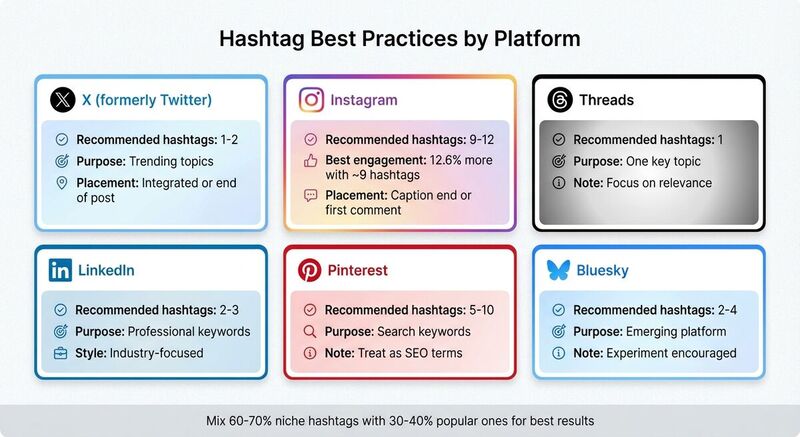
Want to make your social media posts more discoverable? Hashtags are the key. They connect your content to trending topics and niche communities, boosting visibility and engagement. But here’s the challenge: each platform has its own hashtag rules. For example:
- X (formerly Twitter): Use 1–2 hashtags for trending topics.
- Instagram: Posts with 9–12 hashtags perform best.
- Threads: Focus on one highly relevant hashtag.
- LinkedIn: Stick to 2–3 professional tags.
- Pinterest: Treat hashtags like search keywords, using 5–10.
Using AI-powered tools like TheBlue.social's hashtag generator, you can quickly find the best hashtags tailored to your content and platforms. This guide covers how to generate, organize, and refine hashtags for platforms like Instagram, Threads, X, Pinterest, Bluesky, and LinkedIn. Plus, it explains how to track performance and adjust your strategy over time to maximize engagement. Let’s get started.
Social Media Crash Course #Hashtags How to Use them Effectively
How Hashtags Work on Different Platforms
Hashtags are a simple yet powerful way to organize your content and make it easier to find. They link your posts to broader conversations or topics, helping you reach people who are already interested in what you're sharing. But here's the catch: each platform treats hashtags differently. A tag that works wonders on Instagram might feel awkward on X or seem out of place on LinkedIn if used without tweaking.[1][2][3][6] When posting across multiple platforms, you need to balance consistent branding - using a core set of branded and niche hashtags - with each platform's specific norms, like how many tags to use, where to place them, and how users interact with them.[1][3]
Hashtags on X, Instagram, Threads, and Bluesky
On X (formerly Twitter), hashtags are all about connecting to real-time trends. Using just 1–2 highly relevant tags can boost your post's reach without making it feel cluttered or hard to read.[1][2] Instagram, on the other hand, uses hashtags for content categorization and topic feeds. While Instagram lets you add up to 30 hashtags, studies show posts with around 9 hashtags get 12.6% more engagement, so quality and relevance matter more than sheer quantity.[1][3][5]
Threads takes a different approach, encouraging users to focus on one key topic or hashtag per post. This makes your choice of tag especially important since you can’t rely on volume to increase visibility.[1] On Bluesky, hashtags (or similar conventions) are still developing. For now, using 2–4 well-chosen tags can help your content stand out without overwhelming the post. Plus, newer platforms like Bluesky often reward experimentation as their communities and tools evolve.[1]
While platforms like X and Instagram have clear guidelines and algorithms for hashtags, newer ones like Threads and Bluesky are still shaping their norms. Staying tuned to user behavior and adapting your strategy as these platforms grow is key.
Platform Rules for Hashtag Use
Each platform has its own set of rules and audience expectations for hashtags. On X, the character limit forces you to keep things concise, so stick to 1–2 hashtags per post. Users on X prefer hashtags that are either naturally integrated into the text or added sparingly at the end. Overloading a tweet with tags can make it look spammy and hurt engagement.[1][2]
Instagram might allow 30 hashtags, but most experts suggest using 3–12 focused tags to avoid looking spammy. These tags are often placed either at the end of the caption or in the first comment. Just make sure they’re clearly relevant to the post.[1][4][5] For Threads, the focus is on a single, well-chosen tag. Long lists of hashtags copied from Instagram won’t resonate here and could even hurt engagement.[1]
On LinkedIn, hashtags act more like keywords. Using 2–3 professional and concise tags can help your post get discovered without coming across as overly promotional.[1][2][6] For Pinterest, hashtags are also treated like keywords. A small number of relevant and descriptive tags ensures your Pins stay clean and easy to find in searches.[3][6] Across all platforms, shorter, straightforward hashtags tend to perform better than long, complicated ones.[1][2]
By following these platform-specific rules, you can use hashtags effectively without alienating your audience.
Building a Core Hashtag Set with Platform Add-Ons
To make the most of hashtags, it helps to create a core set that works across platforms. This set should include broad industry terms, niche community tags, and branded or campaign-specific hashtags.[1][3] Start by researching what your target audience, competitors, and influencers are using. Search for relevant keywords on each platform and note which hashtags consistently drive high engagement.[1][3]
Aim to build small collections of 15–30 hashtags per language or region that are always relevant to your brand. Save these for easy access, so you can quickly adapt them for each platform. For every post, start with 2–5 core hashtags that highlight your brand, niche, or main topics, then layer in platform-specific tags.[1][3]
- On X, add 1–2 real-time or event-based tags (like #SXSW or #AppleEvent) to stay current without cluttering your message.[1][2]
- For Instagram and Threads, mix high-volume discovery tags with narrower community tags (e.g., #NYCFoodies and #LowerEastSideEats), keeping within the recommended range.[1][3][5]
- On LinkedIn, stick to 2–3 professional tags (e.g., #B2BMarketing or #SaaS) to maintain a polished tone.[2][6]
- For Pinterest, focus on search-friendly tags that align with how users might look for content, like turning "fall decor ideas" into a hashtag. Pair these tags with your Pin titles and descriptions for better visibility.[3]
Tools like TheBlue.social can simplify this process. Their free hashtag generator helps you store core sets and platform-specific collections. This way, you can quickly apply the right combination of hashtags when scheduling posts across platforms like X, Threads, Instagram, Pinterest, Bluesky, and Mastodon.
What Information You Need Before Generating Hashtags
Before diving into a hashtag generator, it’s crucial to gather specific details. The more precise your input, the better the tool can provide relevant hashtags that resonate with your audience.
Required Information for Hashtag Generators
Start by identifying the platforms you’re targeting (e.g., X, Instagram, Threads, Bluesky). Each platform has its own hashtag norms: X typically works best with 1–2 hashtags, Instagram thrives on 9–12, and Bluesky usually sticks to 2–4. Knowing this upfront ensures the generator tailors its suggestions to fit the rules and user behavior of each platform.
Next, define your content type and main topics clearly. Are you promoting a holiday sale, sharing insights on industry trends, or announcing an event? For instance, a promotional post might need campaign-specific hashtags like #HolidaySale, while an educational post could benefit from niche tags like #DentalMarketingTips. Include your core keywords or themes - these are the backbone of your post. For example, if you’re sharing a recipe, keywords might be “vegan desserts” or “quick meals.” The more specific you are, the more relevant the hashtags will be.
Don’t forget to consider your target audience. Include details like age, location, interests, or profession. If you have branded hashtags (e.g., #MyBrandChallenge), make sure to include them for consistency and to track engagement. Some tools, like TheBlue.social's free hashtag generator, even let you upload images, URLs, or full post text to generate suggestions that align closely with your content. The more context you provide, the better the results.
Adjusting Hashtags for US Audiences
Once you’ve generated a list of hashtags, fine-tune them to appeal specifically to US audiences. Start by using American English spellings - #Color instead of #Colour, #Organize instead of #Organise, and #Favorite instead of #Favourite. These small tweaks can make a big difference in how easily your content is discovered.
Incorporate hashtags tied to US-specific holidays and events to boost relevance. Tags like #FourthOfJuly, #ThanksgivingSale, #BlackFriday, #SuperBowl, or #MarchMadness tap into popular moments that American audiences are already engaging with. Regional events such as #SXSW for tech and music or #Coachella for lifestyle and fashion can also help your content stand out. Even seasonal language matters - use #Fall instead of #Autumn when speaking to US users.
Lastly, consider adding cultural references or local slang to make your hashtags feel more relatable. Using language that aligns with how your audience talks and searches increases the likelihood that your hashtags will connect with them and drive engagement.
How to Use Hashtag Generation Tools
Using a hashtag generator can simplify the process of tailoring your hashtags to fit the requirements of different platforms.
Using TheBlue.social Hashtag Generator
Head over to TheBlue.social's free hashtag generator and input a keyword, description, or caption. The more specific you are, the better the suggestions will match your needs. For example, instead of typing something generic like "coffee", try entering "Austin coffee shop Black Friday promotion" to get hashtags that are more aligned with your content and audience.
The tool processes your input and provides a curated list of hashtag suggestions. These may include general industry tags like #CoffeeLovers, niche-specific options like #AustinCoffee, and trending tags. To achieve the best results, aim for a mix of about 60–70% niche hashtags and 30–40% popular ones. This balance helps you reach a broader audience while engaging with a targeted community.
Before finalizing your choices, double-check that your hashtags align with American English conventions (e.g., #Favorite) and include any U.S.-specific seasonal tags, such as #FallSale, when relevant. Once your hashtags are ready, the next step is to organize them for use across various platforms.
Organizing Generated Hashtags for Multiple Platforms
After generating your list, organize your hashtags into tiers. Start by identifying 1–3 core hashtags - these should be branded or campaign-specific tags that can be consistently used across all platforms, like #YourBrandName or #HolidaySale2025.
Next, tailor platform-specific variations based on each network's ideal hashtag count. Use a spreadsheet or document to keep things organized, with separate columns for each platform: X (1–2 hashtags), Instagram (9–12 hashtags), Threads (3–5 hashtags), Bluesky (2–4 hashtags), Pinterest (5–10 hashtags), and LinkedIn (2–3 hashtags). Assign hashtags from your list to each column, ensuring a balanced mix of broad and niche options that suit the audience behavior on each platform.
When it's time to schedule your posts, TheBlue.social's cross-posting scheduler can help streamline the process. It allows you to manage platform-specific variations for X, Threads, Instagram, Pinterest, LinkedIn, Bluesky, and Mastodon, all from one content calendar. As you prepare posts for each platform, simply paste the appropriate set of hashtags you've organized. For Instagram, include hashtags at the end of your caption or in the first comment. For X and Threads, weave them naturally into your message. On Pinterest and LinkedIn, place them directly in your captions. This method saves time and ensures your hashtags are optimized for each platform.
Adjusting Hashtags for Each Platform
After generating your hashtags, the next step is to fine-tune them for each platform. A hashtag that performs well on Instagram might feel out of place on LinkedIn, and what works on X could easily get lost on Pinterest. Each platform has its own audience and behavior, so tailoring your hashtags is key to maximizing visibility and engagement. Here's how to adapt your hashtag strategy for different platforms.
Hashtags for X and Bluesky
X and Bluesky are all about brevity, where every character counts. On X, stick to 1–2 concise hashtags to save space. Bluesky allows for a bit more flexibility, with 2–4 focused hashtags being the sweet spot.
Choose hashtags that are short and easy to read. For instance, #SocialMediaTips or #AustinCoffee are effective, while something like #SocialMediaTipsForSmallBusinessOwnersInTexas is overly long and cumbersome. A good mix includes one broad tag and one or two niche tags to balance reach and relevance. For example, a coffee shop in the US might post on X: "New winter menu - $3 lattes today only. #AustinCoffee #CoffeeLovers." On Bluesky, you could slightly expand this idea with additional relevant tags.
If you're using TheBlue.social's hashtag generator, filter the suggestions to align with these concise formats and focus on terms US users are likely to search for, such as #FallSale or #BlackFriday. Save a few core hashtag sets - like "product launch", "behind-the-scenes", or "US holidays" - in your scheduler to make cross-posting to X and Bluesky faster and more efficient.
Visual platforms like Instagram and Threads, however, require a completely different approach.
Hashtags for Instagram and Threads
Instagram allows up to 30 hashtags per post, but the best engagement typically comes from using 9–12 thoughtful tags. Overloading your caption with hashtags can come across as spammy and doesn’t always improve visibility. On Threads, the strategy is much simpler: focus on one main hashtag that best represents your post. Relevance is far more important than quantity here.
For example, a fitness creator in the US might caption an Instagram post with "New 20-minute home workout 💪" and add in the first comment: "#HomeWorkout #FitnessTips #HIIT #WorkoutFromHome #FitOver30." On Threads, they’d simplify this to just #HomeWorkout.
To streamline your Instagram strategy, create reusable hashtag groups tailored to your audience and content type. Research what your US competitors and niche influencers are using, then organize your tags into categories like "product photos", "US holidays", or "user-generated content." Each group should include 10–15 tags that you can rotate. Save these in TheBlue.social's cross-posting scheduler or a notes app for easy access. For Threads, keep your sets much shorter and focus on the single most relevant tag for each post. For instance, a fashion brand might alternate between #StreetStyle #OOTD #NYCFashion for editorial posts and #SummerSale #DiscountCode #ShopUSA for promotional ones.
Professional and search-driven platforms demand yet another adjustment.
Hashtags for LinkedIn and Pinterest
On LinkedIn, 2–3 clear and specific hashtags per post work best. Keep the tone professional and industry-focused by using tags that align with common searches, such as #DigitalMarketing, #SupplyChain, or #HealthcareIT. Avoid casual or playful hashtags, as they can come across as unprofessional. For example, a B2B SaaS founder might write: "We helped a US retail brand cut inventory costs by 18% in 6 months. #RetailInnovation #InventoryManagement #SaaS."
Pinterest hashtags function more like SEO keywords. Since Pins can appear in search results for months, focus on descriptive phrases that match what US users are actively searching for, such as #WeeknightDinners, #SmallBathroomIdeas, or #DIYHomeDecor. While you can use more descriptive tags here, keep them concise and directly tied to the Pin’s image and title.
When adapting a hashtag list for these platforms, filter out casual or aesthetic tags for LinkedIn, keeping only those that speak to industries or business outcomes. For Pinterest, think of hashtags as search terms. For example, if your generated list includes tags for "vegetarian tacos", you might keep #PlantBasedRecipes and #FoodMarketing for LinkedIn (if sharing a case study) but use #VeggieTacos #MeatlessMonday #EasyDinner for a consumer-facing recipe Pin.
Testing and Improving Your Hashtag Strategy
Once you've set up your cross-platform hashtags, the next step is regular testing to keep them relevant. Hashtag performance can change quickly - what worked yesterday might not deliver the same results today. By consistently testing and tweaking your strategy, you ensure your hashtags remain effective and aligned with your goals. Skipping this step is like shooting in the dark, wasting both time and potential reach.
Measuring Hashtag Performance on Each Platform
To gauge how well your hashtags are working, start by monitoring impressions, engagement rates, and follower growth for each post. On Instagram, for instance, the Insights tool can show how many users found your post through hashtags. On X, track retweets and replies linked to specific tags. For platforms like Bluesky and Threads, where native analytics are limited, third-party tools can step in. Tools like TheBlue.social's analytics provide a centralized dashboard to track hashtag performance across platforms like X, Threads, Instagram, Pinterest, Bluesky, and Mastodon. These tools offer analytics plans ranging from 7 to 90 days, making it easier to identify trends quickly.
Spend a few weeks analyzing your hashtag performance to identify which tags are underperforming. If certain hashtags consistently bring in fewer impressions or clicks than your average, it's time to replace them. Tools such as Brand24 and Sprout Social offer real-time data on hashtag reach and sentiment, helping you understand which tags resonate with your audience and which fall flat[7]. To stay organized, create a spreadsheet to track each hashtag's performance. Include details like the tag, platform, date used, impressions, engagement rate, and follower growth. This setup makes it easier to spot patterns and make data-driven adjustments.
These insights lay the groundwork for keeping your hashtag lists fresh and effective.
Updating Your Hashtag Lists
Using performance data, regularly update your hashtag lists to reflect what's working and what's not. For most users, a monthly review is sufficient, but if you're a high-volume creator, consider revisiting your lists every two weeks. Remove hashtags that consistently underperform and replace them with ones tied to current trends or seasonal themes. For example, swap out #SummerSale for #FallFashion in September or add #BlackFriday in November to capture holiday shoppers in the US.
To discover new hashtags, try tools like TheBlue.social's hashtag generator, which suggests trending tags aligned with your content. Weekly growth reports from TheBlue.social can also help you connect hashtag updates to changes in your audience growth. If a hashtag consistently boosts engagement or follower numbers, keep it in your rotation. If its performance starts to dip, check if it's oversaturated or no longer relevant to your audience, and adjust accordingly.
Conclusion
Creating effective hashtags for posts across multiple platforms doesn’t have to be complicated. The trick lies in recognizing that each platform has its own set of best practices. For example, platforms like X and Bluesky perform better with 1-2 specific hashtags, while Instagram thrives when you use 9-12 relevant ones. A good mix of broad hashtags, such as #Marketing, and more specific ones, like #DentalMarketingTips, helps you strike the right balance between visibility and engagement. Remember, quality beats quantity, and relevance always outweighs popularity.
To make this process even easier, tools can play a big role. For instance, TheBlue.social's free hashtag generator can analyze your content and suggest hashtags that align with your audience, saving you from the guesswork. You can also create reusable hashtag libraries organized by category, making it simple to adjust them for different platforms.
For a more seamless workflow, consider integrating hashtag generation with TheBlue.social's scheduler. This tool allows you to manage your posts across platforms like X, Threads, Instagram, Pinterest, Bluesky, and Mastodon - all from a single dashboard. By combining hashtag generation, scheduling, and performance tracking, you can build an efficient system to maintain a consistent presence across multiple platforms.
To stay ahead, regularly test and refine your hashtags. Drop the ones that aren’t performing and replace them with new, trend-driven options or seasonal themes. As algorithms and audience preferences shift, keeping your hashtags fresh ensures your content stays relevant.
With these strategies and tools, you're ready to take action. Streamline your process, optimize your hashtags, and maximize your reach and engagement across all platforms.
FAQs
How can I create effective hashtags for posts across different social media platforms?
To craft hashtags that work well across multiple platforms, start by pinpointing keywords or phrases that align closely with your content. You can use hashtag generation tools to uncover trending and widely used hashtags that fit your topic or target audience. These tools are especially helpful for tailoring hashtags to platforms like Instagram, Twitter (now X), Threads, and others.
Keep in mind that each platform has its own hashtag culture. On Instagram, a mix of niche and popular hashtags tends to perform well, while Twitter thrives on short, highly specific tags. Test different combinations and monitor how they perform to fine-tune your approach over time.
For an easier way to manage your hashtags and content across platforms, tools like TheBlue.social offer features to simplify the process and suggest hashtags designed to expand your reach.
What are the advantages of using AI tools to generate hashtags for social media posts?
AI-driven hashtag generation tools are a great way to save time and energy while crafting hashtags that fit your content perfectly. These tools dig into your post's text, themes, and target audience to recommend hashtags that can boost your visibility and engagement across various platforms.
With AI in the mix, your hashtags are fine-tuned to align with current trends and platform algorithms, ensuring your posts connect with the right audience. This approach takes the guesswork out of the process, making it simpler to maintain a polished and consistent presence on social media.
How often should I update my hashtag strategy to keep it effective?
To keep your hashtag strategy working effectively, it’s important to revisit and refresh it on a regular basis. Social media platforms evolve fast, with trends and algorithms shifting all the time. Checking in on your hashtags every 1-2 months can help you stay on top of these changes and boost engagement.
Make use of your analytics to figure out which hashtags are bringing in the most traffic or interactions. If some hashtags aren’t pulling their weight, swap them out for ones that are trending or better suited to your content and audience.