How to track Bluesky engagement and follower growth
Last updated: June 21, 2026
Bluesky analytics should answer practical questions, not just decorate a dashboard.
I would start with these:
- Which posts got replies, reposts, likes, and follows.
- Which topics keep working after the first hour.
- Whether follower growth came from one post, a thread, or steady posting.
- Which posts should be repeated, expanded, or retired.
TheBlue.social helps with that by combining Bluesky analytics with scheduling and account-management tools.
Bluesky Analytics & Scheduling Walkthrough
Core Analytics Metrics and Tools
Start with a few metrics you can act on.
Key Engagement Metrics
Some of the most important metrics to track include:
Engagement rate: Calculated as (likes + reposts + replies) ÷ impressions
Post interactions: Track likes, reposts, and replies by post
Follower growth: Watch whether content leads to new followers
Follow-back and cleanup signals: Use account-management tools to keep your network useful
TheBlue.social Bluesky Analytics
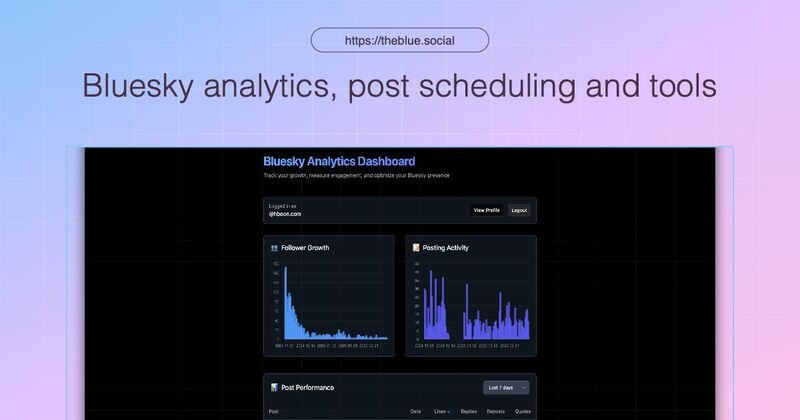 The dashboard helps you review follower growth and per-post performance. Use it to find what to post more often, what to turn into a thread, and what to stop repeating.
Using Data to Improve Content
Use the data to:
- Find the posts that got replies, reposts, and follows
- Schedule follow-up posts when your audience is active
Measuring and Growing Engagement
Monitoring Audience Patterns
Understanding your audience's behavior is key to improving engagement. Focus on:
- Growth Trends: Track daily or weekly changes in followers to spot spikes in growth.
- Engagement Patterns: Identify peak activity times to optimize when you post.
- Topic Performance: Analyze which keywords or themes resonate most with your audience.
These insights help you adjust your posting schedule and refine your content focus.
Building Active Follower Relationships
Strengthen connections with your most engaged followers. TheBlue.social's Bluesky tools can help you:
- Sort followers by their engagement levels.
- Monitor trends in followers and unfollowers.
- Review follower and post signals that show which relationships are worth more attention.
Once you know what drives engagement, dig deeper into analyzing your content to focus on what works best.
Content Performance Analysis
Evaluate how different types of content perform by comparing engagement rates and audience reactions. [1]
Key areas to review:
- Engagement Rates: See which content types drive the most interaction.
- Reaction Patterns: Understand how your audience responds to specific posts.
- Topic Performance: Pinpoint which themes or topics get the best results.
Regularly assess these metrics - along with peak times and engagement quality - to fine-tune your strategy. Then, set up your dashboard and schedule to act on these findings effectively.
Step-by-Step Analytics Guide
Now that you understand the key metrics for engagement, here's how to use that data effectively.
Setting Up Your Dashboard
Start by logging into TheBlue.social and opening Bluesky Analytics. Look at recent post performance and follower growth first. Do not build a complicated dashboard until you know which questions you need answered.
Once your dashboard is ready, align your posting schedule with when your audience is most active.
Optimizing Post Timing
Use TheBlue.social's scheduler to queue posts and follow-ups. For Bluesky, leave room for replies. A good thread or question can keep working after the scheduled post goes out.
Reviewing Analytics Regularly
Make it a habit to review your dashboard every week. Track changes in engagement rate, reach, and follower growth. Adjust your content calendar based on these insights. You can also analyze weekly follower-growth trends from the Building Active Follower Relationships tool to identify the most engaged audience segments.
Summary and Next Steps
The practical routine:
- Review top posts weekly.
- Look for topics that created replies or follows.
- Schedule more of the useful formats.
- Use follow-back and cleanup tools to manage the audience you are building.
- Check Bluesky Network Statistics when platform-wide activity changes.
FAQs
How can I use Bluesky's engagement metrics to enhance my content strategy?
To refine your content strategy with Bluesky's engagement metrics, start by identifying which topics and posts resonate most with your audience. Review your top-performing content to understand patterns and themes that drive interaction. Focus on metrics like likes, shares, and comments to gauge what captures attention.
Engage with your most active followers to strengthen connections and foster loyalty. Use audience demographics to ensure your content aligns with their interests and needs. By regularly analyzing trends and adjusting your approach, you can create more impactful posts and build a stronger community.
What features does TheBlue.social provide to help me better understand and engage with my audience?
TheBlue.social gives you Bluesky analytics for post performance and follower growth, plus scheduling and account-management tools. The useful workflow is simple: see what worked, schedule the next version, and manage the relationships that came from it.
How often should I check my Bluesky analytics to boost engagement on my posts?
To maximize engagement, it's a good idea to review your analytics regularly. For most users, checking weekly allows you to spot trends, evaluate recent post performance, and adjust your strategy in a timely manner.
If you're running a specific campaign or testing new content strategies, consider monitoring your analytics more frequently, such as daily or every few days, to make quick adjustments based on audience interaction. The key is to find a balance that keeps you informed without overwhelming your workflow.