How to Balance Manual and Automated Social Media Posts
Last updated: January 24, 2026
Managing social media effectively means finding the right mix of manual and automated posting. Automation saves time by scheduling posts and tracking performance, while manual efforts help you engage directly with your audience in real time. A balanced approach ensures consistency without losing the personal touch.
Here’s a quick summary:
- Automation Benefits: Saves time, ensures consistent posting, optimizes timing, and reduces errors.
- Manual Posting Benefits: Enables real-time engagement, quick responses to trends, and authentic interactions.
- Recommended Ratio: Use a 70/30 split - 70% automated content for efficiency, 30% manual updates for personal connection.
- Key Tools: Platforms like TheBlue.social help streamline scheduling, analytics, and engagement across multiple social networks.
The goal is to combine automation for routine tasks with manual efforts for meaningful interactions. This hybrid approach strengthens your online presence while maintaining a connection with your audience.
How to Automate your Business' Social Media Content Calendar
Manual vs Automated Posting: Pros and Cons
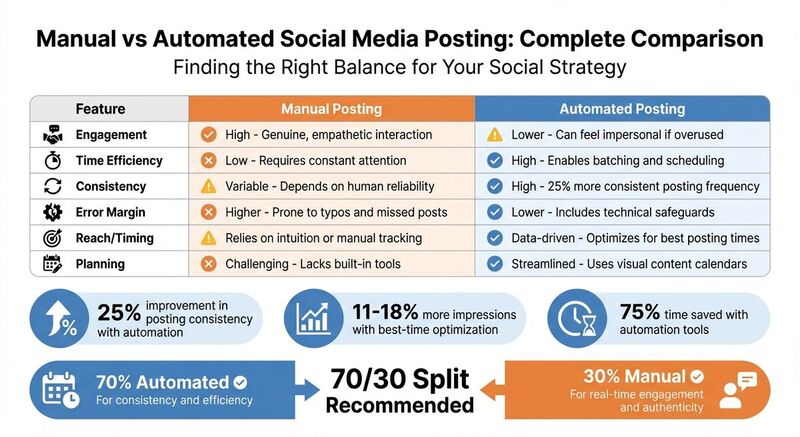 Before deciding on the best approach for your content strategy, it helps to understand the strengths and weaknesses of both manual and automated posting.
Manual posting brings an authentic, personal touch to your social media efforts. It allows you to engage with comments in real time, react quickly to trending topics, and address sensitive customer inquiries with empathy. However, this approach can be a major time drain, especially if you're juggling multiple platforms. Plus, it's easy to miss posting during busy periods or make small mistakes like typos.
Automated posting, on the other hand, is a huge time-saver. You can schedule content in batches, ensure you never miss a post, and leverage data to publish at the most effective times. In fact, automation can improve posting consistency by 25% [2]. But there's a trade-off: over-reliance on automation can make your brand feel distant or impersonal.
The ideal solution? A hybrid approach. By blending automation's efficiency with the genuine engagement of manual posting, you can maintain consistent output without losing the personal connection your audience values. This balance is key to managing your content calendar effectively.
Comparison Table: Manual and Automated Posting
Here's a quick breakdown of how the two approaches stack up:
| Feature | Manual Posting | Automated Posting |
|---|---|---|
| Engagement | High; allows for genuine, empathetic interaction [1] | Lower; risks feeling impersonal if overused [1] |
| Time Efficiency | Low; requires constant attention [1] | High; enables batching and scheduling [2] |
| Consistency | Variable; depends on human reliability [1] | High; 25% more consistent posting frequency [2] |
| Error Margin | Higher; prone to typos and missed posts [1] | Lower; includes technical safeguards [2] |
| Reach/Timing | Relies on intuition or manual tracking | Data-driven; optimizes for best posting times [2] |
| Planning | Challenging; lacks built-in tools [1] | Streamlined; uses visual content calendars [1][2] |
Up next: Discover how to create a winning content calendar with TheBlue.social.
Step 1: Build Your Content Calendar with TheBlue.social
A centralized content calendar gives you a clear, visual snapshot of your upcoming posts across platforms like X, Threads, Instagram, Pinterest, LinkedIn, Bluesky, and Mastodon. With TheBlue.social's cross-platform scheduler, you can easily track what’s scheduled and when, making it simpler to identify any gaps before they become an issue. As Kelly MicKey, Research Manager at Hinge Marketing, puts it:
"The best thing you can do to save time on social media content development is to give everyone visibility into your plan. Communication is key, after all" [3].
Once you’ve got the calendar in place, structure your posts strategically to make the most of the insights it provides.
Start by batching and scheduling evergreen content - posts that stay relevant over time, like industry tips, company culture highlights, or helpful insights. Dedicate a few hours to creating and scheduling content for an entire week or even a month in one go. This approach not only saves time but also ensures consistent engagement [2].
When planning your calendar, focus on variety by defining key content pillars. Include a mix of educational posts, promotional updates, and entertaining content to keep your feed dynamic and engaging. TheBlue.social’s user-friendly interface allows you to easily rearrange posts, so you can alternate between images, videos, and text-based content to maintain interest throughout the week.
Here’s a tip: leave room for flexibility. Don’t fill every slot with scheduled posts. Reserve certain time slots - like LinkedIn mornings or Instagram evenings - for manual updates. These slots are perfect for real-time engagement, such as responding to trending topics, answering customer questions, or sharing timely updates. This approach aligns with the recommended 70/30 balance of automated to manual posts, ensuring your content feels fresh and relevant.
To stay organized, use TheBlue.social’s calendar to clearly label your posts. Mark which ones are automated evergreen content and which slots are set aside for manual updates. This visual distinction helps you stick to a hybrid posting strategy while ensuring you’re publishing at the best times to maximize your reach. With this structure in place, you’ll be ready to fine-tune your scheduling and make adjustments as needed in the next steps.
Step 2: Schedule Automated Posts on TheBlue.social
After organizing your content calendar, the next step is to connect your social media accounts and start scheduling posts. With TheBlue.social, you can manage platforms like X (Twitter), Threads, Instagram, Pinterest, LinkedIn, Bluesky, and Mastodon - all from one streamlined dashboard. Begin by linking your accounts to take advantage of this centralized scheduling system.
Each platform has its own setup process. For example, Bluesky requires your handle and an App Password (which you can generate under "Privacy and Security"), X needs an API key and Bearer token from your Developer Account, Mastodon asks for your public server details, and Threads and Instagram use their standard login credentials.
Once your accounts are connected, use the unified composer to schedule posts. This tool allows you to create and manage threads across multiple platforms simultaneously, with options for platform-specific customization. You can tweak individual posts - adjusting text or media to fit each platform’s style - and use the "Apply to All" feature to sync changes across accounts quickly. Need to reuse an element? You can copy it from one post and modify it further. Don’t forget to check the real-time preview to confirm that your formatting and media display as intended.
For those using Bluesky, TheBlue.social includes built-in analytics to monitor post performance, follower growth, and engagement trends. These insights are invaluable for refining your strategy and identifying what content resonates most. In fact, research shows that posts scheduled using "Best-Time" optimization tools can achieve 11–18% more impressions [2].
Step 3: Know When to Post Manually
Scheduled posts are great for maintaining a steady presence, but manual updates bring an element of spontaneity and immediacy that automation just can't replicate. Once you've automated your routine posts, save manual efforts for moments that demand your direct attention.
Why does this matter? Platforms prioritize engagement speed - likes, retweets, replies - especially within the first 30 minutes of a post going live. This early activity significantly boosts visibility [4]. So, when you need to spark those initial interactions, manual posting becomes a key strategy.
Take breaking news reactions, for example. Timing is everything here. Posting within the first hour of a major event or trending topic can help you tap into heightened audience interest [4]. Similarly, community engagement - like replying to comments, mentions, or messages - thrives on authentic, real-time responses. This is how you build trust and foster genuine connections. And don't forget the power of spontaneous updates, like behind-the-scenes glimpses or interactive questions, which often benefit from immediate follow-ups to keep the momentum going [4].
Need help staying quick on your feet? TheBlue.social offers free tools to make real-time posting easier. Their hashtag generator helps you find trending, relevant tags in seconds, while the emoji adder lets you add personality and engagement to your posts without slowing down. These resources ensure your posts stay polished - even when you're working on the fly.
Step 4: Use a 70/30 Automated-to-Manual Posting Ratio
Striking the right balance between efficiency and authenticity is key, and a 70/30 split can help you do just that. With 70% of your content automated and 30% handled manually, this approach ensures a steady flow of posts while leaving room for meaningful, real-time interactions. It’s a framework that keeps you active and visible without requiring constant effort.
The automated 70% takes care of routine tasks that keep your accounts running smoothly. Use this portion to schedule evergreen content, like how-to guides, product announcements, and motivational posts. Platforms such as X (formerly Twitter), Threads, Instagram, Pinterest, Bluesky, and Mastodon can all benefit from tools like TheBlue.social's cross-posting scheduler. Companies using this method report a 25% improvement in posting consistency and an 11–18% increase in impressions [2].
But automation isn’t everything. The manual 30% is where your brand’s personality shines. Dedicate this portion to engaging with your audience - respond to comments and DMs, join trending conversations, and share time-sensitive updates. As social media marketing writer Rochi Zalani explains:
"Automating relationship-building itself can backfire - one ill-placed 'So cute!' bot comment on a serious post is enough to lose a follower for good" [1].
These personal touches build trust and foster genuine connections with your followers. By automating the bulk of your content, you free up time to focus on the high-value work that truly drives results - whether that’s brainstorming creative ideas, fine-tuning your strategy, or nurturing your online community [1].
To make the most of this approach, use tools like TheBlue.social to automate your content calendar while setting aside daily time blocks for live engagement. This combination not only keeps your feed fresh but also helps turn casual followers into loyal fans. Once your 70/30 system is in place, you can refine it further by tracking performance and making adjustments as needed.
Step 5: Track Performance and Adjust Your Approach
Fine-tuning your 70/30 strategy starts with keeping a close eye on real-time data. Tools like TheBlue.social's Bluesky analytics can help you uncover key insights about your audience - like which content resonates most and when they’re most active. This data is your guide for tweaking both automated and manual posting strategies.
Keep an eye on your 70/30 split as engagement patterns shift. Your engagement rate - likes, comments, shares, and saves - can reveal which content types are hitting the mark. For example, if manual posts consistently outperform automated ones, it might be time to adjust your ratio or rethink the topics you’re scheduling. On the other hand, if automated posts are pulling in 11–18% more impressions[2], that’s a solid sign your scheduling strategy is on point. To measure growth, use this simple formula: (current followers - previous followers) / previous followers x 100. For instance, moving from 436 to 562 followers reflects a 29% increase[5].
Next, evaluate how different content formats perform. TheBlue.social's cross-platform scheduler allows you to categorize posts - like "How-to", "Inspirational", or "Promotional" - so you can see which types are most effective across platforms like X (formerly Twitter), Instagram, Threads, Pinterest, and Bluesky. This categorization helps you refine your strategy. As Monique Thomas, Content Marketing Manager at Later, puts it:
"Truly understanding how (and why) your content performs the way it does is key to building a successful social media strategy for your business." [5]
Use this data to focus on what works and let go of what doesn’t. For instance, if video posts consistently outperform static images, shift more of your automated content toward video. If your analytics show that your audience is more active at certain times, schedule automated posts for those peak periods and save manual posts for when real-time engagement matters most.
Experimentation is key. Try A/B testing: post the same content manually one week and automate it the next to see which approach gets better results. Track metrics like click-through rates on link-in-bio content to determine whether automated evergreen posts or manual promotional ones drive more traffic to your site. Regularly review your monthly analytics and tweak your posting times, content mix, or automation ratio to develop a strategy that keeps delivering results.
Conclusion
Finding the right balance between manual and automated social media posting isn’t about picking sides - it’s about combining both effectively to save time while keeping your audience engaged. Automation takes care of repetitive tasks, potentially freeing up to 75% of your management time[2]. That extra time can be spent on real-time responses, meaningful interactions, and building stronger connections with your audience.
In practice, a mix of automation and manual posting creates a blend of efficiency and authenticity. While a 70/30 split is a good starting point, the perfect ratio for your brand depends on how your audience behaves and how your content performs. Tools designed for social media management can increase engagement by 32%[2], proving that automation can drive growth, while manual interactions keep things personal and relatable.
Platforms like TheBlue.social make this balancing act easier by offering cross-posting and analytics for X (Twitter), Threads, Instagram, Pinterest, Bluesky, and Mastodon. As Rochi Zalani, a Freelance Writer, wisely notes:
"Automation should help you serve your audience better instead of diminishing their experience"[1].
Let the insights from your scheduled posts guide your manual efforts, and adjust your strategy regularly based on performance data. This balanced approach ensures you stay efficient while maintaining the personal touch that defines your brand.
FAQs
What’s the best way to figure out the right times to schedule automated social media posts?
To determine the best times for scheduling your automated social media posts, start by reviewing when your audience is most engaged. Dive into engagement trends on platforms like X (formerly Twitter), Threads, Instagram, and Bluesky. Metrics such as likes, comments, and shares can help pinpoint when your followers are most active.
Scheduling tools with built-in analytics can simplify this process by identifying the ideal posting times based on your audience’s habits. While afternoons and early evenings in the U.S. often see higher engagement, the best times can differ depending on your audience and the platform you’re using.
What are the best ways to engage with my audience manually on social media?
To connect with your audience on a personal level, focus on creating meaningful interactions. Take the time to respond thoughtfully to comments, messages, and feedback. This effort makes your followers feel acknowledged and appreciated, which helps build trust and loyalty.
Add some fun and interaction by using features like polls, Q&A sessions, or live videos. These tools encourage real-time engagement and give you valuable insights into what your audience cares about. Keep your content fresh and varied - whether it’s informative, entertaining, or promotional - to maintain interest and keep your followers coming back for more.
By staying genuine and actively engaging in conversations, you can strengthen your bond with your audience and make their experience on your social media platforms more rewarding.
How can I adjust my 70/30 social media posting strategy using performance data?
To fine-tune your 70/30 posting strategy, start by diving into your social media analytics. Pay attention to metrics like engagement, reach, and conversions to pinpoint the types of posts that resonate most with your audience.
Use these insights to tweak your approach. For instance, if manual posts consistently generate more interaction, consider increasing their frequency. On the flip side, if certain automated posts are falling flat, either refine their content or cut back on them altogether. Automated updates can still be useful for routine or less time-sensitive content, but the goal is to prioritize what truly connects with your followers.
Regularly reviewing your analytics helps ensure your strategy aligns with audience preferences and stays effective over time.