Best File Formats for Social Media Videos 2025
Last updated: April 4, 2026
MP4 with H.264 codec is the best format for social media videos in 2025. It’s widely supported across platforms like Instagram, X, Threads, and Bluesky, offering high quality and small file sizes. MOV is another strong option, especially for Apple users, but its larger size may require compression. WebM works well for web-based platforms like YouTube and Bluesky but struggles on iOS. Legacy formats like AVI, WMV, and MKV are outdated for social media and often require conversion to MP4 for compatibility.
Key Takeaways:
- MP4 (H.264): Best overall for compatibility, quality, and efficiency.
- MOV: Great for high-quality Apple workflows, but larger file sizes.
- WebM: Efficient for web use but not ideal for iOS users.
- AVI, WMV, MKV: Limited support; convert to MP4 for uploads.
For optimal results, stick to 1080p resolution, 8–12 Mbps bitrate, and AAC audio (128–256 kbps). Always check platform-specific guidelines to avoid upload issues.
1. MP4 (MPEG-4)
MP4 stands out as the top choice for social media video formats. It's the universal standard that works effortlessly across platforms like X, Instagram, Threads, Bluesky, and more. Whether your audience uses iOS, Android, Windows, or Mac, MP4 ensures smooth playback on all devices.
Platform Compatibility
MP4's compatibility is unmatched. Major platforms, including Bluesky, recommend MP4 for its balance of quality and speed. Instagram and Threads specifically favor MP4 with the H.264 codec for Reels and feed posts. On X, both MP4 and MOV are supported, but MP4 remains the preferred format for organic content and ads. Its broad support means you can create one file and cross-post between multiple platforms without worrying about playback issues. This makes MP4 a reliable standard when comparing other formats.
File Size Efficiency
One of MP4's biggest advantages is its compression technology. Using the H.264 codec with AAC audio, MP4 creates smaller files while maintaining excellent quality. For 1080p videos, aim for a bitrate of 8–12 Mbps to achieve professional quality without exceeding platform limits. This is especially important for platforms like Bluesky, which caps videos at 300MB, and X, which has a 512MB limit[6].
"MP4 with H.264 codec is universally accepted and produces the best quality-to-file-size ratio" [4].
This efficient compression ensures that videos maintain their quality after being uploaded.
Quality Retention
Another strength of MP4 is its ability to retain quality. Starting with a high-quality MP4 master file helps ensure your video remains sharp, even after platforms apply their own compression. The H.264 codec excels at preserving details that older formats like MPEG or AVI might lose. For audio, use AAC at 128–256 kbps, as platforms may deprioritize videos without an audio track - even if the video is intended to be viewed on mute.
Optimal Use Cases
MP4 is ideal for all types of social media content: vertical videos for Reels and TikToks, horizontal uploads for YouTube, and square posts for Instagram feeds. It's the best option for cross-platform sharing, allowing you to export once and upload everywhere.
"MP4 is still the most flexible container, finding a middle ground between quality and compatibility" [5].
Whether you're sharing a short clip or a longer tutorial, MP4 delivers consistent performance across all platforms. Its versatility makes it the gold standard for social media videos and sets the stage for exploring other formats with specific advantages.
2. MOV (QuickTime)
MOV is Apple's native video format, designed to prioritize quality. If you're editing on a Mac or iPhone, MOV ensures your video maintains its sharpness throughout the production process. While it originated with Apple, MOV is widely accepted across major social platforms like X, Instagram, Threads, Bluesky, TikTok, and Pinterest.
Platform Compatibility
In 2025, MOV files upload smoothly to nearly all social platforms. While most platforms allow MOV with generous limits, LinkedIn requires MP4 with H.264 encoding, so you'll need to adjust your export settings for that platform [1]. For easier sharing across multiple platforms, you might want to convert your MOV files to MP4 when necessary.
File Size Efficiency
MOV files prioritize video quality over compression, which means they tend to be larger. This can lead to slower uploads or even exceed platform size limits. If your MOV file is too large, compress it or convert it to MP4 with H.264 encoding to reduce the file size while still maintaining good quality [2].
Quality Retention
MOV stands out for its ability to preserve video detail and color accuracy, making it ideal for professional-grade content. Although MOV files are larger, they maintain fidelity better than many other formats. Keep in mind that most platforms will transcode MOV files during upload to optimize playback, which could slightly adjust the final look [2]. To get the best results, export your MOV files at the highest quality settings supported by the platform, then let the platform handle any necessary compression.
Optimal Use Cases
MOV is the go-to format when quality matters most, especially if you're editing within the Apple ecosystem. It's a great choice for creating master files that can later be converted to MP4 for broader compatibility [5]. MOV is also excellent for vertical video content on platforms like Instagram Stories and TikTok - export at 1080×1920 to avoid cropping [4]. If you're working exclusively on Apple devices and posting to platforms with high file size allowances, MOV delivers professional results without requiring immediate conversion.
3. WebM
WebM is an open-source, royalty-free video format designed specifically for the web. Unlike proprietary formats that come with licensing fees, WebM offers creators a no-cost, future-ready option. It uses advanced codecs like VP8, VP9, and the newer AV1. These codecs are known for their impressive compression capabilities - AV1 can deliver HD video while using up to 50% less bandwidth than H.264 [5]. This makes WebM a great choice when you need high-quality video in a smaller file size.
Platform Compatibility
By 2025, WebM has become a popular choice on platforms like YouTube, TikTok, and Bluesky [2][3][4]. Its efficient compression makes it particularly useful for Bluesky, which enforces a strict 50MB file size limit [2]. However, WebM does have a significant drawback: it isn't natively supported on iOS or Safari [2]. If your audience relies heavily on iPhones or iPads, MP4 remains the better option for seamless playback across all devices.
File Size Efficiency
One of WebM's standout features is its ability to maintain visual quality while reducing file sizes. This makes it a great choice for creators working with strict upload limits or catering to viewers on slower mobile connections. Thanks to the VP9 and AV1 codecs, WebM often outperforms standard MP4 compression in terms of quality at lower bitrates [2][5]. The downside? Encoding WebM files usually takes longer than MP4, which can slow down production workflows, especially for large-scale projects [2].
Optimal Use Cases
WebM is best suited for content aimed at web browsers or situations where minimizing file size is critical. It's a perfect fit for Bluesky posts, where the 50MB limit is a challenge, or for TikTok and YouTube Shorts, where web-based editing tools are prevalent [3][4]. However, always consider your audience's devices. If a significant portion uses iOS, MP4 remains the safer, more universal choice [2].
4. AVI (Audio Video Interleave)
AVI, developed by Microsoft in the early 1990s, is a legacy video format that struggles to meet the demands of today’s social media platforms. While it’s still supported on platforms like YouTube, Facebook, and Instagram [1], AVI’s lack of efficient compression makes it less practical for modern use. Its larger file sizes result in slower uploads, longer processing times, and a greater chance of hitting file size limits.
Platform Compatibility
Although AVI enjoys broad technical support, some platforms outright avoid it. LinkedIn, for instance, favors MP4 over AVI [1]. Similarly, Pinterest leans toward MP4 and MOV formats [1]. On platforms with strict file size limits, like X (512 MB) and Bluesky (300 MB), AVI files often exceed these caps, making them unsuitable for mobile-first environments where MP4 or WebM performs far better [3][4][6].
File Size Efficiency
AVI files are notorious for their size. Without modern compression, a 60-minute standard-definition video can balloon to 70 GB [4][5]. Even with compression, AVI files remain bulkier than MP4s, which makes them impractical for platforms with size restrictions or for users with slower internet connections.
Optimal Use Cases
AVI is best reserved for archival purposes or as a high-quality master file. Before uploading to social media, convert AVI files to MP4 (H.264), especially for platforms like TikTok, Instagram, or Bluesky [4][5]. Even though YouTube supports AVI, MP4 remains the preferred format for better performance. Stick with modern formats like MP4 to ensure smooth uploads and playback across all platforms.
5. MKV (Matroska)
Let’s take a closer look at the MKV container. Known for its high-quality video archiving and local playback capabilities, MKV is a strong choice for offline use. However, it doesn’t play well with major social media platforms like Instagram, TikTok, Facebook, X (Twitter), LinkedIn, Pinterest, Threads, or Bluesky [3]. Trying to upload an MKV file to these platforms often leads to file rejection, forced conversion, or even cropping issues [5].
Platform Compatibility
Social media platforms overwhelmingly prefer MP4 and MOV formats because they balance quality with efficient file sizes. For instance, platforms like Bluesky support MP4, MPEG, WebM, and MOV but don’t allow MKV uploads. For more platform-specific tips, check out these Bluesky guides. While MKV shines in offline scenarios, its lack of compatibility with social platforms means you’ll need to convert it to a supported format for sharing.
Optimal Use Cases
MKV is ideal for personal video archiving or local playback. For social media uploads, converting MKV files to MP4 is the way to go. Use codecs like H.264 or H.265 (HEVC) during conversion for the best results. H.265, in particular, offers high-definition video with up to 50% less bandwidth compared to older codecs. Just make sure the converted file is in an MP4 container to ensure compatibility. Preparing your files in advance avoids upload headaches while maintaining excellent video quality.
6. WMV (Windows Media Video)
WMV is an older video format with limited relevance in today's social media landscape. While it used to be a go-to format for Windows-based workflows, its compatibility has dwindled. Currently, YouTube is the only major platform that explicitly supports WMV for standard video uploads [4]. Most other platforms - like TikTok, Instagram, Facebook, X (Twitter), LinkedIn, Threads, and Bluesky - do not accommodate WMV files.
Platform Compatibility
For most social media platforms, WMV files are not a viable option. Platforms such as Instagram, TikTok, and Bluesky require MP4 or MOV formats for uploads [4]. Even on YouTube, where WMV is accepted, the platform automatically re-encodes the file upon upload.
| Platform | WMV Support | Recommended Format |
|---|---|---|
| YouTube | Yes [4] | MP4 (H.264) |
| No [4] | MP4, MOV | |
| TikTok | No [4] | MP4, MOV |
| Bluesky | No [4] | MP4 |
| X (Twitter) | No [4] | MP4 |
Given these limitations, converting WMV files before uploading is often necessary.
Optimal Use Cases
Because of its lack of support across platforms, WMV files should be converted to MP4 for smoother uploads. If you're working with older WMV files, converting them to MP4 with H.264 compression ensures compatibility and prevents upload issues. This conversion also helps maintain video quality while reducing file size, making it ideal for social media standards. While WMV played a significant role in past Windows workflows, MP4 with H.264 has emerged as the more practical and universally accepted format for modern video sharing [4].
Format Comparison Table
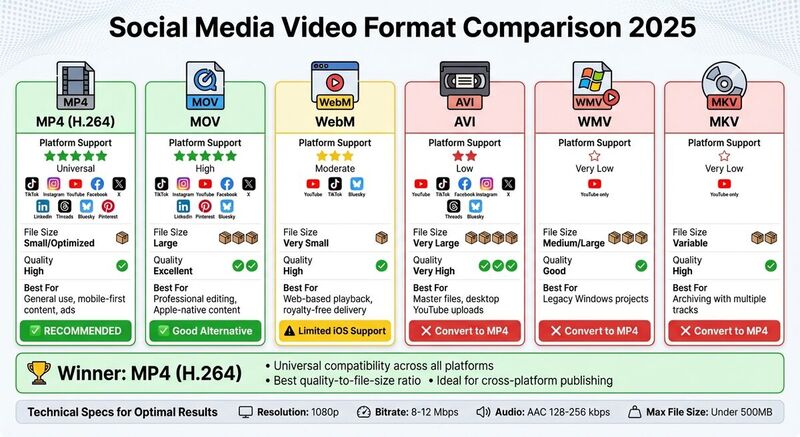 The table below highlights the main differences between six popular video formats. For more detailed explanations, refer to the individual sections. This summary is designed for quick reference.
| Format | Platform Support | File Size Efficiency | Quality | Recommended Use Case |
|---|---|---|---|---|
| MP4 (H.264) | Universal (TikTok, Instagram, YouTube, Facebook, X, LinkedIn, Threads, Bluesky, Pinterest) | Small / Optimized | High | General use, mobile-first content, and ads |
| MOV | High (TikTok, Instagram, YouTube, Facebook, X, Pinterest, Bluesky) | Large | Excellent | Professional editing and high-fidelity Apple-native content |
| WebM | Moderate (YouTube, TikTok, Bluesky) | Very Small | High | Web-based playback and royalty-free web delivery |
| AVI | Low (YouTube, TikTok, Facebook, Instagram, X, Threads, Bluesky) | Very Large | Very High | High-quality master files for desktop YouTube uploads |
| WMV | Very Low (YouTube only) | Medium/Large | Good | Legacy Windows projects; use MP4 conversion for modern uploads |
| MKV | Very Low (YouTube only) | Variable | High | High-quality archiving with multiple tracks; convert before upload |
From the table, it's clear that MP4 with H.264 encoding is the most versatile option. It balances excellent quality with small file sizes, making it ideal for nearly all social platforms. It’s especially suited for mobile-first content and ads due to its universal compatibility.
If you're working on Apple devices and need to retain the highest quality, MOV is a strong choice. However, its larger file sizes may require compression before uploading to platforms with strict size limits.
For creators focused on web delivery, WebM provides excellent compression, minimizing bandwidth usage while maintaining quality [2]. This efficiency is particularly relevant as Bluesky stats show rapid growth in video-heavy user engagement. That said, its lack of native support on iOS and Safari can be a drawback if your audience uses Apple devices.
Formats like AVI and WMV are better suited for older workflows or specific legacy projects. While AVI offers exceptional quality for master files, its large size and limited platform compatibility make it impractical for most modern needs. Similarly, WMV is mainly useful for older Windows-based projects and should be converted to MP4 for broader compatibility.
Finally, MKV is best for archiving purposes, thanks to its ability to store multiple tracks. However, it should always be converted to MP4 before uploading to ensure compatibility with social platforms.
Conclusion
Choose the video format that aligns with your platform's needs and audience preferences. MP4 with H.264 is the top choice for social media in 2025, thanks to its universal compatibility and strong balance of quality and file size. It works effortlessly across devices, making it a reliable option for most creators. This format ensures your content looks great while simplifying cross-platform publishing.
For those in the Apple ecosystem or producing content requiring professional editing, MOV is another reliable option. However, its larger file sizes may require compression before uploading to platforms with strict limits. Meanwhile, WebM is ideal for web-based playback and open-source projects, though its limited support on iOS devices makes it less practical for widespread social media use.
When setting up your videos, aim for these technical specs: 1080p resolution at 8–12 Mbps, paired with AAC audio (128–256 kbps). This setup helps maintain quality by countering platform re-encoding. Additionally, try to keep your files under 500MB to avoid heavy compression that could degrade your content.
Once your videos are formatted correctly, streamline your publishing process. Use tools like TheBlue.social to manage uploads efficiently. This platform allows you to schedule posts across X, Threads, Instagram, Pinterest, LinkedIn, Bluesky, and Mastodon from one convenient dashboard, helping you focus on maximizing engagement and reach.
FAQs
Should I export in H.264 or H.265 for social media?
When creating videos for social media, it's best to export them in H.264 format. This format works seamlessly across most platforms, ensuring smooth playback and broad compatibility.
Although H.265 provides better compression and smaller file sizes, it isn't as widely supported on social media. H.264 strikes the right balance by keeping file sizes manageable while maintaining solid quality, making it easier to meet platform-specific file size and duration requirements. For hassle-free sharing and reliable performance, H.264 remains the go-to choice.
Why does my video look worse after uploading?
When you upload a video and notice a drop in quality, it’s often due to factors like unsupported formats, compression, or incorrect settings. Social media platforms typically re-encode videos, which can reduce quality if the original file isn’t properly prepared. To keep your videos looking sharp, stick to recommended formats like MP4 with the H.264 codec, ensure the resolution is suitable (like 1080p), and follow the platform’s specific size and duration guidelines. This helps preserve the quality of your video during the upload process.
How can I shrink a video to meet platform size limits?
If you're trying to upload a video but it's too large or doesn't meet platform requirements, here's how you can fix that:
- Check the platform's guidelines: Look for specific requirements like file size, video duration, and resolution. For example, some platforms prefer vertical videos with dimensions like 1080×1920px.
- Compress the video: Use video editing or compression tools to reduce the file size without losing too much quality.
- Adjust resolution and aspect ratio: Make sure the video matches the platform's preferred dimensions. This step ensures your video looks great on the platform.
- Trim the video: Cut down the length if it exceeds the platform's duration limits.
Before uploading, double-check that your video meets all the necessary specifications. It’ll save you time and ensure a smooth upload process.