Ultimate Guide to Social Media Video Formats
Uploading videos to social media? Format matters. Each platform has unique specs like aspect ratios, resolutions, and file size limits. Ignoring these can lead to poor-quality uploads, reduced reach, and low engagement.
Key Takeaways:
- TikTok: Vertical (9:16), 1080x1920, up to 10 minutes (app) or 60 minutes (web).
- Instagram: Reels/Stories (9:16, 1080x1920) and Feed (4:5, 1080x1350).
- YouTube: Long-form (16:9, up to 12 hours) and Shorts (9:16, 3 minutes max).
- LinkedIn: Flexible ratios (16:9, 9:16, 1:1), up to 10 minutes for organic videos.
- Bluesky: Vertical and horizontal, up to 3 minutes, 300MB max.
Why It Matters:
- Algorithms favor native formats: Proper aspect ratios and resolutions improve visibility.
- Better viewer experience: Avoid black bars, cropping, and blurry visuals.
- Silent viewing is common: Use captions since many users watch without sound.
Simplify Your Workflow:
Tools like TheBlue.social can automate resizing and cross-posting while ensuring compliance with each platform's specs.
Quick Comparison:
| Platform | Aspect Ratio | Max Duration | File Size Limit |
|---|---|---|---|
| TikTok | 9:16 | 10 min (app) / 60 min (web) | 72MB (Android) / 287.6MB (iOS) |
| 9:16, 4:5 | Reels: 15 min, Feed: 60 min | 4GB | |
| YouTube | 16:9, 9:16 | 12 hours (long-form), 3 min (Shorts) | 128GB |
| 16:9, 9:16, 1:1 | 10 min (organic), 30 min (ads) | 5GB | |
| Bluesky | 16:9, 9:16 | 3 min | 300MB |
Tip: Stick with MP4 (H.264 codec) for universal compatibility. Use captions and design for mobile to maximize engagement.
Social Media VIDEO SIZES & RATIOS (Video Size Guide for 2026)
Video Specifications by Platform
Each platform has its own set of video requirements. Getting these specs right is crucial - mistakes can lead to cropped visuals, poor quality, or even upload errors. Here's a breakdown of the key specifications for some major platforms to help you optimize your videos.
TikTok Video Requirements
TikTok thrives on vertical videos with a resolution of 1080 x 1920 pixels (aspect ratio 9:16). Supported file formats include MP4 and MOV, with the H.264 codec. Videos recorded within the app are capped at 10 minutes, while uploads can go up to 60 minutes[2]. File size limits depend on the device: 72 MB for Android and 287.6 MB for iOS for organic posts. Ads, however, can be as large as 500 MB[4]. Export videos at 30 fps with AAC audio at 128 kbps for the best results[8].
Instagram Video Requirements
Instagram offers different specs depending on the video format. For Reels and Stories, aim for 1080 x 1920 pixels (9:16), while Feed videos work best at 1080 x 1350 pixels (4:5) to take advantage of the screen space. Supported formats include MP4 and MOV, with a maximum file size of 4 GB[7]. Duration limits vary: Reels can be up to 90 seconds when recorded in-app or 15 minutes when uploaded, Stories are capped at 60 seconds per slide, and Feed videos can last up to 60 minutes. Use the H.264 codec, export at 30 fps, and include AAC audio for consistent quality[8].
YouTube Video Requirements
YouTube supports a mix of traditional long-form videos and vertical Shorts. Standard videos are typically 1920 x 1080 pixels (16:9) or higher resolutions like 4K (3840 x 2160) for better quality. Shorts require a vertical resolution of 1080 x 1920 pixels (9:16) and can be up to 3 minutes long[2]. Verified accounts can upload videos as large as 128 GB or 12 hours in length[7]. File formats such as MP4, MOV, AVI, and WMV are accepted, with recommended codecs being H.264 or HEVC. Videos can also be exported at up to 60 fps for smoother playback[9].
LinkedIn Video Requirements
LinkedIn allows a range of resolutions, from 256 x 144 pixels to 4096 x 2304 pixels (4K), though the standard is 1920 x 1080 pixels (16:9)[7]. The platform supports aspect ratios from 1:2.4 to 2.4:1, making it versatile for vertical, square, and horizontal formats. Organic videos can be up to 10 minutes long, while ads can run for 30 minutes. File size limits are 5 GB for organic videos and 200 MB for ads[4]. Videos shorter than 30 seconds will loop automatically until they hit 30 seconds of playback. Supported formats include MP4, MOV, ASF, MKV, and WebM, with codecs such as H.264, VP8, or VP9.
Bluesky Video Requirements
Bluesky supports both landscape and vertical videos, with recommended resolutions of 1920 x 1080 pixels (16:9) for landscape and 1080 x 1920 pixels (9:16) for vertical content[2]. Accepted formats include MP4, MPEG, WebM, and MOV, with a maximum duration of 3 minutes and a file size limit of 300 MB[6][11]. The platform also allows direct uploads of .VTT subtitle files on desktop. For tracking performance, you can use Bluesky Analytics from TheBlue.social.
Platform Comparison Table
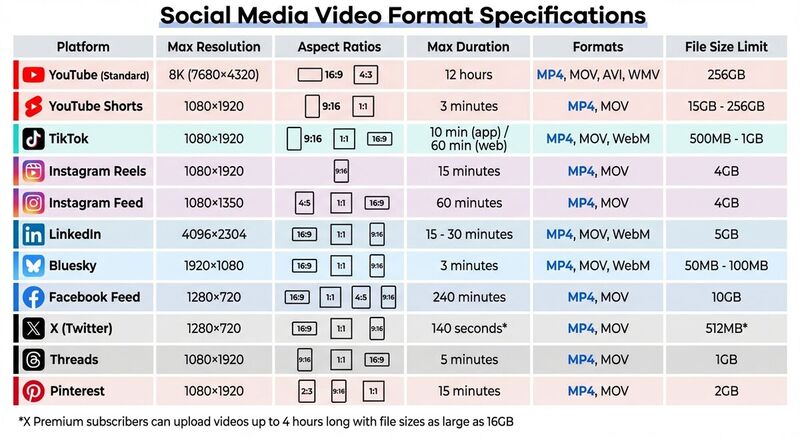 This table lays out key video specifications - covering resolution, aspect ratios, maximum duration, supported formats, and file size limits - for a quick and easy comparison across platforms. It simplifies the detailed specs from earlier sections into a handy reference, making cross-platform video management more efficient.
| Platform | Max Resolution | Aspect Ratios | Max Duration | Formats | File Size Limit |
|---|---|---|---|---|---|
| YouTube (Standard) | 8K (7680×4320) | 16:9 (default), 4:3 | 12 hours | MP4, MOV, AVI, WMV | 256GB [7][4] |
| YouTube Shorts | 1080×1920 | 9:16, 1:1 | 3 minutes | MP4, MOV | 15GB - 256GB [5][4][6] |
| TikTok | 1080×1920 | 9:16 (preferred), 1:1, 16:9 | 10 min (app) / 60 min (web) | MP4, MOV, WebM | 500MB - 1GB [4][6][2] |
| Instagram Reels | 1080×1920 | 9:16 | 15 minutes | MP4, MOV | 4GB [7][4] |
| Instagram Feed | 1080×1350 | 4:5, 1:1, 16:9 | 60 minutes | MP4, MOV | 4GB [7][4] |
| 4096×2304 | 16:9, 1:1, 9:16 | 15 - 30 minutes | MP4, MOV, WebM | 5GB [10][1][2] | |
| Bluesky | 1920×1080 | 16:9, 1:1, 9:16 | 3 minutes | MP4, MOV, WebM | 300MB [10][2][11] |
| Facebook Feed | 1280×720 | 16:9, 1:1, 4:5, 9:16 | 240 minutes | MP4, MOV | 10GB [5][1][4] |
| X (Twitter) | 1280×720 | 16:9, 1:1, 9:16 | 140 seconds* | MP4, MOV | 512MB* [5][4][3] |
| Threads | 1080×1920 | 9:16, 1:1, 16:9 | 5 minutes | MP4, MOV | 1GB [10][6] |
| 1080×1920 | 2:3, 9:16, 1:1 | 15 minutes | MP4, MOV | 2GB [10][4][2] |
*X Premium subscribers can upload videos up to 4 hours long with file sizes as large as 16GB [3].
This comparison highlights some key differences: platforms like YouTube allow for high-resolution, long-form content, while Bluesky's tighter restrictions demand more compressed files. Across the board, MP4 with H.264 encoding remains the most widely accepted format.
For those managing video content across multiple platforms, tools like TheBlue.social streamline scheduling and cross-posting to platforms like X (Twitter), Threads, Instagram, Pinterest, LinkedIn, Bluesky, and Mastodon. If you're focused on Bluesky, check out Bluesky Analytics for performance tracking.
Video Best Practices
Creating videos that perform well across platforms doesn’t have to be overwhelming. A few smart production and export decisions can save you time and ensure your content looks great everywhere.
Use Standard Video Formats
For social media videos, sticking with MP4 files using H.264 encoding is a safe bet. This format balances quality with manageable file sizes. For audio, go with the AAC codec, using a sample rate of 44.1 kHz or 48 kHz and a bitrate of at least 128 kbps. If you’re exporting at 1080p, aim for a bitrate between 5,000 and 10,000 kbps to keep visuals sharp without bloating the file size. A frame rate of 30 fps works well for most videos, while 24 or 25 fps can give your content a more cinematic vibe.
Optimize for Mobile Viewing
With smartphones accounting for 58.67% of global internet traffic [4], designing videos for mobile is a must. Vertical videos (9:16) create a full-screen, immersive experience on platforms like TikTok, Instagram Reels, and YouTube Shorts. Meanwhile, square videos (1:1) are versatile and work across various feeds. To avoid important elements being obscured by platform overlays, keep key visuals, text, and logos within the center of the frame. For vertical videos, steer clear of placing critical content in the top 14% (around 250 pixels) or the bottom 20–35% (roughly 340 pixels). And don’t forget to grab attention quickly - on Facebook, 47% of a video ad’s impact happens in the first 3 seconds [2].
Make Videos Accessible
Accessibility isn’t just about compliance - it can also improve your video’s performance. Around 85% of Facebook users and 80% of LinkedIn users watch videos with the sound off, and captions can lead to a 12% increase in view time and a 7.32% boost in views [4]. Whenever possible, upload SRT files for closed captions, as they keep text sharp and editable. If that’s not an option, burn captions directly into your video using bold, high-contrast fonts with a background box set to 60–80% opacity.
"Captions are a performance lever, not only an accessibility feature. If you can upload an SRT, do it so text stays sharp and editable." - Ethan Bennett, Campaign Strategy Analyst, InfluencerDB [8]
To further enhance accessibility, use tools like TheBlue.social's free alt text generator to create alt text for video thumbnails and images. Limit on-screen text to two lines, use bold fonts for better readability, and design with the expectation that many viewers will watch without sound. These steps not only make your content more inclusive but also help it stand out in crowded feeds.
Conclusion
Getting your video formats right can make or break your reach. For example, uploading a 16:9 video to TikTok can lead to letterboxing, extra compression, and an overall poor viewing experience. The result? Blurry visuals, black bars, and fewer people engaging with your content.
With 92% of marketers already embracing video as a core part of their campaigns [1], it’s clear that proper optimization is non-negotiable. Stick to MP4 files with H.264 encoding and prioritize mobile-friendly formats like vertical or square videos. And don’t forget captions - most users watch videos without sound [4].
If you’re juggling multiple platforms, tools like TheBlue.social can simplify your workflow. This platform allows you to resize and schedule videos for X (Twitter), Threads, Instagram, Pinterest, LinkedIn, Bluesky, and Mastodon - all from one dashboard. By using such tools, you can avoid the hassle of manual resizing and ensure each video is perfectly formatted for its intended platform. No more uploading the wrong aspect ratio by mistake.
Once your videos are live, the work isn’t over. Use platform analytics to track performance - compare vertical versus square formats, experiment with video lengths, and see which formats resonate most with your audience. What clicks on LinkedIn might flop on TikTok, so you’ll need to adapt based on real data. With video expected to make up over 82% of consumer internet traffic [4], brands that pay attention to platform-specific details and continuously refine their approach will have the edge.
FAQs
What’s the best single video format for posting everywhere?
The MP4 format with the H.264 codec is the top choice for posting videos across multiple platforms. It strikes the perfect balance between quality, file size, and compatibility, making sure your videos look sharp and perform well on nearly all social media platforms.
How can I resize a video for TikTok, Reels, Shorts, and LinkedIn without losing quality?
To resize a video without compromising quality, stick to the recommended dimensions for each platform. For TikTok, Reels, and Shorts, the standard is 1080×1920 pixels with a 9:16 aspect ratio. On LinkedIn, aim for 1280×720 pixels with a 16:9 aspect ratio.
Use a reliable video editing tool to adjust the resolution while keeping the aspect ratio intact - this avoids any unwanted stretching or cropping. When exporting, choose high-quality formats like MP4 to preserve clarity. Finally, double-check the platform's upload settings to ensure your video looks its best.
Should I upload captions as an SRT/VTT file or burn them into the video?
When deciding between SRT/VTT files and burned-in captions, it comes down to your goals and the platform you're using. SRT/VTT files offer flexibility, allowing viewers to turn captions on or off. This approach enhances accessibility while keeping the video file size smaller. On the other hand, burned-in captions are permanently part of the video, ensuring they’re always visible. This is ideal for platforms that don’t support caption files or when captions are a must for your audience. Ultimately, the choice depends on your platform’s features, your content goals, and what your viewers prefer.
Last updated: March 18, 2026