How to Check Bluesky Handle Availability
Last updated: June 20, 2026
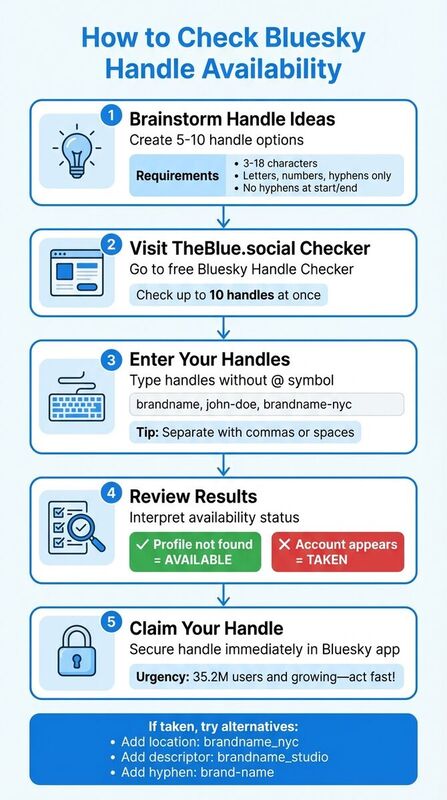
To secure the right Bluesky handle, start with names that match your brand and follow Bluesky’s rules: 3–18 characters, letters, numbers, and hyphens, with no hyphen at the start or end. Use TheBlue.social’s free Bluesky handle checker to test options quickly, then confirm important handles directly in Bluesky before you build a brand around them.
TheBlue is useful here because it does the repeated checking work. It is not a trademark monitor, impersonation scanner, or domain registration service. For serious brand decisions, use it to shortlist names, then verify and claim the final handle in Bluesky.
Understanding Bluesky Handles and Requirements
What Are Bluesky Handles?
A Bluesky handle is your unique identifier on the platform, used in profile URLs, mentions, and search results. Most handles follow the format @username.bsky.social, but if you're tech-savvy or want a personalized touch, you can opt for a custom domain handle like @yourbrand.com, provided you own the domain.
Handles differ from display names, which can include spaces and emojis, as they must be globally unique. Let’s dive into the specific rules that determine what makes a handle acceptable on Bluesky.
Bluesky Handle Rules and Restrictions
The part of the handle before .bsky.social (or your custom domain) must be between 3 and 18 characters long[3]. Only letters, numbers, and hyphens are allowed, but hyphens can’t appear at the beginning or end. These rules are enforced by the Bluesky API, so invalid handles are quickly rejected before even checking if they’re already taken.
Bluesky also filters out offensive language and reserves certain terms to prevent impersonation. If you switch from a default handle (e.g., @example.bsky.social) to a custom domain (e.g., @example.com), your original handle becomes permanently reserved and unavailable to others. Be cautious when using third-party tools to check availability - some reserved handles might incorrectly appear available. Always verify directly in the Bluesky app, especially if a handle seems "too good to be true."
Why Handle Availability Matters for Branding
Claiming a short, memorable handle early is crucial as Bluesky’s user base continues to grow and prime usernames get snapped up. For creators and businesses in the U.S. active on platforms like X, Instagram, Threads, TikTok, and Pinterest, aligning your Bluesky handle with your existing usernames is a smart move. This consistency makes it easier for followers to find your profile and reduces the risk of impersonation or confusion caused by look-alike accounts.
Using the same handle across platforms also simplifies marketing work. Whether it’s on business cards, email signatures, or advertisements, a unified naming structure looks professional and avoids a mix of usernames. Tools like TheBlue.social's Bluesky handle checker can help you quickly see if your desired Bluesky handle appears available. If you also care about cross-platform consistency, use TheBlue’s separate username checkers for Instagram, X, Threads, TikTok, Pinterest, and LinkedIn before you commit to a name.
How to Make Your Bluesky Username your Website Domain Name #godaddy #com #namecheap #bluehost
How to Check Bluesky Handle Availability Using TheBlue.social
TheBlue.social Bluesky Handle Checker Overview
TheBlue.social provides a free Bluesky Handle Checker that makes it easy to see if your desired handle appears available. Direct profile links help you verify the result yourself instead of trusting a vague green checkmark.
One standout feature is its bulk checking capability. You can test up to 10 handles at once by separating them with commas or spaces, saving you time and effort.
Step-by-Step Guide to Checking Handle Availability
To get started, head over to the Free Bluesky Handle Checker. Simply type in the handle you’re interested in - no need to include the @ symbol. For example, try brandname or john-doe. If you want to check multiple handles at once, separate them with commas or spaces, then submit your list for instant results.
Here’s how to interpret the results:
- If you see "Profile not found", the handle is available.
- If an account appears, the handle is already taken.
Keep in mind that some reserved handles may show as available. If you’re unsure, double-check in the Bluesky app to confirm.
If your top choice isn’t available, don’t worry. Use the bulk checker to test alternatives. Add a location like brandname_nyc, a descriptor such as brandname_studio, or a hyphen like brand-name to create a handle that fits your brand and is still available. Just remember, Bluesky handles must follow these rules: they must be 3–18 characters long, can only include letters, numbers, and hyphens, and hyphens cannot be placed at the start or end.
Once you’ve secured your Bluesky handle, explore how additional tools can help maintain consistency across platforms.
Cross-Platform Handle Availability Tools
To ensure your branding stays consistent, try TheBlue.social’s other handle checkers for platforms like Instagram, X (Twitter), Threads, TikTok, and Pinterest.
Here’s a tip: brainstorm 5–10 potential handles, run them through the Bluesky checker in bulk, and then verify the best candidates on the other platforms that matter to you. Aim for handles that work across your main networks, and claim the important ones as soon as possible.
Other Methods to Check Bluesky Handle Availability
Using Bluesky's Search or Profile URL
If you'd rather avoid third-party tools, Bluesky provides two simple, manual ways to check handle availability. The first method is through the Bluesky app or website (bsky.app). Just tap the search icon and type your desired handle - leaving out the "@" symbol. For example, you’d search for "yourhandle.bsky.social." If no profile comes up, the handle is available. However, if a profile appears with user details or posts, the handle has already been claimed.
The second option is to use a direct profile URL. The format looks like this:
https://bsky.app/profile/[handle].bsky.social
Replace [handle] with the username you want. For example, you’d enter https://bsky.app/profile/example.bsky.social into your browser. If the page displays a "Profile not found" message or a 404-style error, the handle is available. On the other hand, if you see a profile with content or an avatar, it means the handle is already in use.
This manual approach works similarly to automated tools but may occasionally be affected by caching delays.
Limitations of Manual Verification
While manual methods can be handy, they do have some notable drawbacks. For instance, they might not account for reserved handles - like those left behind when users switch to custom domains. Even if a handle such as "example.bsky.social" appears available in a search, it could still be reserved by Bluesky and unavailable for claim.
Caching delays can also complicate things, as searches rely on visual confirmation that might not reflect real-time updates. Manual checks also don’t verify certain rules, like character length, proper hyphen usage, or restrictions on inappropriate language. In some cases, reserved words or terms might block a handle without any clear warning during your search.
To avoid potential errors, it’s a good idea to test your desired handle with and without the ".bsky.social" suffix. And if a handle seems available, try creating an account immediately to ensure it’s truly claimable.
These challenges are why TheBlue.social's checker is useful as a first pass. It reduces repetitive manual checking, but it does not replace the final claim step inside Bluesky.
Using Custom Domains as Your Bluesky Handle
How to Set Up a Custom Domain Handle
In addition to standard handles, Bluesky offers custom domain handles. Essentially, you can swap out the default .bsky.social handle for a domain you own. This feature is part of Bluesky's portable identity system under the AT Protocol, giving users more control over their online identity [2]. Bluesky's own domain handle tutorial walks through the same Settings -> Account -> Handle flow.
To set this up, you'll need to own a domain and have access to its DNS settings. Here's how it works:
- In Bluesky, navigate to Settings → Change handle and choose Custom Domain.
- Bluesky will provide you with a TXT record value.
- Log in to your domain registrar or DNS management platform, create a new TXT record for the root of your domain (this is typically set to
@or left blank), and paste in the value Bluesky provided. - Save your changes and wait for the DNS propagation. While this usually takes just a few minutes in the U.S., it could take longer depending on your provider.
- Once propagation is complete, return to Bluesky and confirm the handle change. Bluesky will verify the TXT record, and if everything checks out, your handle will update to the custom domain.
If editing DNS records feels a bit tricky, there's an alternative method: the .well-known approach. This involves uploading a small text file (commonly named something like atproto-did) to the /.well-known/ directory on your website. Bluesky will then confirm your domain ownership by fetching the file from https://yourdomain.com/.well-known/....
Benefits of Using a Custom Domain Handle
Switching to a custom domain handle offers several advantages. First, it strengthens your brand by aligning your Bluesky identity with your existing domain. Instead of using @brand.bsky.social, you can opt for @brand.com, which looks more professional, is easier to remember, and ensures consistency across platforms if you use the same domain elsewhere [2].
Another big plus? It reduces the risk of impersonation. Since someone would need control of your domain to mimic your handle, it’s much harder for others to pose as you. This setup ties your Bluesky presence directly to your established web identity - your website, email, and other DNS-based verifications - giving followers a clear and verifiable connection to your brand [2].
This option is particularly valuable for public-facing brands, businesses, or individuals with portfolio sites who want their Bluesky handle to align with their existing online identity. However, it’s worth noting that switching to a custom domain requires some technical setup, and you’ll need to inform your audience about the change to avoid confusion. Since frequent handle changes can hurt recognition, it’s best to treat this as a long-term decision.
Impact on Handle Availability
Switching to a custom domain handle also affects handle availability. When you move away from a .bsky.social handle, your original username becomes unavailable for others to claim. In other words, your old .bsky.social handle is removed from the pool of claimable usernames. This can be useful if you want to prevent others from using that specific handle in the future [3].
Once your custom domain handle is set up, use TheBlue.social's Bluesky handle availability checker to check related .bsky.social handles early. Use the scheduler later if you want to plan posts for the accounts you connect.
Conclusion
Getting your perfect Bluesky handle is easier than you might think. Start by coming up with handle ideas that follow Bluesky's guidelines: 3 to 18 characters using letters, numbers, and hyphens (but no hyphens at the beginning or end). Once you have a list, head over to TheBlue.social's Bluesky Handle Checker. This tool lets you check up to 10 handles at once and provides direct Bluesky profile links for each one. Look for "Profile not found" to confirm availability before making your claim. If your top choice is taken, tweak it by adding details like your city, niche, or "hq" to find a handle that still works for your brand.
With Bluesky growing, popular handles are being claimed fast. Don’t wait - secure your handle now. TheBlue.social also offers tools to check availability across platforms like X, Instagram, Threads, TikTok, Pinterest, and LinkedIn, so you can keep the same name where it matters.
Once you’ve locked in your handle, use TheBlue.social's cross-posting scheduler to plan posts for the accounts you connect. You can also track your Bluesky performance with analytics, review follower changes, use starter packs for discovering communities, and use free helpers such as alt-text, Open Graph preview, hashtag, and profile image tools.
For added brand security, consider using your own domain as your Bluesky handle. This aligns your brand with a domain you control and helps prevent impersonation. Whether you go this route or stick with a traditional handle, the key is to claim your handle now before someone else does. Take two minutes to brainstorm your top five ideas, run them through the checker, and secure the best option in your Bluesky settings today.
FAQs
How can I get a custom domain handle on Bluesky?
Bluesky supports custom domain handles from its own settings. Go to Settings -> Account -> Handle, choose the custom domain option, then follow the DNS or .well-known verification steps Bluesky gives you. After it verifies ownership, your handle can use the domain you control.
Why should I use the same handle across all my social media platforms?
Using the same handle on all your social media platforms ensures your brand stays consistent, making it simple for people to find and recognize you. This consistency strengthens your credibility and builds trust with your audience. Plus, it boosts your visibility and creates a unified online presence, which can result in higher engagement and deeper connections with your followers.
Why should I check if a Bluesky handle is available before choosing it?
Checking the availability of a Bluesky handle ensures that the username you want hasn’t already been claimed. By doing this, you can avoid any potential mix-ups or losing out on the chance to secure the handle you prefer. Acting quickly to claim your desired username helps make it distinctly yours.