Cross-Posting Do's and Don'ts for Social Media
Last updated: December 15, 2025
Cross-posting is a time-saving approach to managing multiple social media accounts by sharing a single piece of content across platforms like X (formerly Twitter), Threads, Instagram, Pinterest, Bluesky, and Mastodon. The trick lies in tailoring your content to fit each platform’s style and audience preferences. Here’s what you need to know:
- Benefits: Save time, maintain consistent messaging, and expand your reach to diverse audiences.
- Key Practices:
- Use a content calendar to plan posts 2–4 weeks ahead.
- Adjust captions, hashtags, and visuals to match each platform’s norms.
- Add alt text for accessibility and optimize visuals for platform-specific dimensions.
- Stagger posting times to avoid appearing spammy and test for optimal engagement.
- Track performance metrics to refine your strategy.
- Common Mistakes to Avoid:
- Don’t post identical content everywhere - customize for each platform.
- Avoid ignoring platform-specific quirks (e.g., hashtags, tone, or features).
- Don’t overwhelm your audience by posting too often or at the same time across platforms.
Pro Tip: Tools like TheBlue.social can streamline the process, allowing you to draft, customize, and schedule posts from one dashboard while tracking performance across platforms.
How to Cross-Promote Content on Every Social Platform (TikTok, IG, YT, LinkedIn, FB in 2025)
Cross-Posting Do's Checklist
When it comes to cross-posting, having a clear plan and strategy can make all the difference. Here's how to make the most of your efforts.
Plan with a Content Calendar
A well-organized content calendar is your best friend for consistent cross-posting. Plan your posts 2–4 weeks ahead, including important details like the date, time (clearly labeled with your U.S. time zone, such as ET or PT), target platform, post objective, content format, draft captions, hashtags, and visual specs. This approach helps you avoid overlaps, identify content gaps, and align campaigns across platforms like X, Threads, Instagram, Pinterest, Bluesky, and Mastodon.
Tools like TheBlue.social's cross-posting scheduler can simplify this process by giving you a centralized view of all your planned posts. For time-sensitive content like product launches or sales, schedule posts 3–7 days in advance, while evergreen content can be slotted even further out. This balance between planning and flexibility allows you to stay consistent while quickly jumping on trends when they arise.
Customize Content for Each Platform
While your core message should remain consistent, the way you deliver it needs to match the platform. For example:
- X: Keep it short and snappy with 1–3 lines and a strong hook.
- Threads: Use casual, conversational language and engage with reply chains.
- Instagram: Focus on compelling first lines, skimmable spacing, and clear calls-to-action.
- Pinterest: Write keyword-rich, descriptive captions tailored for search intent.
- Bluesky and Mastodon: Prioritize thoughtful, community-focused posts that feel more conversational than promotional.
Don’t forget to adapt your hashtags too. Use 5–15 for Instagram and Pinterest, fewer for X and Threads, and be selective for Bluesky and Mastodon. Also, ensure media formats match the platform’s specs, and avoid using watermarked videos to maximize reach.
Use Alt Text and Optimize Visuals
Accessibility and visual appeal play a big role in successful cross-posting. Adding alt text ensures your content is accessible to users relying on screen readers and provides context when images fail to load. Keep your descriptions concise - just 1–2 sentences - and include any important text that appears on the image (e.g., "Text on image: 'Cross-posting checklist'"). Tools like TheBlue.social's free alt-text generator can help streamline this process.
For visuals, stick to platform-specific aspect ratios: 1:1 or 4:5 for Instagram feeds, vertical 9:16 for Reels and Pinterest, and horizontal or 16:9 for X and link previews. Keep key elements like faces, text, and logos away from the edges to avoid cropping. Before sharing links, use TheBlue.social's Open Graph preview tool to check how your URL will appear on platforms like X, Threads, Instagram, LinkedIn, and Discord. This ensures your visuals and meta text are polished before publishing.
Schedule Posts at Different Times
Posting the same content on all platforms at once can come across as spammy to users who follow you across multiple channels. Instead, stagger your posts to avoid fatigue, extend your content’s visibility, and test optimal posting times. For example:
- X: Weekdays, 8–10 a.m. and 3–5 p.m. ET
- Instagram: 11 a.m.–1 p.m. and 6–8 p.m. ET
- Threads: Later in the evening
- Pinterest: 8–11 p.m. on evenings and weekends
- Bluesky/Mastodon: 8–10 a.m., 12–2 p.m., and 5–7 p.m. (local time)
Using tools like TheBlue.social allows you to set different time slots for each platform, making it easier to engage audiences when they’re most active.
Track Performance and Adjust
Analyzing performance metrics is essential for refining your strategy. Keep an eye on stats like reach, engagement rate (reactions, comments, reposts, saves), click-through rate, and follower growth. For instance, if a post performs well on Threads but flops on X, it might need a different tone or hook for X. On the other hand, if a Pinterest pin continues to generate clicks weeks later, focus on creating more evergreen, search-optimized content.
If certain content types consistently underperform on a platform, it might be time to rethink your approach or stop posting that type of content there altogether. Tools like TheBlue.social's Bluesky analytics can help you track engagement and identify which posts and time slots are driving the best results. Use this data to tweak your schedules and focus on what works best for each platform.
Cross-Posting Don'ts Checklist
While effective cross-posting can amplify your reach, avoiding common mistakes is just as important to ensure your content stays engaging and fits the vibe of each platform. Here's what to steer clear of:
Don't Post Identical Content Everywhere
Posting the same content across all platforms can quickly backfire. Each platform has its own expectations, formats, and audience preferences. Ignoring these nuances can make your posts seem out of place or, worse, irrelevant. For instance, a professional, lengthy LinkedIn caption copied directly to X (formerly Twitter) may get cut off, leaving it looking messy. Similarly, reposting TikTok videos with their watermark on Instagram Reels can restrict reach due to Instagram's algorithm.[2][4][5]
Repetition can also come across as spammy to users who follow you on multiple platforms.[2][3] Instead, focus on repurposing your core message to fit each platform's style. For example:
- Share a detailed explainer on LinkedIn.
- Condense it into a snappy, attention-grabbing post on X.
- Create a visually appealing carousel for Instagram.
- Take an inspirational angle for Threads.
By tailoring your content, you’ll make it feel native to each platform while keeping your audience engaged.[2][4][5]
Don't Ignore How Each Platform Works
Each platform has its own rules and quirks, and ignoring them can hurt your content's performance. This could mean using the wrong tone, overly long captions, or skipping features like tags, alt text, and interactive stickers.[2][4][5] Missteps like excessive hashtags or poor formatting can also make your posts feel out of sync with the platform's norms.[2][4]
For example:
- On X and Bluesky, keep it short, with clear hooks and line breaks for readability.
- On Instagram and Pinterest, focus on high-quality visuals and platform-friendly formats.
- On Threads, avoid overly formal or sales-heavy tones; aim for a conversational, community-driven approach.[2][4][5]
Using tools like TheBlue.social, which supports platforms like X, Threads, Instagram, and Pinterest, can help you preview drafts and fine-tune tone and formatting for each channel before posting. Paying attention to these details ensures your posts resonate with the audience and perform well algorithmically.
Don't Post Too Often
Posting too frequently, especially with similar or recycled content, can overwhelm your audience. This can lead to post fatigue, causing followers to ignore, mute, or even unfollow your accounts.[2][3] Flooding all platforms with the same content at the same time dilutes engagement and lessens your impact.[2][3][4]
To avoid this, define platform-specific limits. For example:
- A few posts per day on X or Bluesky.
- 1–2 feed posts daily on Instagram.
- A handful of pins on Pinterest.
Spread your cross-posted content over different days and times to keep things fresh and engaging.[3][4]
Watch for warning signs that you're over-posting. If engagement metrics like likes, comments, and shares are dropping while impressions remain steady - or if you notice a spike in unfollows and mutes - it’s time to scale back.[2][3][4] Tools like Bluesky engagement and follower-growth insights from TheBlue.social can help you track performance and adjust your posting strategy to maintain audience interest.
Platform-Specific Cross-Posting Tips
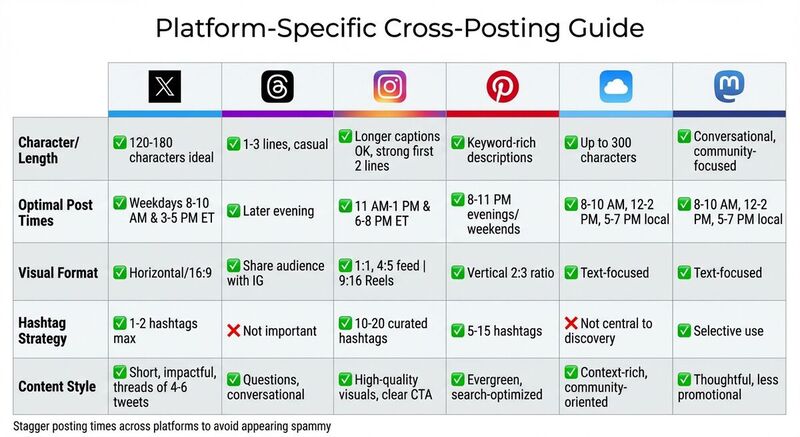 When it comes to cross-posting, one size doesn’t fit all. Each platform has its own vibe and audience preferences, so tailoring your content is key. While your core message stays the same, adjust the format, tone, and visuals to match what works best for each platform. Here's how to fine-tune your strategy for maximum engagement.
X (Twitter)
X is all about short, impactful updates and real-time interactions. Stick to concise text - 120–180 characters per post is ideal. If you’re repurposing longer content like blog posts or newsletters, break it into a thread of 4–6 tweets. Each tweet should stand on its own while leading to the next, with the final tweet linking back to the full content.
Use hashtags sparingly - 1 or 2 relevant ones are enough. To boost visibility, pair your text with an image, video, or even a poll. If you're setting up a new account, try TheBlue.social's X username availability checker to secure a memorable handle.
Threads
Threads leans into casual, conversational content. When adapting posts from X or LinkedIn, loosen up the tone and keep posts short - 1 to 3 lines work best. Asking direct questions can encourage replies and spark discussions.
Since Threads shares its audience with Instagram, you can reference or tease related visuals without duplicating them. For example, instead of reposting the same image, you might say, “Check out the full carousel on IG - here’s a quick summary.” Hashtags aren’t a big deal here, so focus on creating authentic, engaging posts.
Instagram is all about visuals, so prioritize high-quality images or videos. Use platform-specific formats: 1:1 for regular feed posts, 4:5 for vertical images, and 9:16 for Reels and Stories. Content designed for platforms like YouTube or LinkedIn may need cropping or reformatting to fit Instagram’s aesthetic.
Captions can be longer, but make the first couple of lines attention-grabbing. For hashtags, use a curated group of 10–20 that target niche, industry, and branded categories. Avoid simply copying hashtag sets from other platforms. Repurpose blog content creatively - turn tips into a Reel, create a carousel with step-by-step visuals, or write a concise caption with a clear call-to-action. For a polished look, try TheBlue.social's profile picture editor to ensure a consistent avatar across platforms.
Think of Pinterest as a visual search engine rather than a social feed. Content here should focus on evergreen appeal and long-term traffic. Use vertical images with a 2:3 aspect ratio, incorporating clean, readable text overlays. Avoid cluttered designs.
Optimize titles and descriptions with keywords people might search for. Each Pin should link to a relevant blog post, product, or video. You can create multiple Pins from a single blog post, targeting different angles or keywords. For example, a post on budgeting could become a series like “5 Steps to Start a Budget,” with each Pin featuring a unique image. Since Pins can remain relevant for years, it’s worth investing effort into their design and SEO.
Bluesky
Bluesky is a text-focused platform that values community and conversation over polished, brand-heavy posts. While it shares similarities with X, you’ll want to provide more context in your posts. Bluesky allows up to 300 characters, so take advantage of the extra space to elaborate or ask questions that encourage interaction.
Instead of a generic promo like “New video out!”, try something more engaging: “Just shared a 10-minute guide on batching content for 3 platforms - here’s what’s inside…” Follow up with another post asking for feedback. Hashtags exist on Bluesky, but they’re not central to discovery - clear and engaging language works better. Use tools like TheBlue.social's Bluesky analytics to see what resonates, and explore starter packs to find communities and topics worth engaging with.
Final Tips
Secure your usernames across platforms using TheBlue.social's tools. If you’re having trouble with scheduled posts, check if platforms are down with TheBlue.social's status checkers. Tailoring your content for each platform can seem tedious, but it’s worth the effort to connect with your audience where they are.
Using TheBlue.social for Cross-Posting
TheBlue.social simplifies cross-posting by eliminating the need to log into multiple platforms. With everything managed through one dashboard, you can draft, customize, and schedule content for X, Threads, Instagram, Pinterest, Bluesky, and Mastodon. Here's how you can make the most of its features.
Schedule Posts Across Multiple Platforms
Once you’ve connected your accounts, TheBlue.social’s scheduler lets you plan content across platforms using a single calendar view. Start by drafting your main message, then tweak captions, hashtags, and visuals to suit each platform. You can also set different publish times to avoid posts going live simultaneously, which helps prevent that "spammy" feel. This approach not only improves engagement but also allows you to test the best times for posting. With tools tailored for platforms like Bluesky, you can fine-tune your strategy even further.
Improve Your Bluesky Strategy
TheBlue.social offers tools designed specifically to enhance your Bluesky presence. For example, Bluesky Analytics helps you identify which posts perform best based on likes, replies, and reposts. You can then adjust your content accordingly to focus on what resonates most with your audience. The follow-back manager makes it easy to grow your network by reciprocating follows, and curated starter packs help you connect with communities that match your interests.
As one user, DWDwander, shared:
I just used @theblue.social to follow-back my followers on Bluesky! THE EASIEST way to follow back. [1]
By combining these tools with a consistent posting schedule, you can transform your Bluesky efforts into a data-driven part of your overall cross-posting strategy.
Use Free Tools for Better Content
TheBlue.social also provides free tools to enhance your posts and streamline your workflow. For example:
- The alt-text generator creates accessible image descriptions.
- The Open Graph preview tool lets you see how links will appear across platforms.
- The username availability checkers help you secure consistent handles on platforms like X, Instagram, Threads, and more.
- The platform status checkers let you confirm if platforms like Bluesky or X are experiencing downtime, so you can reschedule posts instead of troubleshooting in real time.
These tools make it easier to create polished, professional content without spending extra hours on your workflow. Whether you're rebranding, setting up new accounts, or simply refining your strategy, TheBlue.social has you covered.
FAQs
What’s the best way to customize content for different social media platforms?
To make your content shine across different social media platforms, it's key to tailor your approach to match the unique vibe and audience of each one. For instance, Instagram thrives on hashtags and eye-catching visuals, while X (formerly Twitter) is all about short, punchy text. On platforms like Bluesky and Mastodon, focus on community-driven posts that spark meaningful interactions.
Don't overlook the power of platform-specific features and analytics. These tools can reveal what your audience connects with most. Scheduling tools and performance trackers can also help you pinpoint the best times to post and fine-tune your strategy. When your content aligns with the style and expectations of each platform, you'll see better engagement and build a deeper connection with your followers.
What are the best practices for scheduling content across multiple social media platforms?
To get the most out of your social media efforts, aim to post during high-traffic times like Tuesday mornings (9:00–11:00 AM) or Saturday evenings (6:00–8:00 PM). A dependable social media scheduling tool can help you plan ahead, maintain consistency, and stay on top of your posting game. Make sure your content aligns with what each platform's audience prefers, and keep an eye on performance metrics to fine-tune your posting schedule.
Be cautious about overloading your audience with too many posts. Instead, prioritize sharing meaningful, well-crafted content that connects with your followers and keeps them interested. Quality always beats quantity.
What’s the best way to track the success of my cross-posting strategy?
To gauge how well your cross-posting strategy is working, keep an eye on essential engagement metrics like likes, comments, shares, and follower growth across all platforms. Tracking these numbers over weeks or months can reveal trends and highlight what’s effective.
Take a closer look at your most successful posts to figure out what connects with your audience. Use this insight to tweak your approach. Analytics tools are incredibly helpful here - they can simplify tracking and help you fine-tune your strategy for even stronger results.