Top 7 Tools for Managing Social Media Comments
Last updated: June 22, 2026
Managing social media comments can be overwhelming, especially when dealing with multiple platforms like Instagram, X, Threads, and Bluesky. Spam, missed messages, and duplicate responses can harm your brand and disrupt your workflow.
Most tools in this list are true comment-management products: unified inboxes, moderation queues, saved replies, and team assignment. TheBlue.social is different. It is included as the Bluesky-first adjacent option for creators who mainly need cross-posting, Bluesky analytics, follow-back review, and publishing helpers around the conversation, not a full moderation inbox.
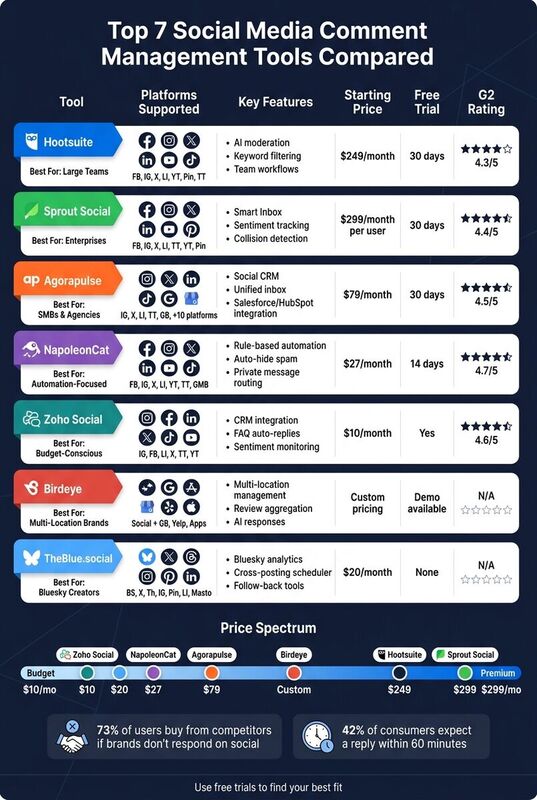
- Hootsuite: Customizable streams, AI moderation, and team collaboration tools. Starting at $249/month.
- Sprout Social: Smart Inbox, sentiment tracking, and collision detection. Starting at $299/month per user.
- Agorapulse: Unified inbox, social CRM, and affordable plans. Starting at $79/month (billed annually).
- NapoleonCat: Rule-based automation and team tools. Starting at $27/month.
- Zoho Social: Unified inbox and CRM integration. Starting at $10/month.
- Birdeye: Ideal for multi-location businesses, managing social and review platforms. Custom pricing.
- TheBlue.social: Bluesky analytics, cross-posting, follow-back review, and publishing helpers. Starting at $20/month.
Quick Comparison
| Tool | Platforms Supported | Key Features | Starting Price | Free Trial |
|---|---|---|---|---|
| Hootsuite | Instagram, X, Threads, LinkedIn, YouTube, TikTok | AI moderation, automation, team workflows | $249/month | 30 days |
| Sprout Social | Instagram, X, LinkedIn, TikTok, YouTube, Pinterest | Sentiment tracking, collision detection | $299/month per user | 30 days |
| Agorapulse | Instagram, X, LinkedIn, TikTok, Google Business | Social CRM, unified inbox | $79/month | 30 days |
| NapoleonCat | Facebook, Instagram, X, LinkedIn, YouTube, TikTok | Rule-based automation, task assignments | $27/month | 14 days |
| Zoho Social | Instagram, X, LinkedIn, TikTok, YouTube | CRM integration, FAQ auto-replies | $10/month | Free trial |
| Birdeye | Social platforms + review sites | Multi-location management | Custom pricing | Demo available |
| TheBlue.social | Bluesky, X, Threads, Instagram, Pinterest, LinkedIn, Mastodon | Bluesky analytics, cross-posting, follow-back review | $20/month | - |
Each tool offers unique features tailored to different needs, budgets, and team sizes. If your pain is missed comments and moderation queues, start with the inbox-first tools. If your pain is posting consistently around Bluesky and tracking what gets replies, TheBlue.social is the more relevant fit.
How To Manage Social Media Comments Using HighLevel Social Planner
1. Hootsuite
Hootsuite has long been a trusted name in social media management, and its tools for handling comments showcase its experience in the field. Its customizable "Streams" feature lets you view comments, mentions, and replies from various platforms all in one place, making it easier to stay on top of interactions.
One standout feature is Smart Moderation, an AI-powered tool that works around the clock to detect and hide spam, profanity, or trolling comments. This ensures your brand's reputation remains intact, even during off-hours.
Hootsuite also offers advanced collaboration tools. Managers can assign specific comment threads to team members, create multi-step approval workflows, and control access using role-based permissions. These features help prevent missed responses or overlapping efforts.
For those looking to save time, Hootsuite includes automation options. You can set up keyword-triggered rules - like automatically replying to comments that mention "price" or sending direct messages. Additionally, its OwlyWriter AI helps craft on-brand responses, which is especially useful for managing a high volume of comments.
Hootsuite has earned a 4.3/5 rating on G2 [1] and is used by 59% of small businesses for managing their social media [2]. However, its Advanced plan, priced at approximately $249 per month for a single user [1], may be better suited for businesses rather than individual creators.
2. Sprout Social
Sprout Social steps up as a strong contender for managing high volumes of comments, especially for teams that need streamlined workflows. Its Smart Inbox consolidates everything - comments, mentions, messages, and reviews - into one place, saving you from endlessly switching between tabs.
A standout feature is its collision detection, which prevents multiple team members from responding to the same comment at the same time. Combine that with message routing and task assignment, and you’ve got a system that ensures each comment lands in the right hands.
Sprout Social also shines with tools like keyword filters and automation rules to keep spam and bot comments at bay. It even supports ad comment moderation for Facebook and Instagram. To make responses quicker and more consistent, it offers AI-assisted reply templates that help maintain your brand’s tone.
Additional features include sentiment tracking and automated tagging, which help flag urgent comments, so they get immediate attention. Plus, you can mark conversations as "complete" directly in the inbox to keep everything organized.
With a 4.4/5 rating on G2, Sprout Social is well-regarded for its enterprise-level tools. However, this level of functionality comes at a price - the Professional plan starts at $299 per user per month [1]. This makes it a better fit for larger teams rather than solo creators or small businesses.
3. Agorapulse

Agorapulse provides a solid solution for managing comments, catering to small and mid-sized businesses as well as agencies, all at a budget-friendly price. Its standout feature, the Unified Social Inbox, brings together comments, mentions, and direct messages from up to 10 platforms (like Instagram, X, Threads, and Bluesky) into a single, streamlined interface.
Another highlight is its Social CRM, which shows a complete history of interactions with your brand, enabling more tailored and meaningful replies.
For teams, Agorapulse offers tools for assigning conversations, adding internal notes, and using saved replies. It also includes a collision prevention feature to stop duplicate responses. The interface, resembling Gmail in its simplicity, makes team collaboration easy and efficient, unlike the more complicated workflows seen in enterprise-level tools.
With CRM integrations for Salesforce and HubSpot, Agorapulse allows you to turn social interactions into actionable sales leads or support tickets, effectively connecting social engagement with business objectives.
Agorapulse has earned a 4.5/5 rating on G2 from 967 reviews [3], with many users praising the user-friendly inbox design.
Pricing begins at $79 per user per month (billed annually) for the Standard plan, but features like inbox assignment, ad comment monitoring, saved replies, and automated moderation rules are only available on higher-tier plans.
| Feature | Standard ($79/mo) | Professional ($119/mo) | Advanced ($149/mo) |
|---|---|---|---|
| Inbox Assignment | No | Yes | Yes |
| Ad Comment Monitoring | No | Yes | Yes |
| Saved Replies & Labels | No | No | Yes |
| Automated Rules | No | No | Yes |
With its competitive pricing and broad feature set, Agorapulse stands out as a strong contender in this category. Up next, we’ll see how these tools stack up against each other.
4. NapoleonCat
NapoleonCat brings all your social interactions under one roof. With its Social Inbox, you can manage comments, mentions, messages, and reviews from platforms like Facebook, Instagram, TikTok, LinkedIn, YouTube, X (formerly Twitter), Google My Business, and even mobile app reviews.
One standout feature is its rule-based automation, which simplifies moderation. For instance, it can automatically hide, delete, or respond to comments based on keywords or links. If someone posts a spammy link on your Facebook or Instagram ad, NapoleonCat can hide it instantly. It also handles after-hours inquiries by sending automatic replies to common questions, such as business hours or contact details. This streamlined automation works hand-in-hand with its team collaboration tools.
A unique feature of NapoleonCat is its ability to automatically send private messages. If a public comment includes sensitive details, like an order number, the platform can shift the conversation to a private channel, ensuring professionalism and security.
NapoleonCat doesn’t stop at automation - it also enhances teamwork. You can assign tasks, add notes, and route issues automatically, making team responses more efficient. Plus, it tracks response times and sentiment trends, giving you insights into your team’s performance.
With a G2 rating of 4.7/5 [1], users often highlight the convenience of its unified inbox for capturing sales opportunities. Pricing starts at $27/month for the Standard plan, while the Pro plan, which includes the full Social Inbox and moderation tools, is available for $89/month (billed annually) [3].
| Feature | Details |
|---|---|
| Supported Platforms | Facebook, Instagram, TikTok, LinkedIn, YouTube, X, Google My Business, and mobile app reviews (Apple App Store & Google Play) |
| Ad Moderation | Handles comments on Facebook and Instagram ads |
| Automation Type | Rule-based filtering (keywords, links, sentiment) |
| Team Tools | Task assignment, note-taking, and automatic issue routing |
| Starting Price | $27/month (Standard); $89/month (Pro, billed annually) |
5. Zoho Social
Zoho Social is a great option for those already using Zoho's suite of tools. It supports scheduling and engagement across platforms like Instagram, Facebook, LinkedIn, X, TikTok, and YouTube [2]. You can manage comments and messages from all these platforms in one place, eliminating the need to jump between different apps.
Its unified inbox is a standout feature, bringing together comments, direct messages, and mentions into a single dashboard [4]. This makes it easy to assign tasks to team members, ensuring every customer inquiry is handled without delay.
Another helpful tool is sentiment monitoring, which flags negative or urgent comments so your team can respond quickly [4]. To save time, Zoho Social also automates replies to frequently asked questions, reducing the need for repetitive manual responses [4].
Zoho Social integrates directly with Zoho CRM, allowing you to sync social interactions into your sales or support workflows. This makes tracking leads and following up a smoother process [2]. Additionally, the platform offers detailed analytics, helping users - whether they're marketers or not - gain actionable insights to improve performance [2].
| Feature | Details |
|---|---|
| Supported Platforms | Instagram, Facebook, LinkedIn, X, TikTok, YouTube |
| Unified Inbox | Yes - combines comments, DMs, and mentions |
| Automation | FAQ auto-replies; SmartQ for best post timing |
| Team Tools | Task assignment, sentiment monitoring, workflow integration |
| CRM Integration | Direct sync with Zoho CRM |
| G2 Rating | 4.6/5 [4] |
| Starting Price | From $10/month [2] |
6. Birdeye
Birdeye is tailored for businesses with multiple locations - think restaurant chains, healthcare groups, or franchises - that need to keep tabs on customer interactions across various platforms. It pulls together comments, reviews, and messages from social media and review sites like Google Business Profile, Yelp, and app stores, presenting them all in one dashboard. This consolidated view makes it easier to manage and respond to customer feedback from every corner.
| Feature | Details |
|---|---|
| Best For | Multi-location businesses and franchise brands |
| Sources | Social comments, reviews, and messages |
| Review Platforms | Google Business Profile, Yelp, and app stores |
Up next, check out another tool that simplifies managing comments across multiple platforms.
7. TheBlue.social
TheBlue.social focuses heavily on Bluesky while also supporting cross-posting to X (formerly Twitter), Threads, Instagram, Pinterest, LinkedIn, and Mastodon.
This is not a unified comment inbox and it does not automate moderation. It serves as a cross-posting scheduler, allowing creators to plan and adapt posts from a single calendar. It also includes Bluesky-specific features like analytics, follow-back tools, and starter packs to help users discover and engage with communities.
On top of that, TheBlue.social offers free tools around the publishing workflow:
- AltCaption: Write alt text when image descriptions are part of the post.
- Generate Hashtags: Suggests relevant hashtags to boost your content's visibility.
- Open Graph Preview Tool: Lets you see how your links will look when shared on platforms like Threads, X, and LinkedIn.
For comment management, use TheBlue.social as the tool around the conversation: publish better posts, preview links before sharing, monitor Bluesky engagement, and decide where to spend reply time.
| Feature | Details |
|---|---|
| Best For | Bluesky-first creators who cross-post |
| Scheduling | Cross-posting across seven platforms using one calendar |
| Bluesky Tools | Includes analytics, follow-back review, starter packs, and community discovery |
| Free Tools | Hashtag generator, OG preview, username checkers, status checks, and more |
| Pricing | Early Supporter plan available for $20/month |
For creators juggling multiple platforms but prioritizing Bluesky, TheBlue.social offers a practical support layer. Pair it with a true inbox tool if you need moderation queues, saved replies, ad comment handling, or team assignment.
Comparison Table
Choosing the right tool depends on your team size, budget, and preferred platforms. Below is a side-by-side comparison of each tool's main features and pricing.
| Tool | Platforms Supported | Filtering & Automation | Starting Price | Free Trial |
|---|---|---|---|---|
| Hootsuite | Facebook, Instagram, X, LinkedIn, YouTube, Pinterest, TikTok | Keyword filtering, AI moderation (OwlyGPT), auto-hide, smart routing | $249/month | 30 days |
| Sprout Social | Facebook, Instagram, X, LinkedIn, Pinterest, TikTok, YouTube | Smart Inbox, sentiment scoring, keyword filters, spam-hiding rules | $199/seat/month | 30 days |
| Agorapulse | Facebook, Instagram, X, LinkedIn, YouTube, TikTok, Google Business, +10 | Labels, filters, Inbox Assistant rules, saved replies, AI suggestions (Custom plans) | $99/user/month ($79 billed yearly) | 30 days |
| NapoleonCat | Facebook, Instagram, X, LinkedIn, YouTube, Google Business | Sentiment analysis, smart filtering, auto-moderation for spam/hate speech, FAQ auto-replies | $89/month (Pro, billed yearly) | 14 days |
| Zoho Social | Facebook, Instagram, X, LinkedIn, YouTube, Pinterest, Google Business | Keyword monitoring, unified inbox, basic filtering | $10/month | Free trial available |
| Birdeye | Facebook, Instagram, Google Business, and review platforms | Review filtering, AI-powered response suggestions, multi-location management | Custom pricing (contact sales) | Demo available |
| TheBlue.social | Bluesky, X, Threads, Instagram, Pinterest, LinkedIn, Mastodon | Cross-posting scheduler, Bluesky analytics, follow-back review, free content tools | $20/month (Early Supporter) | - |
The table highlights major differences in platform compatibility, automation features, and pricing. Hootsuite and Sprout Social are premium options, ideal for larger teams that need advanced features. Mid-range tools like Agorapulse and NapoleonCat provide strong automation capabilities at a more moderate cost. Zoho Social stands out at just $10/month.
Birdeye requires direct contact for pricing details. TheBlue.social caters specifically to Bluesky users with a plan starting at $20/month, offering analytics, follow-back tools, and support for six additional platforms.
Conclusion
Handling social media comments on a large scale can feel overwhelming. Spam piles up, customer questions go unanswered, and constantly switching between apps eats up valuable time. A centralized tool can simplify the process, helping you respond efficiently while safeguarding your brand's reputation.
Here’s why it matters: 73% of social media users say they’d buy from a competitor if a brand doesn’t respond on social media [3], and 42% of consumers expect a reply within 60 minutes [3]. The right tool ensures you meet these expectations without overloading your team.
To find the best solution, consider a few key questions: How many comments do you manage daily? Which platforms are most important to your audience? Do you need advanced moderation features or just a better way to stay organized?
Tools like Hootsuite and Sprout Social are great for larger teams with bigger budgets. If you're looking for a balance between features and cost, Agorapulse and NapoleonCat are excellent choices. Zoho Social is ideal for those on a tighter budget, while Birdeye is tailored for brands juggling multiple locations and review platforms. The best tool will fit seamlessly with your workflow and meet your audience's expectations.
For creators and smaller teams focused on Bluesky but still posting to X, Threads, Instagram, Pinterest, LinkedIn, or Mastodon, TheBlue.social is worth exploring. It offers cross-posting across seven platforms, Bluesky-specific features like analytics and follow-back review, and starts at just $20/month. It will not replace a moderation inbox, but it can make the publishing and Bluesky-measurement side much less scattered.
Take advantage of free trials to test these tools with your actual comment volumes and find the one that works best for your needs.
FAQs
What tool works best for my team size and budget?
For managing comments, the right tool depends on your specific needs and the level of moderation required. If you're part of a small to medium-sized team, Buffer's Community feature is a budget-friendly option that provides a centralized platform for responding to and organizing comments efficiently.
Larger teams handling higher volumes or requiring advanced features - like spam filtering and automated responses - might find tools like Agorapulse or Brandwatch better suited. These platforms are designed to handle complex workflows and scale with your needs.
What comment moderation automations should I set up first?
Start by setting up automated tools to handle spam, profanity, and negative comments. These tools can flag offensive language, delete spam, and filter out irrelevant details like phone numbers or email addresses. This approach helps keep your online presence professional and inviting. By automating moderation tasks, you can maintain a clean and on-brand social media environment across platforms like Bluesky, X, Threads, and Instagram.
How can I avoid missing or duplicating replies across platforms?
Managing comments across multiple platforms like Bluesky, X, Threads, and Instagram can feel like juggling too many balls at once. That's where a unified comment management system comes in handy. These tools pull all your comments into a single inbox, making it easier to stay on top of conversations without the chaos.
With features like filtering, organizing, and categorizing comments by status (e.g., New, Replied, Dismissed), you can respond quickly and efficiently. Use TheBlue.social alongside that kind of inbox when your workflow also needs cross-posting, Bluesky analytics, and post-prep tools.