Ultimate Guide to Twitter Poll Engagement
Last updated: April 1, 2026
Twitter polls are a simple way to engage your audience, gather feedback, and spark conversations. They allow users to vote anonymously and are easy to create, making them perfect for boosting visibility and interaction on the platform. Here’s what you need to know:
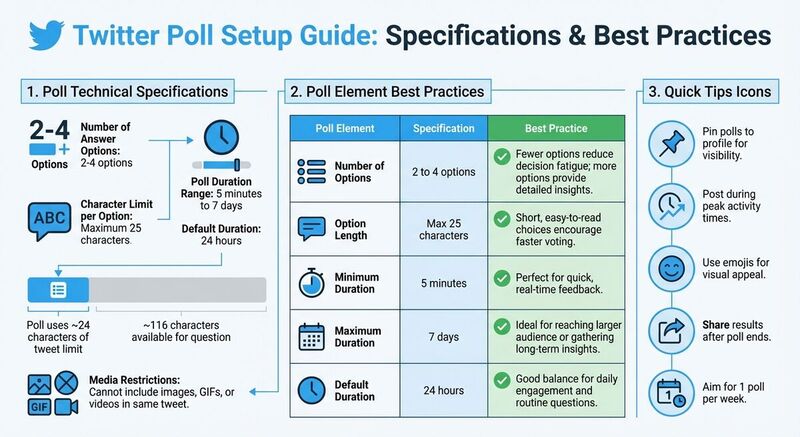
- Poll Basics: Create polls with 2-4 answer options (max 25 characters each) and set durations from 5 minutes to 7 days. Results remain hidden until voting ends or a user votes.
- Why Use Polls: They increase engagement, provide audience insights, and signal relevance to Twitter’s algorithm, improving content visibility.
- Best Practices: Write clear, short questions, align with trending topics, and post during peak activity times. Use emojis for added appeal and pin polls for visibility.
- Advanced Uses: Use polls during live events, in threads, or for targeted audience feedback. Share results to keep the conversation going.
- Metrics to Track: Focus on total votes, percentage splits, and engagement rates to understand audience preferences and refine your strategy.
Twitter polls are a quick, interactive tool to connect with your audience and gather valuable insights. Keep questions engaging, time polls strategically, and always follow up with results to show your audience their input matters.
How to Increase Twitter Poll Votes (Best Strategy for X Polls)
Creating Your First Twitter Poll
 Setting up a Twitter poll is quick and simple. Start by logging into your Twitter account and clicking the "Post" button to open the tweet composer. Once there, look for the poll icon - it appears as a small bar graph. Click it, and you'll be prompted to type your question in the main text box. Below that, you'll find slots to input your answer choices. You need at least two options, but you can add up to four by clicking the "+" icon.
How to Create a Poll on Twitter
Once you've entered your answer choices, you can adjust the poll's duration by clicking the "Poll length" section. Twitter allows you to set the poll to run for as short as five minutes or as long as seven days, with the default duration being 24 hours. After finalizing your question, options, and duration, click "Post" to publish your poll. To keep it visible during the voting period, consider pinning it to the top of your profile.
Keep in mind that a poll uses around 24 characters of your tweet's limit, leaving you with about 116 characters for your question. Additionally, Twitter does not allow you to include images, GIFs, or videos in the same tweet as your poll.
With your poll live, the next step is crafting a question that grabs attention and encourages participation.
Writing Effective Poll Questions
A well-written poll question is crucial for maximizing engagement. Aim for clarity and brevity. If your audience has to pause to interpret your question, they’re less likely to vote. Add a compelling lead-in sentence above the poll to spark curiosity or encourage action. For example, Casper once asked, "Which side is your side of the bed?" - a relatable question that tied seamlessly to their brand.
Tying your poll to trending topics or niche interests can also boost visibility. For example, on National Pizza Day in February 2023, Walden University asked, "Does pineapple belong on pizza?" - a playful question that resonated with a wide audience. Make sure your poll’s tone reflects your brand’s personality. Lighthearted brands can lean into humor, while more formal accounts might focus on industry-specific questions.
Selecting Poll Options and Duration
Keep your poll options short and to the point. Brief choices make it easier for followers to compare and decide quickly. If you're looking for higher response rates, stick to fewer options - like a simple "Yes/No." However, if more detailed feedback is needed, you can add up to four options.
The duration of your poll should align with its purpose. Short polls, such as those lasting 30 minutes, are great for live events or trending topics, as they create a sense of urgency. For broader discussions or research, longer durations - up to seven days - allow more people to participate. Use your analytics to identify when your audience is most active, and schedule your poll accordingly to maximize early engagement.
| Poll Element | Specification | Best Practice |
|---|---|---|
| Number of Options | 2 to 4 options | Fewer options reduce decision fatigue; more options provide detailed insights. |
| Option Length | Max 25 characters | Short, easy-to-read choices encourage faster voting. |
| Minimum Duration | 5 minutes | Perfect for quick, real-time feedback. |
| Maximum Duration | 7 days | Ideal for reaching a larger audience or gathering long-term insights. |
| Default Duration | 24 hours | A good balance for daily engagement and routine questions. |
How to Increase Poll Engagement
Make your poll grab attention in your followers' feed by focusing on timing, eye-catching design, and smart sharing strategies.
When and How Often to Post Polls
To maximize engagement, post your polls during peak activity times identified in your analytics. This ensures early votes, which can increase your poll's visibility thanks to platform algorithms [4].
Timing your polls around live events can also boost participation. For example, posting during sports games, popular TV shows, or industry events taps into ongoing conversations when users are already active. Similarly, aligning your poll with trending topics or hashtags increases its exposure as people search for and discuss those subjects [7].
Aiming for one poll per week strikes a good balance - keeping your audience engaged without overwhelming them [1]. After the poll ends, share the results in a follow-up tweet or thread to acknowledge your audience's input and encourage them to participate again in the future [7].
Once you’ve nailed the timing, it’s time to focus on making your poll visually appealing.
Adding Visuals and Emojis
Although Twitter doesn’t allow you to include images, GIFs, or videos directly within a poll, you can enhance its appeal with emojis. Emojis add personality and make your brand feel more relatable. Plus, they’re a great way to communicate visually without using up the limited 25-character space for poll options [1].
"Polls with rich media generally attract more attention, as the X algorithm favors posts that foster interaction." – Noble Desktop [7]
Want to include images or videos? Post them as a separate tweet before or after your poll, and then link the two in a thread. This approach adds a visual element while keeping the poll functional. You could even use teaser visuals - like a cryptic image hinting at a product launch - and ask followers to guess what’s coming [2].
Once your poll is visually engaging, the next step is to promote it effectively.
Promoting Your Poll
Since you can’t retweet your own poll, you’ll need other methods to amplify its reach. Share the poll’s URL in additional tweets or threads to keep it visible. Cross-platform promotion is another great tactic - embed the poll in blog posts or share it on other social platforms. Tools like TheBlue.social make it easier to cross-post between social platforms and drive traffic back to your poll.
Resurface your poll by tweeting its direct URL at different times throughout the day. This helps you capture users in various time zones [4]. You can also incorporate polls into threads to breathe new life into older content while creating a cohesive narrative [8].
Understanding Poll Results
When your poll wraps up, the next step is turning the data into practical insights.
Reading Poll Metrics
Poll performance isn’t just about counting votes. The total vote count shows how many people participated, helping you gauge whether the data is reliable. For example, 50 votes might not represent your audience well, but 5,000 votes provide a clearer picture [1][5].
The percentage split reveals audience preferences, but don’t overlook the runner-up option - it highlights a significant segment of your audience [5]. Meanwhile, impressions show how many people saw your poll but didn’t vote. If impressions far outweigh votes, your question could have been unclear or irrelevant [4][7].
Engagement rate measures likes, retweets, and replies in addition to votes. This metric indicates whether your poll resonated with people or if it was just passively scrolled past [7]. Here’s a quick breakdown of the main metrics:
| Metric | Insight | Action |
|---|---|---|
| Total Votes | Sample size and reach | Helps determine if the data is reliable |
| Percentage Split | Audience preferences | Guides decisions on content or product direction |
| Engagement Rate | Interest level | Shows how engaging or polarizing your poll was |
| Comments/Replies | Contextual feedback | Provides insight into why people voted the way they did |
While numbers are important, qualitative feedback can add depth to your analysis.
Using Audience Feedback
Poll results are most useful when paired with audience feedback. Numbers tell you what people chose, but understanding why they chose it requires a closer look. For instance, if you expected 70% of voters to favor one option, but the result was closer to 50-50, it might be time to rethink your customer personas or dig deeper into your analytics [5].
Check replies to uncover the reasoning behind votes. These comments often provide the context that raw numbers can’t [4]. Combine this feedback with analytics for a more complete understanding [7].
Always follow up by sharing the results and outlining any actions you plan to take based on the feedback. Ignoring audience input can hurt future engagement [5][7]. Use the data to create follow-up content, showing your audience that their input matters [3].
Tools for Tracking Engagement
Platforms like TheBlue.social make it easy to track poll performance and overall engagement across different channels. While Twitter’s native analytics offer basic metrics, dedicated tools allow you to cross-reference poll data with your content calendar, giving you a clearer view of what resonates.
To maximize participation, pin active polls to the top of your profile. A larger sample size means more reliable insights [1][5]. The more data you gather, the more confident you can be in shaping your strategy based on poll results. These foundational insights pave the way for more advanced polling techniques.
Advanced Poll Strategies
Once you've got the basics of poll setup and audience engagement down, it's time to explore more advanced tactics to keep your audience hooked.
Using Polls in Twitter Threads
Polls work exceptionally well in Twitter threads, where you can craft a story or narrative across multiple tweets. Keep in mind that polls take up 24 characters of your tweet limit and can’t be paired with visuals in the same tweet. However, you can use this to your advantage: include the poll in one tweet and follow up with visuals or additional context in subsequent tweets.
Consider involving your audience in shaping the narrative. For example, during the January 2023 NBA All-Star game, the @NBAonTNT account used a poll to let fans choose which player would appear on a specialized "ISO-CAM" broadcast [1]. This "choose your own adventure" style keeps followers engaged and eager to see the outcome. Always follow up with a tweet sharing the poll results or providing further insights - this not only shows you value their input but also encourages them to participate in future polls [7].
To take it a step further, align your polls with live events to amplify engagement and keep the momentum going.
Polls for Events and Campaigns
Live events and product launches are prime opportunities for short-duration polls. By setting your poll to run for just 1–4 hours, you create a sense of urgency and focus the conversation on what’s happening in the moment [5][6]. For instance, in December 2022, Buffer used a poll to ask users if they’d use an AI assistant within their account. This served as quick, informal market research while the feature was still being developed [1].
You can also use polls to prompt predictions during live events. Twitter Sports adopted this approach during the January 2023 College Football National Championship, asking followers to predict the winner between Georgia and TCU using the hashtag #NationalChampionship [1]. Not only does this kind of participation make your content more engaging, but it also signals to Twitter’s algorithm that your post is worth featuring on "For You" timelines [6]. To maximize visibility, pin your active poll to your profile so it’s the first thing visitors see [1][5].
From here, you can fine-tune your strategy by tailoring polls to specific audience segments.
Targeting Specific Audiences with Polls
The most effective polls are those that speak directly to specific audience groups. You can segment your audience by expertise level, asking them to identify as "Beginner", "Intermediate", or "Expert." This helps you gauge your community’s knowledge base and plan future content accordingly.
For specialized communities, polls can help uncover pain points or opportunities. For example, you could ask followers about their "biggest challenges" or "ideal tools" to gather insights for potential new products or services. Walden University tapped into this strategy on National Pizza Day in February 2023, sparking a lively debate with the classic question: "Does pineapple belong on pizza?" This playful poll drove engagement while tying into a trending topic [1].
The tone of your poll matters, too. Casual, lighthearted questions are perfect for general audiences, while more technical or industry-specific phrasing will resonate better with professional or niche communities. Tailoring your approach ensures your poll feels relevant and keeps your audience invested.
Conclusion
From crafting simple polls to leveraging advanced audience targeting, Twitter polls offer a powerful way to boost engagement. They require just a single tap from users, making participation far easier than writing a reply or composing a quote tweet[4]. This effortless interaction aligns perfectly with the X algorithm in 2025, which favors active participation. The more engaging your content, the more likely it is to appear in "For You" timelines[6].
Polls do more than gather votes - they provide honest, anonymous feedback on sensitive topics. Since no one can see who voted for what, including the creator, they create a safe environment for your audience to share genuine opinions. This makes polls a simple yet effective tool for gathering market research without relying on complex external surveys[1][8].
"For poll creators, it's a new way to engage with Twitter's massive audience and understand exactly what people think. For those participating, it's a very easy way to make your voice heard." – Todd Sherman, Product Manager, Twitter[1]
Sharing poll results and insights can turn a single vote into an ongoing conversation[3][6]. When you follow up with your audience, it shows them that their input matters and directly influences your decisions. This not only builds trust but also strengthens loyalty over time. Plus, it helps you make smarter, audience-driven strategy decisions.
Polls encourage two-way communication, validating ideas, shaping content, and sparking discussions. With 217 million daily active users on the platform[2], you have access to a vast audience ready to provide instant feedback. When used thoughtfully, polls can transform your followers from passive viewers into an engaged community that actively contributes to your brand’s growth.
FAQs
Should I use 2, 3, or 4 poll options?
Twitter polls let you include between 2 and 4 options, which is the sweet spot for keeping things clear and engaging. If you go with fewer than two options, you won’t gather enough feedback. On the flip side, Twitter doesn’t support more than four options, and even if it did, too many choices could overwhelm participants and lower response quality. The key? Keep your poll short and simple to boost participation and get results that matter.
What poll length gets the most votes?
Polls that are set to last for 1 day tend to gather the highest number of votes. This default setting strikes a perfect balance: it gives participants enough time to engage while creating a sense of urgency to act quickly.
How can I turn poll results into my next posts?
To make the most of your Twitter poll results, start by digging into the feedback to uncover popular topics, preferences, or trends. Once you've got a clear picture, you can use this information to create content that resonates with your audience. Here are a few ideas:
- Share the poll results: Post a follow-up to reveal the outcome and spark further discussion.
- Dive deeper into audience interests: Create posts that expand on the topics your followers care about most.
- Plan future polls: Use the insights to craft targeted questions that keep the conversation going.
By doing this, you'll keep your content fresh, engaging, and in tune with what your audience wants to see.