How to Use Bluesky Starter Packs for Community Building
Last updated: April 24, 2026
Bluesky starter packs simplify the process of building and joining niche communities on the platform. Launched in June 2024, these curated bundles allow new users to populate their timelines with up to 150 recommended accounts and 3 custom feeds in just one click. Unlike algorithm-based recommendations, these packs are handpicked by experts, ensuring relevance and quality. By November 2024, over 86,000 packs were available, contributing to a surge of 1 million daily new users.
Key Features of Starter Packs:
- Bulk Follow: Instantly follow up to 150 accounts.
- Custom Feeds: Includes 3 tailored feeds to shape your timeline.
- Easy Sharing: Share packs via links or QR codes.
- Notifications: Alerts when someone joins using your pack.
To create your own pack, manually select accounts and feeds that represent your niche. Keep packs updated and focus on active, relevant accounts. Use tools like TheBlue.social to find, share, and manage packs effectively. Starter packs are a simple yet powerful way to build and grow engaged communities on Bluesky.
How to create Started Packs on Bluesky
What Are Bluesky Starter Packs?
Bluesky starter packs are like a shortcut to building a vibrant timeline. Instead of manually hunting for accounts to follow, you can instantly join a curated community with just one click. Each pack includes up to 150 recommended accounts and three custom feeds, all thoughtfully selected by experienced users to help you get started quickly [1].
These packs go beyond typical follow lists. With a "follow all" button, they make filling your timeline a breeze [2].
Main Features of Starter Packs
Bluesky starter packs offer three standout features that make them incredibly useful for onboarding:
- Bulk follow up to 150 accounts: With one click, your timeline is instantly populated.
- Easy sharing: Unique URLs and QR codes make it simple to share packs across platforms or even in person [1].
- Notifications for new members: Get alerts when someone joins Bluesky using your link, allowing you to engage with them right away [1].
Each pack also includes custom algorithmic feeds - like "Science" or "Quiet Posters" - that shape your home timeline from the start [1]. Plus, these packs help train Bluesky's algorithm. For instance, if you follow a pack focused on indie game developers, the platform’s "Discover" feed will quickly adapt and suggest similar content [4].
These features not only simplify the onboarding process but also provide tools for growing and engaging communities.
How Starter Packs Help Build Communities
For community leaders, starter packs act as tailored invitations, bringing new members directly into their Bluesky network [1]. With these tools, you can recreate your community’s structure in minutes, which is especially useful when moving groups from other platforms.
Starter packs let Bluesky's own user base curate its network into distinct, thematic groups that make it easier for people to go from an empty timeline to one filled with posts they find interesting. - Sarah Perez, Consumer News Editor, TechCrunch [2]
How to Create a Bluesky Starter Pack
Step-by-Step Instructions
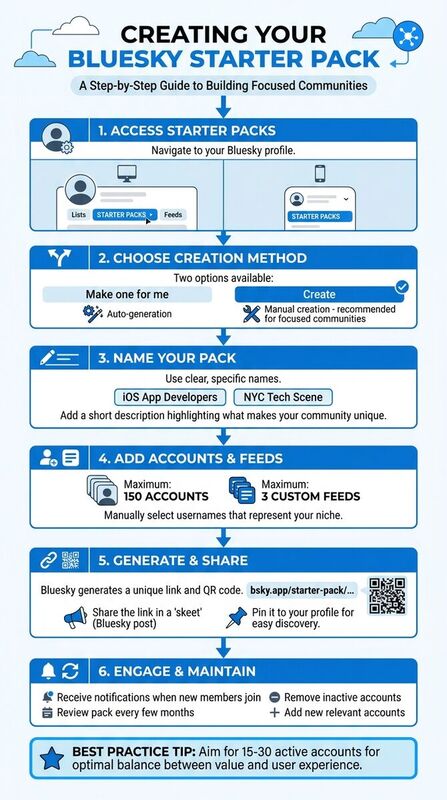
To get started, open your Bluesky profile and head to the "Starter Packs" tab. You'll find it between "Lists" and "Feeds" on desktop or in your profile menu on mobile [1] [4] [5].
From there, you'll see two options: "Make one for me" and "Create". The first option uses an auto-generation tool to suggest accounts and feeds for your pack. However, for building a focused community, the manual creation option is usually better. It gives you the freedom to carefully select accounts that best represent your niche [1].
Once you choose "Create", name your pack clearly and specifically - something like "iOS App Developers" or "NYC Tech Scene" works well to define your niche [5]. Add a short description that highlights what makes your community stand out. Then, start adding usernames, with a limit of 150 accounts and 3 custom feeds [1].
When you're done, Bluesky will generate a unique link and QR code for your starter pack [1]. Share the link in a "skeet" (Bluesky's version of a post) and pin it to your profile so it's easy for others to find [4]. You'll also receive notifications when new members join, allowing you to engage with them right away [1]. Monitoring Bluesky stats can also help you track the growth and engagement of your community over time.
If you encounter any errors, give it 5–10 minutes to process before trying again [4]. Following these steps will set you up for a successful starter pack creation.
Best Practices for Creating Starter Packs
Once your starter pack is ready, consider these tips to make it as effective as possible. Focus on quality over quantity. A pack with 15–30 active accounts strikes a good balance, offering value without overwhelming new users [5]. Carefully selecting accounts ensures your pack stays true to its niche. Aim for a mix of prominent figures and lesser-known creators who consistently post engaging content. This combination introduces users to fresh voices while still including familiar names [5].
Make sure every account in your pack is active. Inactive accounts take up space and lower the overall value of your curation. While not mandatory, it's polite to ask for permission before including someone in your pack [5].
Keep your pack up-to-date by reviewing it every few months. Clean up your followings by removing accounts that have gone inactive or shifted focus. Packs don’t update automatically if someone changes their handle or leaves Bluesky, so regular maintenance is key [5].
| Niche Category | Starter Pack Content Ideas |
|---|---|
| Professional | SaaS founders, UX designers, data analysts, product managers |
| Geographic | Local news outlets, regional tech communities (e.g., NYC tech), city-specific journalists |
| Interest-based | Vinyl collectors, film photographers, book reviewers, coffee enthusiasts |
| Creative | Digital artists, indie game developers, musicians, poets |
| Academic/Science | Climate scientists, AI researchers, historians, space exploration experts |
How to Find and Use Existing Starter Packs
Finding Starter Packs
You can find starter packs on user profiles - look for a dedicated tab where they're listed. Prominent users often pin their curated packs to their profiles, making them easy to spot when you visit their page [5].
However, starter packs aren't searchable within Bluesky itself. As Bluesky explains, "Currently, starter packs do not show up in search, so to find a starter pack, a friend will have to send you the link or you can see the embed preview within the Bluesky app" [1]. This limitation makes third-party directories an important tool for finding them.
One such directory is TheBlue.social, which organizes starter packs into over 15 categories, covering topics like science, software development, gaming, art, and even specialized areas like "14th-century art studies" and "bioinformatics" [3]. You can browse these categories or use the search function to pinpoint packs tailored to your interests. The platform also shows which packs you're already included in and highlights ones you're not part of, helping you expand your presence in your niche [3].
Starter packs are also shared through various channels, such as embed previews in posts, direct links, and QR codes [1]. These are often distributed via professional networks, newsletters, and other social media platforms to help new members get started on Bluesky [1]. To find them, you can search on Bluesky using phrases like "[Topic] + starter pack", which often leads to relevant posts or announcements [5]. This approach connects your search efforts with actionable ways to integrate these packs into your strategy.
Using Starter Packs to Grow Your Community
Once you've found the right starter pack, the next step is to use its recommendations wisely to grow your community. These packs not only help populate your feed but also strengthen your niche identity.
Bluesky's "Follow All" feature allows you to quickly follow up to 150 accounts from a single pack [1]. However, it’s best to review account bios and posting history before using this feature. As Selina Lynn from Schedulala suggests, "Don't feel pressured to follow everyone. Following fewer, more relevant accounts leads to a better feed experience than following hundreds you'll eventually mute" [5]. Taking the time to review accounts ensures your feed remains focused and beneficial.
Starter packs also play a role in teaching Bluesky's algorithm about your preferences. CNET reporter Katelyn Chedraoui notes, "Using starter packs is also a great way to teach Bluesky what kind of content you're interested in... Using starter packs expedites that learning process" [4]. By following relevant accounts through these packs, you help the algorithm fine-tune your "Discover" feed to better match your interests.
For onboarding new community members, sharing starter pack links across your networks can provide an easy entry point into your Bluesky presence [5]. Additionally, tools like Pack2List allow you to convert a starter pack into a Bluesky List, enabling you to monitor posts from a specific community in a separate timeline without overloading your main feed [2].
Community Building Strategies with Starter Packs
Starter packs on Bluesky are a smart way to encourage followers to connect with the right accounts while fostering targeted community growth. By crafting thoughtful pack combinations and teaming up with other leaders, you can create a vibrant niche community.
Creating Tiered and Complementary Packs
Instead of relying on a single, all-encompassing starter pack, consider creating multiple packs tailored to different audience needs. This approach allows you to better serve distinct segments of your community.
A tiered strategy is particularly effective for groups with varying levels of expertise. For example, you could design a "Beginner" pack featuring well-known, approachable accounts and an "Expert" pack with niche researchers and advanced technical feeds. This way, newcomers won’t feel overwhelmed, and experienced users will stay engaged with content that matches their level.
Complementary packs can also help you branch out into related topics. For instance, if you manage a "Graphic Design" pack, you might add packs for "Typography", "UI/UX Design", or "Motion Graphics." Use the description section of each pack to link to the others and include at least one custom feed focused on a specific topic. This ensures users can immediately dive into active community discussions instead of just browsing a static list of accounts [1].
To refine your strategy further, tools like TheBlue.social can help you identify gaps in your pack offerings. It highlights areas where new packs could fill a need, and you can even collaborate with others to address those gaps [3].
Building Collaborative Community Packs
Teaming up with other community leaders to create shared starter packs is another way to boost your credibility and expand your audience. These packs make it easier for newcomers to discover relevant accounts while showcasing a well-curated feed.
When designing collaborative packs, aim for 15–30 accounts. This range offers enough variety without overwhelming users [5]. Include a mix of established voices and emerging creators to strike a balance between credibility and fresh perspectives. While Bluesky doesn’t require permission to add someone to a pack, reaching out to community leaders beforehand can strengthen relationships and increase the chances they’ll promote the pack [5].
Keep in mind, collaborative packs require ongoing upkeep. They don’t automatically update when members change handles or go inactive, so regular maintenance is key. Set up periodic check-ins with your collaborators to remove outdated accounts and add new ones. Promoting these packs by cross-posting to other social media platforms can also attract new Bluesky users, helping your niche community grow even further [5].
How to Promote and Manage Your Community
Share your starter packs with your target audience by posting their unique links on platforms like X (formerly Twitter), LinkedIn, and other places where your audience is active. Bluesky makes this easier by generating a preview image that includes your pack name and suggested users, making your posts more eye-catching and engaging[1].
Using TheBlue.social Tools
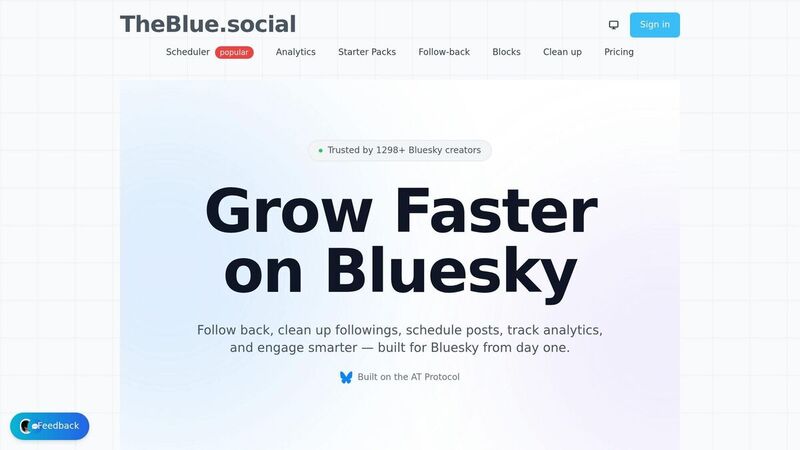
Once you've started promoting, TheBlue.social can help you take it further. Their centralized directory lets you categorize your starter packs - whether they focus on Tech, Science, Art, or Business. Plus, their discovery tool shows which starter packs already feature you and highlights relevant ones you're missing, opening up new opportunities to connect with different audiences[3].
TheBlue.social also offers tools to streamline your promotional efforts. Use their cross-posting scheduler to share your starter packs across multiple platforms with ease. Their hashtag generator suggests relevant tags to boost visibility, while the emoji tool adds a fun, engaging touch to your posts. These tools make it easier to extend your starter pack strategy and keep building your community. For more tips, check out our Bluesky guides.
Tracking Growth and Keeping Members Engaged
Promotion is just the first step - tracking your progress and engaging with your community are just as important. With Bluesky Analytics from TheBlue.social, you can monitor engagement metrics and track how your packs are performing over time. One standout feature is the follow-back tool, which automatically follows users who follow you. This helps maintain reciprocal connections, which are key to building a strong community[3].
Bluesky also notifies you whenever someone joins through your shared starter pack[1]. Use these notifications as an opportunity to personally welcome new members. A quick, friendly message can turn a simple follow into a real connection. To keep your community vibrant, regularly review your packs and remove inactive accounts. With over 86,000 starter packs available on Bluesky as of November 2024, staying active and relevant is crucial for standing out[4][5].
Conclusion
Bluesky starter packs tackle one of the toughest hurdles for any new social network: the "cold start" problem. What makes them stand out is their human touch. Instead of relying on algorithms, these packs are carefully curated by community members who truly understand their niche, opening up countless ways to connect.
TheBlue.social takes this concept further with tools designed to make community management easier. A centralized directory organizes packs by category, simplifying the search process. Plus, a visibility tracking feature lets you see which packs already include you and where you might still have room to grow. With integrated analytics, a follow-back tool, and a cross-posting scheduler, you have everything at your fingertips to build and sustain an engaged, thriving community. These tools complement earlier strategies, ensuring your community stays active and connected.
The secret to making it work? Stay involved and purposeful. Keep your packs updated, personally welcome newcomers, and use the tools to monitor your progress. Starter packs aren't just about gaining followers - they're about fostering genuine connections in your niche and helping others find their place on the platform.
FAQs
Should I use 'Follow All' or select accounts individually?
Using 'Follow All' in starter packs can be a quick and easy way to connect with a curated set of accounts. This helps you fill your feed and dive into a community right away. If you'd rather have more control over your experience, picking accounts one by one is a better option, though it does take more time. For those who want to get started fast, 'Follow All' is the way to go. On the other hand, individual selection works best if you're aiming for a more customized feed.
How often should I update my starter pack to keep it effective?
While TheBlue.social doesn’t provide a strict timeline for updating your starter pack, it’s smart to revisit it periodically. Aim to review it every few months or whenever there’s a noticeable shift in your community or interests. Regular updates help keep it relevant, make onboarding smoother for new members, and maintain engagement with your existing community.
How can I find starter packs if Bluesky doesn’t let me search them?
Bluesky currently lacks a direct search feature for starter packs. However, you can turn to TheBlue.social's Bluesky Starter Packs Directory. This directory offers curated lists of accounts and communities, complete with browsing and search tools categorized by topics. It’s a handy way to find relevant communities despite Bluesky’s limited search capabilities.