How Bluesky Algorithms Impact Starter Pack Visibility
Last updated: March 10, 2026
Starter packs on Bluesky are curated lists of accounts and feeds that help new users quickly populate their timelines with engaging content. Their visibility depends heavily on how Bluesky's multi-feed system works:
- Following Feed: Posts appear in chronological order, so timing your post when your audience is active is critical.
- Discover Feed: Prioritizes posts with fast engagement (likes, replies, reposts) within the first hour.
- Custom Feeds: Focus on specific topics using keywords, hashtags, or emojis to target niche communities.
Key takeaways:
- Starter packs with clear, descriptive names (e.g., "iOS App Developers") perform better than generic ones.
- Posts shared during peak activity hours (e.g., 8:00–10:00 AM and 7:00–9:00 PM EST) are more likely to succeed.
- Quick engagement within the first hour boosts visibility in the Discover feed.
- Using keywords, hashtags, and relevant emojis helps starter packs appear in Custom feeds.
Master BlueSky: A Complete Tutorial for Beginners in 2024
How Bluesky's Multi-Feed System Works
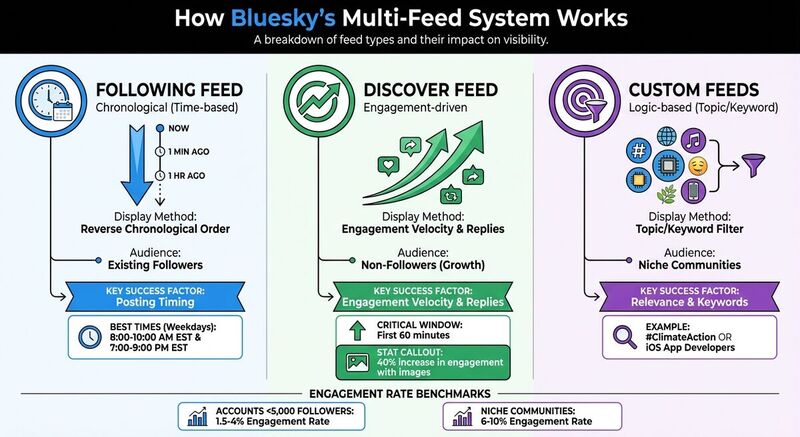 Bluesky operates differently from platforms that rely on a single algorithm. Instead, it uses three distinct feed types, each with its own way of displaying content. If you're sharing a starter pack, understanding these feeds is crucial because the visibility of your post depends on how it performs across them.
Following Feed: Time-Based Display
The Following feed organizes posts in reverse chronological order, meaning the most recent posts appear first. When you share a starter pack here, it shows up for your followers immediately - but only if they're online at that moment. This feed is ideal for reaching your existing audience, so timing is everything. Posting when your followers are most active increases the chances they'll see and engage with your content.
Discover Feed: Engagement-Driven Recommendations
The Discover feed takes a different approach by focusing on engagement to expand your reach beyond just your followers. It highlights posts based on two key factors: engagement velocity (how quickly a post gets likes, replies, and reposts) and network proximity (content that people in your social circle are interacting with).
"The Discover feed shows you what your network is talking about right now." – Ross Simmonds, Founder, Distribution.ai [6]
To make the most of this feed, aim for immediate engagement. Encourage your audience to interact with your starter pack quickly to boost its visibility.
Custom Feeds: Topic-Specific Discovery
Custom feeds are tailored to niche interests, offering a more focused way to reach specific communities. These feeds are built around keywords, hashtags, or curated account lists. For instance, if you're sharing a starter pack for "Climate Tech Founders", it could appear in custom feeds centered on climate, startups, or technology. Success here depends on aligning your post with the feed's logic. Using relevant hashtags like #ClimateAction or giving your starter pack a clear title, such as "iOS App Developers", makes it more likely to show up in the right feeds.
| Feed Type | Display Method | Audience | Key Success Factor |
|---|---|---|---|
| Following | Chronological (Time-based) | Existing Followers | Posting Timing |
| Discover | Engagement-driven | Non-Followers (Growth) | Engagement Velocity & Replies |
| Custom | Logic-based (Topic/Keyword) | Niche Communities | Relevance & Keywords |
Each feed plays a specific role in determining how your starter pack gets noticed. The Following feed depends on timing, the Discover feed rewards quick engagement, and custom feeds thrive on relevance to specific topics. Understanding these dynamics can help you maximize your content's reach.
How to Increase Starter Pack Visibility
Boosting the visibility of your starter pack on Bluesky doesn't require paid promotions - because they don't exist on the platform. Instead, the key lies in understanding Bluesky's feed mechanics, posting strategically, and engaging authentically. Here's how to make your starter pack stand out.
Best Posting Times for the Following Feed
The Following feed operates on reverse chronological order, meaning your post's visibility depends on when your followers are online. If they’re offline when you post, your content risks being buried under newer updates by the time they log in.
To avoid this, post when your audience is most active. Analytics tools like Bluesky Analytics offer "When Posts Get Liked" heatmaps, showing the hours your content receives the most engagement. For example, if your heatmap points to 9:00–11:00 PM as a high-engagement window, schedule your post accordingly.
"If your audience is active when you post, they'll see your content. If they aren't, it scrolls past in time." – Ross Simmonds, Founder, Distribution.ai [6]
Engage immediately after posting to build momentum. Replying to comments or questions early on signals high engagement, which can help your post transition into the Discover feed. Posts that perform well within the first hour are more likely to gain traction beyond your follower base.
Getting More Visibility in the Discover Feed
The Discover feed is where your starter pack can reach beyond your followers, introducing it to a whole new audience. To boost your chances here, focus on generating quick engagement.
Start by including a high-quality image, which can increase engagement by 40% [3]. Pair this with a question to encourage replies, such as, "Which accounts from this 'iOS App Developers' starter pack are you most excited to follow?" Active discussions signal to the algorithm that your content is valuable.
"Posts that get quick engagement (likes, replies, reposts) in the first hour are more likely to appear in Discover feeds." – Selina Lynn [2]
Another way to amplify visibility is through cross-platform promotion. Share your starter pack link on platforms like X (Twitter), LinkedIn, or Threads to drive external traffic. Tools like TheBlue.social's cross-posting scheduler can help you share your content across multiple platforms simultaneously, ensuring you hit peak activity times on each network. This external engagement can further boost your Discover feed reach.
Once you've maximized initial engagement, refine your approach to target specific audiences using Custom feeds.
Appearing in Custom Feeds
Custom feeds on Bluesky are curated around keywords, hashtags, and emojis, making them a great way to connect with niche communities. To increase your chances of appearing in these feeds, align your starter pack content with the feed’s focus.
Choose a clear and descriptive name for your starter pack. For example, "AI Researchers" is more specific and effective than "Tech People." Naturally include relevant keywords in your post to ensure it matches the criteria for topic-specific feeds [1]. For instance, if your pack is for filmmakers, mention terms like "filmsky" or "independent film" to target film-related feeds [4].
Incorporate emojis to enhance visibility. A starter pack for climate activists could include 🌍 or ♻️. Tools like TheBlue.social's Add Emojis tool can suggest relevant emojis to include in your post.
Lastly, don’t overlook alt-text. Some feeds scan alt-text in images to categorize content [4]. If your post includes visuals, use TheBlue.social's Generate Alt Text tool to create descriptive, keyword-rich alt-text that aligns with the feed's focus. This small step can make a big difference in ensuring your starter pack gets noticed by the right audience.
Tools and Analytics for Better Performance
To maximize the impact of your starter packs, it’s crucial to use the right tools and analytics. These resources help you measure performance and refine your strategy.
Monitoring Performance with Bluesky Analytics
Bluesky Analytics provides detailed metrics to evaluate how well your starter pack announcements are performing. By linking your account, you can track likes, replies, reposts, and quotes for each post - giving you a clear picture of how your content is connecting with your audience. Plus, frequent updates ensure you get timely feedback on new posts [5].
One standout feature is the "When Posts Get Liked" heatmap, which highlights the hours your posts receive the most engagement. For U.S.-based accounts, the busiest times are typically 8:00–10:00 AM and 7:00–9:00 PM EST on weekdays [5][7]. Additionally, follower growth tracking allows you to analyze trends over 7-day, 30-day, or 90-day periods, helping you determine whether sharing or being featured in a starter pack is boosting your audience [5].
"By looking at the engagement data that is presented, you can optimize your posting time and grow your account." – TheBlue.social [5]
Instead of focusing on individual posts, take a weekly approach to track engagement. This broader perspective reveals patterns in how your starter packs resonate with your audience [7]. For accounts with fewer than 5,000 followers, engagement rates generally range between 1.5% and 4%, while niche communities often achieve rates of 6% to 10% [7].
Beyond performance tracking, TheBlue.social offers free tools to refine your strategy even further.
Free Tools to Improve Your Content
TheBlue.social provides a suite of free tools to enhance your starter pack content. For example:
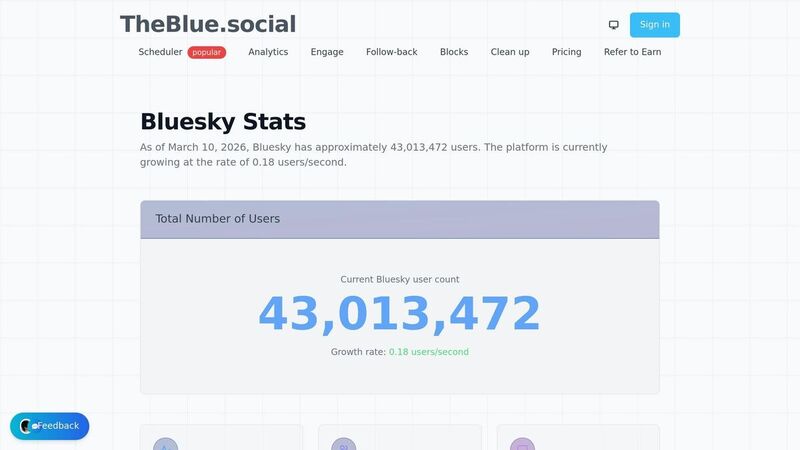
- Bluesky Network Statistics: This tool delivers real-time data on platform growth and activity, helping you identify trends. With over 90,510 starter packs indexed and 1,141 active creators, you can browse successful examples to inspire your own [8].
- My Top 3 Emojis: Emojis can boost visibility in custom feeds, and this tool shows which ones you use most often. Understanding your emoji usage can help you refine the tone and visual appeal of your posts [8].
- Generate Alt Text: If your starter packs include visuals, this tool generates descriptive, keyword-rich alt-text, improving your chances of appearing in topic-specific feeds [8].
Once you’ve fine-tuned your content using these tools, you can expand your reach with cross-platform promotion.
Promoting Starter Packs Across Platforms
Your starter pack doesn’t have to stay confined to Bluesky. By promoting it across multiple platforms, you can attract external traffic and increase visibility in Bluesky’s Discover feed. TheBlue.social's cross-posting scheduler allows you to share your starter pack link on X (Twitter), LinkedIn, Threads, Instagram, Pinterest, and Mastodon - all timed to hit peak engagement hours on each platform.
This approach has a dual benefit: external engagement signals to Bluesky’s algorithm that your content is valuable. When users from other platforms click through and engage with your starter pack, that initial activity can help push your post from the Following feed into the Discover feed, exposing it to a wider audience.
Summary: How to Make Your Starter Packs More Visible
Bluesky's multi-feed system provides three distinct ways to increase visibility: the Following feed, which prioritizes recent posts; the Discover feed, which highlights posts with fast engagement in the first hour; and Custom feeds, which rely on keywords - so picking clear, descriptive names is key.
Visibility Checklist
Start with thoughtful naming. A generic title like "Tech People" won't cut it. Instead, go for something more specific, like "iOS App Developers", to boost searchability and ensure your pack shows up in relevant custom feeds [1][2][4]. Keep your starter pack lean, with 15–30 carefully curated accounts, to make it more effective [1]. When sharing your pack, time your posts strategically - weekday mornings (8:00–10:00 AM EST) and evenings (7:00–9:00 PM EST) are peak hours for visibility in the Following feed [7].
To stand out in the Discover feed, focus on driving immediate engagement. When you post, include a question or call to action to encourage likes and reposts within the first 60 minutes - this signals quality to the algorithm [2]. Lastly, pin your top starter pack to your profile, ensuring it’s the first thing visitors see [1]. Once you’ve set everything up, keep an eye on how your strategy performs and adjust as needed.
Keep Testing and Tracking Results
Use tools like Bluesky Analytics to measure which announcement posts are resonating most with your audience. The "When Posts Get Liked" heatmap is particularly useful for identifying the best times to post [5]. Track your follower growth over 7-day, 30-day, or 90-day periods to see if your starter packs are helping you attract new followers [5].
Spend just 10 minutes a week reviewing your performance data. Look for trends in which themes or descriptions generate the most engagement, such as replies or reposts [7]. Update your packs regularly by removing inactive accounts - this keeps them fresh and focused on quality [1]. For reference, accounts with fewer than 5,000 followers typically see engagement rates between 1.5% and 4%, while niche communities often achieve higher rates, ranging from 6% to 10% [7].
FAQs
How many accounts should a starter pack include?
A starter pack for Bluesky should include up to 150 accounts to follow. This number allows for a well-rounded mix of profiles, helping you tap into the right communities and boost your interactions.
How can I get more first-hour engagement?
If you want to make the most of your posts on Bluesky, timing, engaging content, and active interaction are key. Here's how you can get started:
Post at the Right Time: Share your content during peak activity hours when your followers are most active. Use analytics tools to figure out these optimal posting times.
Create High-Quality, Engaging Content: Posts that include threads, images, or tie into trending topics tend to grab attention. Make your content stand out by being relevant and visually appealing.
Engage with the Community: Replying to comments and consistently interacting with your audience can encourage early engagement. These conversations not only boost visibility but also help build stronger connections with your audience.
By combining these strategies, you can set the stage for better first-hour engagement and meaningful interactions on Bluesky.
Do keywords in image alt text improve custom feed visibility?
Using keywords in image alt text can improve the visibility of your custom feed on Bluesky. This approach not only makes your images easier to find in searches but also enhances accessibility for users who rely on screen readers. By adding relevant keywords, you optimize your content for better engagement and a broader reach.