How to Schedule X Posts for Maximum Engagement
Last updated: March 9, 2026
Timing and consistency are critical for increasing engagement on X. Here’s what you need to know:
- Post at peak times: Use analytics to identify when your audience is most active. Commonly, mornings (e.g., 8:00–10:00 AM ET) on weekdays like Tuesday and Wednesday perform well.
- Consistency matters: Accounts posting 3–5 times daily can see 2–3x higher engagement. Scheduling posts in advance ensures regular activity.
- Use scheduling tools: X's built-in tools or platforms like TheBlue.social let you plan posts, manage multiple accounts, and save time.
- Focus on engaging content: Use strong headlines, visuals (images/videos), and a mix of educational, interactive, and promotional posts. Posts with visuals can boost retweets by 150% and engagement by 10x.
The Best Time to Post on X (Twitter) in 2025 | Data from 1M+ Posts 📈
Find the Best Times to Post on X
 Your followers don't scroll aimlessly - they follow daily routines. Some check X during their morning coffee, others during lunch breaks, and many unwind with a quick scroll before bed. The key is learning when your audience is most active, rather than relying on generic advice.
Use Analytics to Find Peak Engagement Times
The first step? Dive into your own data or use a Bluesky Analytics Dashboard if you are cross-posting to other platforms. Visit analytics.x.com, navigate to "Tweets", and sort by "Impressions" or "Engagements." Review your top 10–15 posts from the past month and note the times they were published [2][4]. This helps you identify patterns and refine your posting schedule. Additionally, the "Answers" tab in your analytics dashboard breaks down engagement rates by day of the week [5]. You might notice trends, like higher engagement on Tuesdays or better results on weekend mornings.
If you're new to X or don't have much data yet, run a simple test. Over two to four weeks, schedule posts at three different times each day - morning (8:00–10:00 AM), midday (12:00–1:00 PM), and evening (5:00–6:00 PM). Track which time slots consistently generate the most engagement within the first one to three hours [2]. Armed with this data, you'll have a clearer picture of the best posting times for your audience.
Peak Posting Times by Day and Time
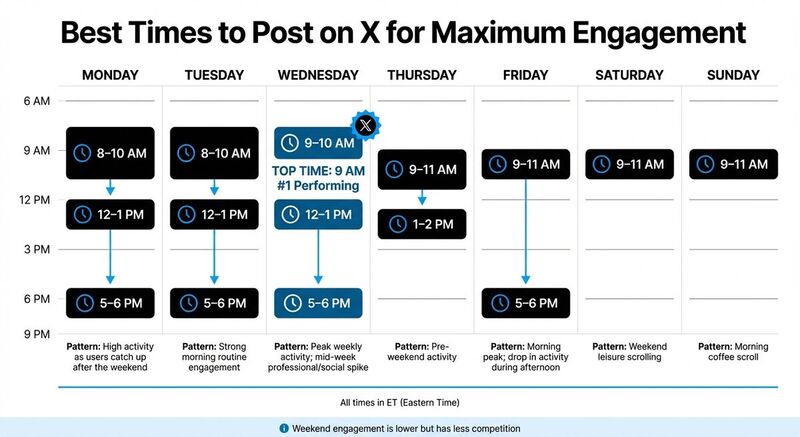
While your analytics should ultimately guide your strategy, general trends can provide a solid starting point. For example, studies suggest that 9:00 AM on Wednesdays is the top-performing time for engagement, followed closely by 8:00 AM on Tuesdays and Mondays [5]. These early-week mornings align with users starting their day.
| Day | Best Times (ET) | Engagement Pattern |
|---|---|---|
| Monday | 8:00–10:00 AM, 12:00–1:00 PM, 5:00–6:00 PM | High activity as users catch up after the weekend |
| Tuesday | 8:00–10:00 AM, 12:00–1:00 PM, 5:00–6:00 PM | Strong morning routine engagement |
| Wednesday | 9:00–10:00 AM, 12:00–1:00 PM, 5:00–6:00 PM | Peak weekly activity; mid-week professional/social spike |
| Thursday | 9:00–11:00 AM, 1:00–2:00 PM | Pre-weekend activity |
| Friday | 9:00–11:00 AM, 5:00–6:00 PM | Morning peak; a drop in activity during the afternoon |
| Saturday | 9:00–11:00 AM | Weekend leisure scrolling |
| Sunday | 9:00–11:00 AM | Morning coffee scroll |
Engagement tends to dip on weekends compared to Monday through Wednesday, but there's also less competition [5]. If you decide to post on Saturday or Sunday, aim for the 9:00–11:00 AM slot when people are likely enjoying a relaxed morning [2][4].
How to Schedule Posts on X
Once you've figured out the best times to post, scheduling your content on X becomes the next step. X provides two main tools for this: the standard desktop interface and X Pro (previously known as TweetDeck). Both allow you to schedule posts up to 18 months in advance [5][2], making them ideal for planning long-term campaigns.
Schedule Posts on X Desktop
To schedule a post using the desktop version of X, follow these steps:
- Head to x.com and click the Post button.
- Write your message and include any media - images, videos, GIFs, or quote posts.
- Click the calendar icon, choose your desired date and time, then hit Confirm and Schedule [5][2].
If you need to manage scheduled posts, click the Post button, go to Drafts in the top right corner, and switch to the Scheduled tab. From there, you can view, edit, or delete any upcoming posts [5][2].
Keep in mind: Threads must be scheduled one post at a time, and polls cannot be scheduled - they need to be posted manually [4][5].
For more advanced scheduling options, including support for threads, consider using X Pro.
Schedule Posts with X Pro
X Pro is the go-to option for users seeking more robust scheduling tools. Available with an X Premium subscription starting at $8 per month [2], X Pro provides a range of features tailored for advanced content management. Its column-based interface lets you monitor multiple feeds, mentions, and scheduled posts all at once [6].
With X Pro, you can schedule threads directly and access extended formatting options, like creating posts up to 25,000 characters long [2][6]. It also supports longer videos, ranging from 10 minutes to 3 hours, depending on your subscription tier [6].
This tool is perfect for users who need more flexibility and control over their posting strategy. If you're also exploring decentralized alternatives, check out these helpful guides about Bluesky to manage your presence there.
Schedule Posts Across Multiple Platforms with TheBlue.social
X's native tools work well for single-platform scheduling, but juggling multiple social networks can be a headache. Enter TheBlue.social, a platform that simplifies cross-posting by letting you manage X, Threads, Instagram, LinkedIn, Pinterest, Bluesky, and Mastodon - all from one dashboard. It’s designed to make your workflow smoother across all major platforms.
Schedule Posts for X and Other Platforms
With TheBlue.social’s one-tap cross-posting, you can say goodbye to rewriting the same post for different platforms. Just craft your content once, pick the networks you want to publish on, and the platform takes care of the formatting quirks for each one. This means you can draft a post for X and, with a few clicks, have it ready to go live on Threads, Instagram, or any combination of the supported platforms.
The scheduler is powered by natural language processing, so you don’t have to fiddle with clunky calendar widgets. Simply type commands like “tomorrow at 3pm,” “next Tuesday 2pm,” or “9am,” and the system schedules your post. All your planned posts stay private until they’re published, and you can easily manage them through a sidebar calendar view that lets you edit or delete them before they go live.
For those who love posting threads on X, the platform’s automatic thread stitching takes the hassle out of breaking long content into connected posts. No need to manually number them - it’s all done for you. Plus, TheBlue.social uses official APIs for every platform, so your account stays compliant with X’s terms of service, avoiding risks like throttling or bans. Best of all, it’s free to start, and there’s no need to enter a credit card to begin scheduling.
Additional Tools for Social Media Management
TheBlue.social doesn’t stop at scheduling - it packs in extra tools to enhance your social media game. The hashtag generator helps you discover tags that can expand your reach, while the Open Graph preview tool shows how your links will appear on X, Threads, LinkedIn, and more. This ensures your link cards look polished, which can improve click-through rates.
Need to make your posts more accessible? The platform includes an image alt-text generator. Want to add some personality to your content? There’s an emoji suggestion tool to find the perfect icons for your message. Managing multiple accounts? The X username availability checker instantly verifies if a handle is up for grabs. And if X is acting up, the “Is X Down?” tool lets you check the platform’s status in real time.
Write Content That Gets More Engagement
Once you’ve nailed down your posting schedule, the next challenge is creating content that truly grabs attention. Timing is important, but on platforms like X, where users scroll through endless posts, your content needs to stand out immediately. You’ve got just a fraction of a second to make an impression.
Write Better Headlines and Use Visuals
Your headline or opening line is everything - it’s what makes someone pause. Start with a bold statement, an intriguing question, or even a surprising statistic to hook your audience. For threads, the first tweet should clearly promise value, encouraging readers to dive into the rest. Keep your text short - 140–200 characters works best - and use line breaks to make it easy to skim.
Adding visuals is a game-changer. Posts with images get 150% more retweets, and videos drive 10x more engagement. Even GIFs can increase interaction by 55%. When using visuals, make sure they’re optimized: images should be 1,200 pixels wide and under 5 MB, while videos should be in MP4 format and under 512 MB. Also, polished link-card previews can significantly improve click-through rates.
To keep your content strategy balanced, aim for a mix like this: 40% educational tips, 30% engagement-driven questions, 20% curated commentary, and 10% promotional posts. And don’t forget consistency - accounts that post 3-5 times a day tend to achieve 2-3x higher engagement rates compared to those with irregular posting schedules.
Pair your strong headlines and visuals with the smart use of hashtags and emojis to maximize reach.
Add Hashtags and Emojis
Hashtags and emojis can broaden your audience, but moderation is key. Stick to 1-2 relevant hashtags per post to keep your message focused and avoid coming across as spammy. If you’re unsure which hashtags to use, tools like TheBlue.social’s hashtag generator can help you pinpoint the ones that align with your audience.
Emojis, when used sparingly, can add personality and make your posts more relatable. The sweet spot? 1-2 emojis per post. Overloading your content with emojis can make it look cluttered and unprofessional. TheBlue.social also offers an emoji suggestion tool to help you choose icons that fit your content’s tone.
Finally, engagement doesn’t stop after you post. Be ready to monitor and respond to comments within the first 30-60 minutes - this interaction can give your post an algorithmic boost and help it reach even more people.
Track Performance and Improve Your Schedule
Keep an eye on your data and tweak your schedule based on what’s working. X provides built-in analytics that showcase essential metrics like impressions (how often your post is seen), engagement rate (the percentage of viewers who interact), and performance broken down by post type. Pay close attention to likes, retweets, replies, and clicks to figure out which posts are driving the most engagement.
Monitor Engagement Metrics
Once your posts are scheduled, the next step is to track how they’re performing and adjust your strategy based on the results. Look for patterns in your top-performing posts - what hashtags worked? Which content formats resonated most? While industry data suggests peak times like 9 a.m. on Wednesdays or 8 a.m. on Tuesdays and Mondays [5], your own analytics will reveal the best times for your audience.
For example, if text-only posts aren’t gaining traction, consider experimenting with video content or threads to spark more interest [5]. Users of TheBlue.social have reported a 40% engagement boost in just two weeks by leveraging smart scheduling and analytics tools [3]. Use these insights to refine your strategy and focus on what works best.
Adjust Your Posting Strategy
Once you’ve gathered clear engagement data, tweak your schedule and content priorities to maximize results. Schedule your most critical announcements during peak engagement times identified in your analytics. If a specific post performs exceptionally well, don’t hesitate to recycle it at a different time to reach followers in other time zones.
Keep an eye on daily averages to uncover weekly trends. For instance, if Thursdays consistently show low engagement, consider scaling back posts on that day and shifting content to higher-performing slots. Remember, a mix of automated scheduling and real-time interaction is key - engaging with your audience shortly after your posts go live can help boost visibility and build stronger connections.
Conclusion
Maximize your impact by aligning the best posting times with a solid scheduling routine. Posting on X doesn’t have to be complicated - it’s about timing, consistency, and using tools that simplify the process. Regular posting and batch scheduling not only save time but also significantly increase engagement[2].
Start by diving into your analytics to pinpoint when your audience is most active. Then, create and schedule your content in advance to maintain consistency without feeling overwhelmed. Don’t forget the power of visuals - posts with images or videos tend to grab more attention and drive higher engagement[2]. Pair this with strong hooks, relevant hashtags, and active interaction after your posts go live for even better results.
To make this process seamless, tools like TheBlue.social are game-changers. With TheBlue.social, you can schedule posts across X and other platforms like Threads, LinkedIn, Instagram, Pinterest, Bluesky, and Mastodon - all from one intuitive dashboard. Features like natural language scheduling (e.g., "tomorrow at 3pm"), thread stitching, and link previews make it easy to stay on top of your content. Plus, it uses official APIs to keep your account safe and secure, and you can get started for free - no credit card needed[1][3].
Whether you’re building a personal brand or managing a business account, dedicating just one hour to batch-schedule posts during peak times can transform your presence on X. With the right tools and strategy, you’ll be creating engaging content and connecting with your audience effortlessly.
FAQs
How can I find the best times to post if I’m just starting out?
When you're just starting out, figuring out the best times to post can feel like a guessing game. But a good starting point is to focus on general peak activity periods. Weekday mornings, lunch breaks, and evenings tend to see higher engagement. On weekends, aim for morning or evening posts when people are more likely scrolling through their feeds.
Late-night posts? Probably not your best bet - engagement usually dips during those hours.
As you grow, tools like TheBlue.social can be a game-changer. They can track your audience's behavior and recommend the best posting times. And don’t forget: regular testing and keeping an eye on your engagement metrics will help you fine-tune your schedule over time.
What should I do if my scheduled post goes live but gets no engagement?
If your scheduled post isn’t getting any engagement, it’s time to rethink a few things: timing, content quality, and how your audience behaves. Posting when your audience is most active can give your content a better chance to be seen. Take a closer look at your analytics to figure out those peak activity hours and adjust your posting schedule.
Also, mix up your content. Instead of focusing solely on promotional material, try adding posts that spark interest or encourage interaction. Remember, being consistent and staying relevant to your audience’s interests are essential to boosting engagement.
How can I cross-post to multiple networks without rewriting each post?
If you want to share the same post across different social media platforms without rewriting it for each one, a scheduling tool like TheBlue.social can make your life easier. With this tool, you can craft a single post and schedule it to go live on platforms like X, Threads, Instagram, Pinterest, Bluesky, and Mastodon. This approach not only saves you time but also ensures your message stays consistent while the tool handles the posting for you.