Best Tools for Optimizing YouTube Descriptions
Last updated: March 7, 2026
Optimizing your YouTube descriptions is key to improving video visibility, search rankings, and viewer engagement. The right tools can simplify this process, saving you time and helping your content reach the right audience. Here’s what you need to know:
- Why Descriptions Matter: They help YouTube understand your content, match it with relevant searches, and improve video rankings. The first 125–150 characters are crucial for search snippets.
- Boost Engagement: Use timestamps, links, and hashtags to increase watch time and click-through rates.
- Top Tools:
- vidIQ: AI-generated descriptions, keyword research, and competitor analysis.
- TubeBuddy: SEO Studio, keyword insights, and A/B testing.
- Keywords Everywhere: Browser extension for search data and related keywords.
- YouTube Autocomplete: Free, real-time suggestions for trending search terms.
- TheBlue.social: Free tools for hashtags, emojis, and alt-text.
Quick Tip: Focus on keywords in the first 150 characters, include timestamps for easy navigation, and keep descriptions between 200–400 words.
| Tool | Key Features | Best For | Price |
|---|---|---|---|
| vidIQ | AI descriptions, trending alerts | Detailed keyword strategies | Free–$39/month |
| TubeBuddy | SEO Studio, A/B testing | Metadata optimization | Free–$49/month |
| Keywords Everywhere | Search volume, CPC, competition | Quick keyword research | Credit-based |
Start small by testing one tool, track performance, and refine your approach to maximize results.
How to Use AI to Write YouTube Descriptions & Rank Videos
Why YouTube Descriptions Matter for Video Performance
Think of your YouTube description as more than just a box to fill - it’s a critical tool for your video's success. YouTube relies heavily on descriptions to understand your content and decide who should see it [1]. This directly affects where your video lands in search results and which audiences YouTube recommends it to.
As the second-largest search engine in the world [3], YouTube processes millions of searches every day. A well-optimized description ensures your video can appear for multiple long-tail search queries by incorporating related keywords. For instance, if your video is about an "iPhone", including terms like "iOS" or "battery life" helps YouTube’s algorithm better categorize your content. This optimization boosts visibility through improved search snippets, chapter links, and increased viewer engagement.
How Descriptions Help Videos Get Found
Your first 150 characters are crucial - they act as your video’s search snippet. On mobile devices, this space shrinks to just 125 characters [1][5]. That means you need to grab attention fast by placing your main keyword and value proposition right at the start.
Descriptions don’t just influence YouTube rankings - they also work with Google’s Key Moments feature. By including timestamps, you allow Google to highlight specific chapters of your video directly in search results [1]. This creates additional opportunities for your video to appear in broader search snippets. To maximize these benefits, aim for a description length of 250 to 400 words. This gives you enough space to include multiple keywords while keeping your content reader-friendly [1].
Using Descriptions to Increase Viewer Engagement
Optimized descriptions do more than improve search rankings - they also keep viewers engaged. Timestamps make it easy for users to skip to the parts they care about, which can increase watch time and improve the overall viewing experience. For videos longer than 10 minutes, chapters are especially important for navigation and boosting algorithmic performance [5].
Descriptions can also function as a call-to-action hub. Whether you’re encouraging viewers to subscribe, download a resource, or visit your website, placing a clear link "above the fold" (within the first two lines) can significantly increase click-through rates [1]. Finally, adding 3–5 relevant hashtags at the end of your description helps YouTube categorize your content effectively without coming across as spammy [1][5].
Best Tools for YouTube Description Optimization
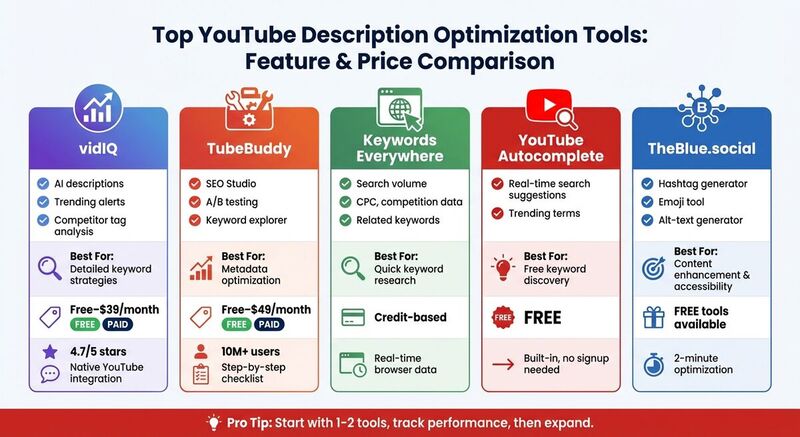 The right tools can transform guesswork into precise, data-backed strategies. These platforms help you uncover high-traffic keywords, analyze competitor tactics, and create optimized descriptions directly within your workflow. By focusing on how keywords enhance video performance, these tools simplify the process of integrating keywords and optimizing descriptions. Here’s a closer look at some of the top options available.
vidIQ Keyword Tools
vidIQ is a standout tool that integrates seamlessly with YouTube through a browser extension. When uploading a video, you can use vidIQ's AI Description Generator right on the upload screen [2]. By entering your video title or target keywords, the tool suggests optimized phrases based on real search trends.
Beyond descriptions, vidIQ offers features like keyword rankings, trending topic alerts, and competitor tag analysis. The free plan includes limited AI credits and basic keyword tools, while paid tiers (Pro, Boost, and Max) start at around $8/month [2]. Its native integration with YouTube and ability to highlight trending keywords have earned it a 4.7/5 rating [10].
| Feature | Free Plan | Pro Plan | Boost Plan |
|---|---|---|---|
| AI Description Generator | Limited credits | Unlimited | Unlimited |
| Keyword Research | Basic | Advanced | Advanced + Trending Alerts |
| Competitor Analysis | Limited | Full access | Full access + Historical data |
| Price | $0 | ~$8/month | ~$39/month |
TubeBuddy Keyword Explorer
TubeBuddy offers a structured approach to optimization with its "SEO Studio", a step-by-step checklist designed to refine your metadata [7][9]. Its Keyword Explorer tool provides insights into search volume, competition levels, and an "Optimization Score" that updates in real time as you tweak your metadata. This makes it easy to see how your changes improve your video's SEO potential.
With over 10 million users [9], TubeBuddy also includes A/B testing for thumbnails and titles (available in the Legend tier), helping you understand what resonates best with your audience. The free plan offers basic tools, while Pro and Legend tiers unlock advanced features like bulk processing and in-depth analytics.
"TubeBuddy is like having a YouTube expert on staff who will give you advice and direction whenever you need it." - Karin Carr, @KarinCarr [4]
| Plan | Key Features | Best For |
|---|---|---|
| Free | Basic keyword suggestions, tag explorer | New creators testing the platform |
| Pro | SEO Studio, advanced keyword research | Growing channels (1K–50K subscribers) |
| Legend | A/B testing, bulk processing, priority support | Established creators and agencies |
Keywords Everywhere Browser Extension

For quick, on-the-spot data, Keywords Everywhere is a handy Chrome and Firefox extension. It displays search volume, cost-per-click (CPC), and competition data directly in YouTube's search bar. As you type a query, it shows how many people search for that term each month, along with related keywords you might have overlooked.
This tool uses a credit-based pricing system, making it affordable for creators who only need occasional keyword research. It's particularly helpful for identifying long-tail keyword variations, which can help your video rank for multiple search queries.
YouTube Search Bar Autocomplete
Don’t overlook YouTube’s own autocomplete feature - it’s free and gives you direct insights into what users are actively searching for [6]. When you start typing a keyword into the search bar, YouTube suggests popular variations based on real-time search behavior. For example, typing "how to edit videos" might bring up suggestions like "how to edit videos on iPhone", "how to edit videos for beginners", or "how to edit videos on CapCut." These suggestions are a goldmine for tailoring your descriptions to match user intent, leveraging real-time data from the world’s second-largest search engine.
More Tools for Writing Better Descriptions
Beyond keyword analytics platforms, several free tools can improve the clarity and searchability of your descriptions.
TheBlue.social's Content Optimization Features
TheBlue.social, widely recognized for its cross-posting scheduler, also offers free tools designed to enhance YouTube description optimization. For example, the hashtag generator suggests relevant tags for your videos. Using 3–5 hashtags per video can increase visibility without overwhelming your audience [5].
Another handy tool is the emoji adder tool, which helps emphasize key details by incorporating emojis for better visual appeal. Additionally, the alt-text generator creates descriptive text for thumbnails and other assets, improving accessibility. With these tools, creators can fine-tune their descriptions into SEO-friendly drafts in less than 2 minutes [8][10].
These tools work alongside keyword platforms to improve both the presentation and accessibility of your video descriptions.
How to Write Optimized YouTube Descriptions
Once you've gathered the right keywords using the tools mentioned earlier, it's time to craft a description that gets results. While YouTube allows up to 5,000 characters, the first 125–150 characters are the most critical - they show up in search results and mobile previews [1][5]. Aiming for a description between 200 and 400 words gives you enough space to naturally include primary, secondary, and related keywords. For example, in a video about iPhones, including terms like "iOS" and "battery life" helps provide context [1].
"YouTube descriptions are crucial for video discovery, SEO, and viewer engagement. The first 125 characters appear in search results, making them your video's elevator pitch." – Social Rails [5]
Here’s how to turn your keyword research into an engaging and effective description.
Put Important Keywords First
Start your description with your most important keyword right in the first sentence [5]. This section, often called "above the fold", should quickly highlight the problem your video solves or the value it offers. For instance, a video about budget travel tips might begin with: "Learn how to travel Europe for under $50 per day with these proven budget strategies." Follow this with a 125–300 character summary that naturally incorporates secondary keywords. Keep the tone conversational and avoid overloading it with keywords - keyword stuffing can actually hurt your rankings [1][5].
Add Timestamps and Links
Beyond keywords, structuring your description with timestamps and links improves user engagement. Timestamps let viewers skip to the parts they care about most, which boosts watch time - a key factor in YouTube's algorithm [5]. Use the format "MM:SS - Description" (e.g., "05:15 - Overcoming Early Failures") to create clickable chapters automatically [2].
"Internal linking via timestamps (Chaptering) is a massive ranking signal." – YouTube Tools Hub [1]
Place your most important link - like an affiliate product, lead magnet, or related resource - in the first two lines of your description [1]. Group additional links, such as social media handles or extra resources, under a "Resources" header at the bottom to keep things tidy [1][5].
Use Related Keywords Naturally
Write a detailed summary that helps YouTube understand your video’s content for a variety of long-tail searches [1]. Use keyword tools to find 5–15 related terms and incorporate them seamlessly into your text. Since most viewers watch on mobile devices, double-check how your first 125 characters appear on smaller screens [5]. Wrap up your description with 3–5 relevant hashtags - but don’t go overboard, as using more than 60 can cause YouTube to ignore them. End with a clear call-to-action encouraging viewers to like, subscribe, or comment [1][5][2].
Conclusion
Optimizing your YouTube descriptions goes far beyond simply cramming in keywords - it’s about sending clear, intentional signals to YouTube's algorithm so your content connects with the right audience. Tools like Semrush, vidIQ, and YouTube's own autocomplete feature provide valuable keyword insights, but the real magic happens when you combine those insights with effective strategies. Focus on tactics like front-loading essential keywords, using timestamps for easy navigation, and placing links where they’re most useful.
"When you're working with YouTube SEO, think about where you're placing your keywords. It's like leaving breadcrumbs for viewers to find your videos." – Kate Ross, SEO of Irresistible Me Hair Extensions [11]
The numbers back it up: optimized descriptions directly impact engagement. Videos with detailed descriptions and captions experience a 12% boost in watch time, while captioned videos average 7.32% more views [11]. With 70% of YouTube views coming from the platform’s recommendation system, leveraging optimized descriptions is one of the most effective ways to grow your channel [11].
Start small - try one or two tools that fit your workflow. For quick research, a browser extension like Keywords Everywhere is a great option, while platforms like TubeBuddy offer deeper analytics. Test out different formats, track how your keywords perform, and adjust accordingly. Remember, your first 150 characters act as your search snippet, so make them count. By fine-tuning your descriptions, you can turn them into a powerful driver of views, engagement, and long-term channel growth.
FAQs
How do I choose the best description tool for my channel?
When selecting a description tool, prioritize options that offer SEO-focused features like keyword recommendations and real-time performance insights to improve visibility. Tools with automation capabilities, such as pre-designed templates, automatic timestamps, and built-in social media link integration, can streamline your process and save time. Additionally, assess usability by checking for free trials, intuitive editing interfaces, and seamless workflow integration. Reading user reviews and expert opinions can also guide you toward reliable and efficient tools tailored to your needs.
What should I include in the first 150 characters of my description?
To boost your video's visibility and engagement, craft a concise, 150-character summary packed with relevant keywords. This makes your content easier to find.
How can I track if my description changes improved results?
To see if updating your YouTube descriptions has made a difference, keep an eye on key metrics like click-through rates (CTR), watch time, and search rankings both before and after making changes. Use tools with real-time analytics, such as YouTube's built-in analytics, to track performance. You might also try A/B testing to compare different versions of your descriptions. This approach helps you figure out which version works best, ensuring your updates are guided by data and deliver better results.