Bluesky Scheduling Tools: Features to Look For
Last updated: February 27, 2026
Managing your Bluesky presence without built-in scheduling tools can be challenging. Third-party tools simplify this process by helping you organize posts, maintain consistency, and analyze performance. Here's what to look for:
- Integration: Tools should support Bluesky via the AT Protocol and offer cross-posting to platforms like X, Threads, Instagram, and more.
- Analytics: Features like audience heatmaps, follower trends, and performance tracking are essential for optimizing engagement.
- User-Friendly Design: Clean dashboards, bulk management tools, and thread stitching make content creation smoother.
- Additional Features: AI-powered alt-text, follow-back management, and free utilities like hashtag generators or username checkers add extra value.
Top Options to Consider:
- TheBlue.social: Offers advanced Bluesky tools, robust analytics, and cross-platform posting ($0-$20/month).
- Schedulala: Affordable, multi-platform scheduling ($9/month), though analytics are still in progress.
- Buffer: Reliable team workflows ($6/month per channel) but basic Bluesky features.
- Typefully: Ideal for thread-focused creators ($12.50/month), though multimedia support is limited.
- Fedica: Strong analytics ($10/month), but lacks a free tier.
Quick Comparison
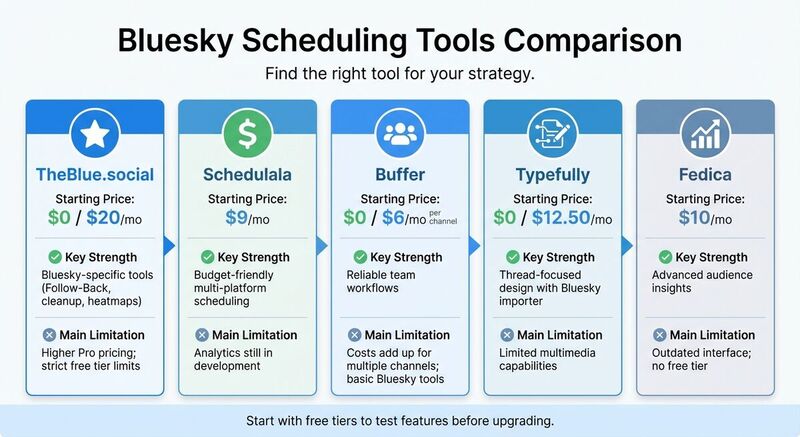
| Tool | Starting Price | Key Strength | Main Limitation |
|---|---|---|---|
| TheBlue.social | $0 / $20/mo | Bluesky tools, heatmaps | Higher Pro pricing, strict free tier limits |
| Schedulala | $9/mo | Budget-friendly | Analytics still in development |
| Buffer | $0 / $6/mo | Team workflows | Costs add up for multiple channels |
| Typefully | $0 / $12.50/mo | Thread-focused design | Limited multimedia capabilities |
| Fedica | $10/mo | Advanced audience insights | Outdated interface, no free tier |
Takeaway: Start with a free tier to test features. For Bluesky-specific tools, TheBlue.social offers the most depth, while Schedulala is a cost-effective choice. Choose based on your posting habits and platform needs.
1. TheBlue.social
Integration
TheBlue.social seamlessly connects to Bluesky via the AT Protocol, using a dedicated app password to ensure your posts are published just as they would be on the native app. From one streamlined dashboard, you can cross-post to seven platforms - X, Threads, Instagram, Pinterest, LinkedIn, Mastodon, and Bluesky. The platform automatically adjusts formatting to meet the specific requirements of each network.
Getting started is straightforward with a step-by-step video guide that shows you how to create your app password securely. Once set up, you can schedule posts and threads with ease. Alongside its effortless publishing features, TheBlue.social provides robust analytics to help fine-tune your posting strategy.
Analytics
The platform delivers detailed Bluesky analytics, tracking key engagement metrics like likes, replies, reposts, and quotes. The dashboard refreshes multiple times an hour, offering near real-time insights into how your content performs. With activity heatmaps, you can pinpoint when your audience is most active, ensuring your posts reach them at the best times.
You can also monitor follower growth trends over 7, 30, and 90 days, with weekly email reports summarizing new followers and top-performing posts. Trusted by over 1,000 active creators, TheBlue.social provides frequent updates and detailed data to help creators refine their strategies. For more tips on optimizing your presence, explore our Bluesky guides and FAQs.
User Interface
The post editor supports everything from standard skeets to multi-post threads and quote-skeets, all from a clean and intuitive dashboard. For longer content, the platform automatically stitches threads together. It also includes an AI-powered alt-text generator to improve image accessibility.
The interface offers handy bulk tools for managing your followings and cleaning up inactive accounts. Additionally, free utility tools are integrated into the workflow, such as the Bluesky handle checker to verify username availability, a hashtag generator for better reach, and an Open Graph preview tool to see how links will appear across platforms before publishing.
Additional Features
TheBlue.social is packed with features designed to improve content management and engagement. The Follow-Back manager helps grow your community by identifying followers you haven’t followed back, while the Clean Up tool removes inactive accounts or non-reciprocal followings in bulk. Pro users ($20/month) can access the Smart Engagement feature, which allows you to reply to 20 posts in just 2 minutes, boosting interactions quickly.
Several free tools are available directly on the platform, including an AI alt-text generator for automatic image descriptions, an OCR text extractor to pull text from images, a profile picture editor with AI effects, and an emoji tool to automatically add relevant emojis to posts. You can even check your top 3 emojis on Bluesky or view real-time Bluesky network stats.
For community discovery, the Starter Pack Browser indexes over 89,981 Bluesky Starter Packs, making it easier to find relevant groups. Troubleshooting tools like Is Bluesky Down? help diagnose connection issues across platforms. TheBlue.social operates with a privacy-first approach, ensuring user data is never sold. Plus, personal support is typically available within 24 hours for any assistance you might need.
How To Automate & Schedule Posts on BlueSky Social | Best Social Media Scheduler!
2. Other Bluesky Scheduling Tools
While TheBlue.social focuses on a wide range of features for Bluesky, other tools bring their own strengths to the table.
Integration
Several scheduling tools offer seamless integration with Bluesky. Buffer, for instance, supports unlimited channels and cross-post between multiple platforms, starting at $6 per month per channel. For those managing multiple social accounts, its free tier includes three channels with 10 posts per channel. Schedulala connects to eight platforms, including Bluesky, Twitter/X, and Instagram, all from one dashboard at $9 per month. It boasts a quick setup - linking Bluesky accounts in under two minutes - and has earned a 4.8/5 rating for its user-friendly design.
Publer provides Bluesky posting along with cross-platform management, starting at $3.60 per month when billed annually. Meanwhile, CoSchedule integrates Bluesky into a unified marketing calendar at $19 per user per month. Most of these tools use the AT Protocol for secure connections.
Analytics
Analytics offerings vary significantly between these tools. Fedica focuses on metrics, with its Essentials plan priced at $10 per month for basic analytics and a Professional plan at $25 per month for more detailed insights. Buffer offers tiered analytics, while Typefully provides analytics starting at $12.50/month through its Creator plan. Vista Social also delivers detailed performance reports.
Schedulala plans to introduce analytics soon, which may not suit users needing immediate performance data. Since analytics depth and update frequency differ across platforms, it’s worth reviewing each tool’s metrics before committing.
User Interface
Ease of use is a shared priority across these tools. Schedulala features a visual drag-and-drop content calendar, praised for its straightforward design. Buffer emphasizes simplicity with drag-and-drop scheduling and customizable queues, though its per-channel pricing can become costly for some users. Typefully caters to writers with thread-focused tools, while Planly highlights its intuitive interface alongside AI-driven features.
Most platforms include visual calendars for at-a-glance planning. However, mobile app experiences can differ - some users have reported bugs or slower support response times. Testing free tiers or trial periods can help determine which tool aligns best with your workflow.
Additional Features
Some tools offer standout features to enhance content management. Buffer supports Bluesky threads with up to 25 sub-posts, while Planly incorporates AI content creation, automated posting, and HD video uploads. PostQuickAI includes AI-assisted creation, visual calendars, posting streaks, and workflow automation.
Schedulala provides bulk scheduling, a media library, and will soon add optimal posting time suggestions. CoSchedule offers customizable templates and task assignment for team collaboration. Pricing varies widely - from Publer’s $3.60 per month (Professional plan, billed yearly) to CoSchedule’s $19 per user per month. Many tools also offer free tiers or seven-day trials, making it easier to explore features before committing.
Pros and Cons
Taking a closer look at the tools mentioned earlier, here’s a breakdown of their strengths and weaknesses to help you decide which one fits your needs.
TheBlue.social stands out for Bluesky enthusiasts who want advanced scheduling features. Its integration with the AT Protocol brings tools like Follow-Back management (up to 2,000 accounts with the Pro plan), bulk block/mute options, and audience heatmaps. Plus, it supports cross-posting to seven platforms - X, Threads, Instagram, LinkedIn, Pinterest, Mastodon, and Bluesky - with just one click. According to user data, this tool can boost engagement by 40% in just two weeks[1]. On the flip side, the Pro plan costs $20/month, which is pricier than some alternatives, and the free tier imposes strict limits (around 100 follow/unfollow actions), which might frustrate active users.
Other tools also bring unique benefits. Schedulala, for instance, is a budget-friendly option at $9/month, making it a great pick for small businesses watching their expenses. However, its analytics features are still in progress, leaving some gaps in performance tracking.
Buffer, known for its reliability, offers team collaboration tools starting at $6/month per channel. It’s a solid choice for those prioritizing smooth integrations. But for creators managing multiple platforms, the per-channel pricing can quickly add up, and its Bluesky-specific features are relatively basic compared to more specialized tools.
For writers who focus on threading, Typefully provides a distraction-free editing experience for $12.50/month. While excellent for text-based content, it lacks robust multimedia management. Fedica, on the other hand, delivers detailed audience insights and competitor tracking starting at $10/month, though its interface feels outdated, and there’s no free tier for users to test before committing.
Here’s a quick comparison of the tools:
| Tool | Starting Price | Key Strength | Main Limitation |
|---|---|---|---|
| TheBlue.social | $0 / $20/mo | Bluesky tools (Follow-Back, cleanup, heatmaps) | Higher Pro pricing; strict free tier limits |
| Schedulala | $9/mo | Affordable multi-platform scheduling | Analytics features still in development |
| Buffer | $0 / $6/mo per channel | Reliable team workflows | Costs add up for multiple channels; basic Bluesky tools |
| Typefully | $0 / $12.50/mo | Thread-focused design with Bluesky importer | Limited multimedia capabilities |
| Fedica | $10/mo | Advanced audience insights | Outdated interface; no free tier |
If you’re unsure which tool suits your workflow, take advantage of free tiers or trials to test them out.
Conclusion
Picking the right Bluesky scheduling tool starts with understanding your unique needs and workflow. If you're a new creator, starting with a free plan is a great way to explore basic scheduling features. Tools offering free follow-back options and timeline cleanup can make it easier to build your community.
For businesses and power users juggling multiple social media accounts, more advanced tools are a better fit. Features like cross-posting to major platforms from a single dashboard can save a lot of time, while detailed analytics provide valuable insights into performance. For example, TheBlue.social is already used by over 1,098 active Bluesky creators [2], with one user reporting a 40% engagement increase in just two weeks [1]. Their Pro plan, priced at $20/month, is ideal for those serious about optimizing their social media strategy.
When choosing a tool, focus on features that align with your posting habits. If you post daily threads, prioritize tools with automatic stitching. If managing multiple platforms feels overwhelming, look for one-click cross-posting options. For those focused on building a Bluesky community, features like bulk follow-back management (up to 2,000 accounts) and smart engagement tools are key. Tailor your choice to fit your routine and goals.
Start with a free tier to see how well the tool fits your needs, then upgrade as you require deeper analytics and more streamlined posting. Many creators notice time savings and increased engagement within their first month of using the right tool.
FAQs
Is it safe to connect a scheduling tool to Bluesky?
Connecting a scheduling tool to Bluesky can be safe, provided the tool is trustworthy and specifically designed for Bluesky. Most reputable tools rely on secure methods like app passwords or OAuth authentication to ensure your account remains protected. To stay safe, always check the tool's reputation before granting access. Stick to secure integrations and take steps to protect your login details to reduce potential risks.
What analytics are most important for Bluesky growth?
Key metrics to watch for Bluesky growth include engagement rate (calculated by dividing likes, reposts, and replies by impressions), reach, and impressions. These numbers reveal how widely your content circulates and how effectively it connects with your audience. Additionally, monitoring follower growth and follow-back rates is essential for expanding your audience. By analyzing these insights, you can fine-tune your strategies, choose the best times to post, and boost your overall results.
How do I choose between cross-posting and Bluesky-only scheduling?
When deciding how to manage your content, think about your strategy and goals. Cross-posting is a time-saver, allowing you to share the same post across multiple platforms. This approach works well if you're aiming for broad visibility and consistent messaging.
On the other hand, Bluesky-only scheduling is about creating posts specifically for Bluesky. It lets you focus on engagement analytics, build stronger community connections, and grow your presence within that platform.
In short, choose cross-posting to maximize reach across platforms or go with Bluesky-only tools if your goal is to build deeper connections within Bluesky’s community.