How to Check Username Availability on Social Media
Last updated: March 4, 2026
Want the same username across all your social media accounts? Here's how to secure it.
With billions of users on platforms like X (formerly Twitter), Instagram, Threads, and Bluesky, usernames disappear fast. A consistent username strengthens your online identity, making it easier for others to find and recognize you. Using tools like TheBlue.social, you can quickly check if your desired handle is available across platforms - no need for manual searches.
Key Takeaways:
- Why It Matters: A unified username builds trust, boosts discoverability, and avoids confusion.
- How to Check: Use TheBlue.social's free tools or manually verify on each platform.
- Platform Rules: Each platform has unique limits:
- X: 1–15 characters, only letters, numbers, and underscores.
- Instagram/Threads: 1–30 characters, allows periods and underscores.
- Bluesky: Up to 253 characters, supports custom domains.
Pro Tip: Stick to X's 15-character limit for maximum compatibility across platforms. Use strong passwords and enable two-factor authentication to secure your accounts.
Ready to claim your username? Start with TheBlue.social to save time and lock in your handle today.
CHECK USERNAME AVAILABILITY IN ONE CLICK (social media + other platforms)
Why Check Username Availability First?
Having the same username across platforms builds a strong and recognizable brand identity. It makes it easier for people to find you without guessing variations. This is especially important on fast-growing platforms like Threads, which reached 100 million users in just five days [7]. A consistent username ensures seamless discovery, and this guide will show you how to check availability quickly on major platforms.
Using mismatched usernames can confuse your audience. If you're @yourname on X but @yourname_official on Instagram and @yourname123 on Bluesky, it creates unnecessary friction. A single, uniform username is easier for people to remember, share, or type into a search bar - whether they’re hearing about you in a conversation or reading your business card.
Since Threads automatically adopts your Instagram username - changing one updates the other [7] - claiming a handle on Instagram also secures it for Threads. This integration, however, means you can’t use different usernames for these Meta-owned platforms.
Consistency across platforms also boosts your credibility. Matching usernames signal professionalism and commitment to your online presence, which is essential for networking, building trust, and maintaining relationships in various communities.
When choosing a username, keep it under 15 characters to comply with X (Twitter)'s limits [1]. Avoid using special characters like periods or hyphens, as they’re not universally supported and can make your handle harder to type and remember [1]. Up next, we’ll dive into tools and strategies for checking username availability across platforms.
Using TheBlue.social Free Username Checkers
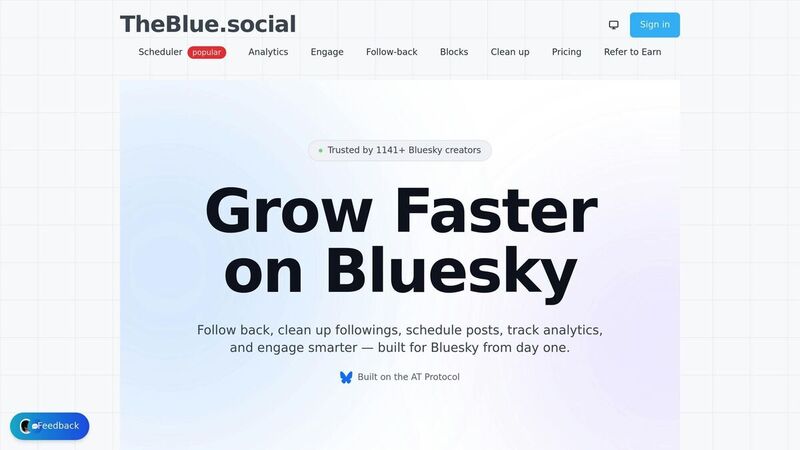
TheBlue.social provides free tools to instantly check username availability across major platforms - no signup required. Instead of manually searching each site, these tools offer clickable links that quickly verify if a handle is available. You can even test up to 10 usernames at once by separating them with commas or spaces, making it easier to explore options while brainstorming.
These tools also ensure your desired username meets each platform's specific rules - like character limits and permitted symbols - before you start the signup process. This saves time and avoids the hassle of formatting errors. Unlike manual searches, these automated checkers simplify the process significantly.
Here’s how to check handles on popular platforms:
Check X (Twitter) Username Availability
Use the X (Twitter) Username Checker to see if your handle is free. Keep in mind, X usernames must be 15 characters or fewer and can only include letters, numbers, and underscores. If you see "This account doesn't exist," the username is available.
Check Instagram Username Availability
The Instagram Username Checker verifies handles up to 30 characters long. Instagram allows letters, numbers, periods, and underscores, and usernames are case-insensitive. If the link shows "Page not found," the username is ready to claim.
Check Threads Username Availability
Threads usernames are tied to your Instagram account. The Threads Username Checker checks availability for both platforms at once. If you see "Page not available," the handle is unclaimed. Since Instagram and Threads sync usernames automatically, securing one ensures consistency across both platforms.
Check Bluesky Handle Availability
Bluesky stands out with its flexible handle options, supporting up to 253 characters, including letters, numbers, periods, hyphens, and even custom domains like @yourname.com. Use the Bluesky Handle Checker to verify your preferred handle. If you see "Profile not found," the username is available. This flexibility makes Bluesky ideal for professional branding with domain-based handles.
Manual Methods for Checking Usernames
If you'd rather check username availability directly on each platform, the process is pretty simple. Just head to the platform's profile URL format and plug in your desired username. This manual method works as a dependable fallback when automated tools aren't accessible. Platforms typically display a specific message when a username isn't claimed, so you can confirm availability without signing up or relying on external tools. Here's a breakdown of how to do it for popular platforms:
How to Check X (Twitter) Usernames Manually
Go to x.com/[username], replacing [username] with the handle you want to check. If you see the message "This account doesn't exist", the username is up for grabs[3]. Alternatively, during sign-up, you can type the handle into the username field - X will instantly notify you if it's already taken[6]. Keep in mind, usernames tied to suspended or deactivated accounts are not available. If you encounter a suspension notice, that handle is off-limits. For details on character limits and acceptable symbols, see the Username Rules section.
How to Check Instagram Usernames Manually
Navigate to instagram.com/[username]. If the page shows "Page not found" or "Page not available", the username is free to claim[5]. For Instagram-specific guidelines, refer to the Username Rules section.
How to Check Threads Usernames Manually
Since Threads usernames are linked directly to Instagram accounts, the process is identical. Visit threads.net/[username] and check for the "Page not available" message. If it appears, the username is available[4]. For more on how Threads integrates with Instagram, consult the Username Rules section.
How to Check Bluesky Handles Manually
Head to bsky.app/profile/[username].bsky.social. If you see "Profile not found", the username is available[2]. One unique feature of Bluesky is its support for custom domains (e.g., @yourname.com), which can add a professional touch to your handle[2][1]. For further details on Bluesky handle options, check the Username Rules section.
Username Rules by Platform
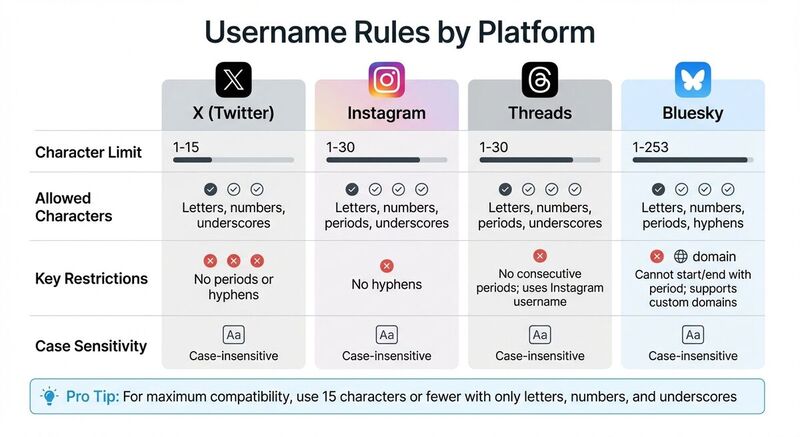 Each platform has its own set of rules for usernames, and knowing these can help save time and avoid headaches. If you're aiming to use the same handle across multiple platforms, it's smart to stick to the most restrictive rules - which in this case means following X's 15-character limit.
X (formerly Twitter) has the tightest restrictions, allowing usernames between 1 and 15 characters. Handles can include only letters, numbers, and underscores - no periods or hyphens are allowed. On the other hand, Instagram and Threads provide more flexibility with a 1–30 character limit. These platforms allow letters, numbers, underscores, and periods (but no hyphens). Since Threads pulls your Instagram username, both platforms share the same rules. One key detail: Threads does not allow consecutive periods, so usernames like "user..name" are off the table.
When it comes to Bluesky, the rules are much more flexible. Usernames can be up to 253 characters long and may include letters, numbers, periods, and hyphens. However, handles cannot start or end with a period. Bluesky also stands out by letting users incorporate custom domains as handles (e.g., @yourname.com), which can lend a professional feel and help verify your identity.
Here’s a quick breakdown of the username rules across platforms:
Username Rules Comparison Table
| Platform | Character Limit | Allowed Characters | Key Restrictions |
|---|---|---|---|
| X (Twitter) | 1–15 | Letters, numbers, underscores | No periods or hyphens; case-insensitive |
| 1–30 | Letters, numbers, periods, underscores | No hyphens; case-insensitive | |
| Threads | 1–30 | Letters, numbers, periods, underscores | No consecutive periods; uses Instagram username |
| Bluesky | 1–253 | Letters, numbers, periods, hyphens | Cannot start/end with period; supports custom domains |
For maximum compatibility across platforms, stick to 15 characters or fewer and use only letters, numbers, and underscores. This approach ensures your handle works seamlessly everywhere.
Tips for Choosing and Securing Usernames
Picking the right username is just the beginning; keeping it safe is equally important. Start by choosing a handle that's short, memorable, and consistent across platforms. Aim for under 15 characters to meet X's character limit, and stick to letters, numbers, and underscores for maximum compatibility. Avoid trendy buzzwords or random numbers that don't align with your brand or personal identity.
Once you've decided on the perfect username, focus on securing it with strong password habits. Use a unique password for each platform. This ensures that if one account is compromised, others remain safe. Tools like password managers can help create and store complex passwords securely. As the NI Cyber Security Centre advises, "Choose a strong password using three random words" [8].
Enable two-factor authentication (2FA) on all accounts for an extra layer of security. Use an authentication app to guard against SIM-swapping attacks. This step is crucial because, as noted, "even if a criminal... knows your password, they won't be able to access any of your accounts that are protected using 2FA" [8].
Take additional precautions by fine-tuning your profile settings. Adjust privacy settings to limit what others can see and copy. For instance, setting accounts to private can deter impersonators. Be mindful about sharing sensitive information like your birthdate or location. Regularly search for your name or brand on social media to spot and address fake accounts. Social media fraud cost users $1.2 billion in 2022 [9], so staying alert can help protect both your reputation and finances.
Different platforms may require unique approaches. For example, on Bluesky, you can use a custom domain as your handle (e.g., yourname.com) to verify your identity through DNS. This not only looks professional but also makes impersonation much more difficult. If verification badges are available, apply for one to further distinguish your account from potential fakes. These steps, tailored to each platform, can go a long way in keeping your online presence secure.
Conclusion
Before diving into content creation or branding, it's smart to check username availability. This simple step can save time, ensure cohesive branding, and prevent unnecessary frustration. Platforms like X, Instagram, Threads, Bluesky, TikTok, Pinterest, and LinkedIn allow you to verify usernames in seconds, which is especially helpful when managing multiple accounts or launching a new brand that requires a unified digital identity.
TheBlue.social offers free username checkers that make this process incredibly efficient. With the ability to check up to 10 usernames at once across major platforms, these tools simplify the task. They automatically account for platform-specific requirements - like X’s 15-character limit or Bluesky’s custom domain support - and even provide direct verification links for instant confirmation. No more tedious manual checks; these tools are a game-changer for creators, businesses, and social media managers alike.
Using consistent usernames across platforms strengthens your digital identity. Whether you’re a content creator building your presence, a business safeguarding your brand, or a social media manager handling multiple clients, having matching handles makes you easier to find and builds trust with your audience.
Secure the perfect username today with TheBlue.social’s free tools for X, Instagram, Threads, or Bluesky - no sign-up required.
FAQs
What if my username is taken on just one platform?
If your desired username is already taken on a platform, consider tweaking it by adding words like "official", including your location, or using abbreviations to maintain consistency. Another option is to pick a similar username that still reflects your brand identity. Tools such as TheBlue.social can simplify the process by checking username availability across multiple platforms. This can help you find a suitable alternative or confirm if your preferred username is free on other sites.
Can I reserve a username before creating an account?
Yes, it's possible to check and reserve a username before setting up an account on social media platforms. Tools like TheBlue.social offer free username availability checkers for popular platforms like Bluesky, Instagram, X (formerly Twitter), Threads, and TikTok. If the username you want is available, make sure to claim it right away before someone else does.
Why do Instagram and Threads usernames have to match?
When you sign up for Threads, your username is automatically linked to your Instagram account. This means your Instagram username is reserved for Threads as well, ensuring your identity stays consistent across both platforms.