Ultimate Guide to Cross-Platform Post Scheduling
Last updated: February 11, 2026
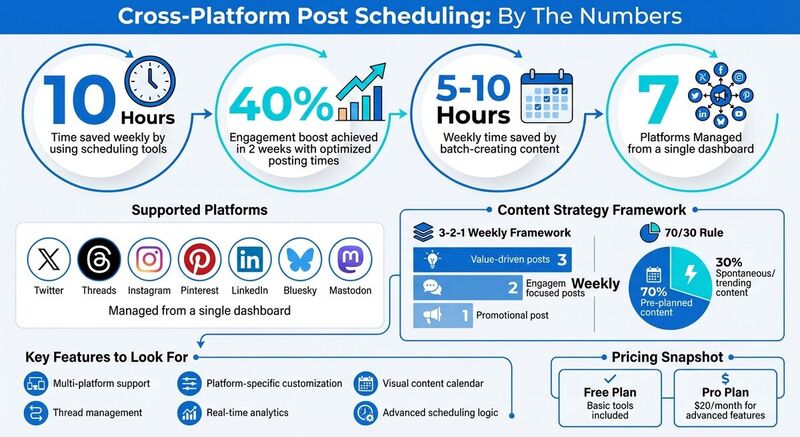
Managing multiple social media accounts can be overwhelming. Cross-platform scheduling tools simplify this process by letting you write once and post everywhere across platforms like X (Twitter), Threads, Instagram, Pinterest, LinkedIn, Bluesky, and Mastodon - all from a single dashboard. You can also find Bluesky guides to help you navigate newer decentralized networks. These tools save time, ensure consistent posting, and improve engagement.
Key Takeaways:
- Save Time: Reduce time spent on posting by up to 10 hours weekly.
- Optimize Reach: Schedule posts for peak engagement times across time zones.
- Custom Features: Adjust captions, hashtags, and formats for each platform.
- Advanced Tools: Use features like thread management, analytics, and content calendars to streamline workflows.
For example, TheBlue.social is a scheduling tool that supports seven major platforms, offers free utilities like hashtag generators, and provides a Pro plan for $20/month with extended features.
Batch-create your posts, schedule them strategically, and use automation to simplify your workflow. With the right tool, you can maintain a consistent presence while focusing on creating quality content.
Features to Look for in Scheduling Tools
Core Features You Need
Scheduling tools aren’t all created equal. The right one can simplify your workflow and help keep your content polished across different platforms.
One must-have feature is multi-platform support. A good tool should allow you to manage networks like X (Twitter), Threads, Instagram, Pinterest, LinkedIn, and decentralized platforms like Bluesky and Mastodon - all from a single dashboard. Jumping between apps wastes time that could be better spent creating content.
Another key feature is platform-specific customization. The best tools let you adjust captions, hashtags, and image formats for each platform without the hassle of manual copy-pasting [6].
A visual content calendar with drag-and-drop functionality is also invaluable. It gives you a clear overview of your schedule, making it easy to fill content gaps and balance promotional posts with value-driven ones [3]. Look for tools offering advanced scheduling logic, including options like automatic post spacing ("Add to Queue"), recurring posts for evergreen content, and smart send-time suggestions based on when your audience is most active [3].
For platforms like Bluesky or X, thread management is another critical feature. Tools that support creating and scheduling threads with automatic stitching can save you the hassle of manually following up with additional posts [1]. Lastly, real-time analytics help you track engagement and growth trends, giving you the data you need to fine-tune your strategy [2].
These features lay the groundwork for more advanced scheduling techniques, which we’ll explore in the next section.
How TheBlue.social Handles Cross-Platform Scheduling
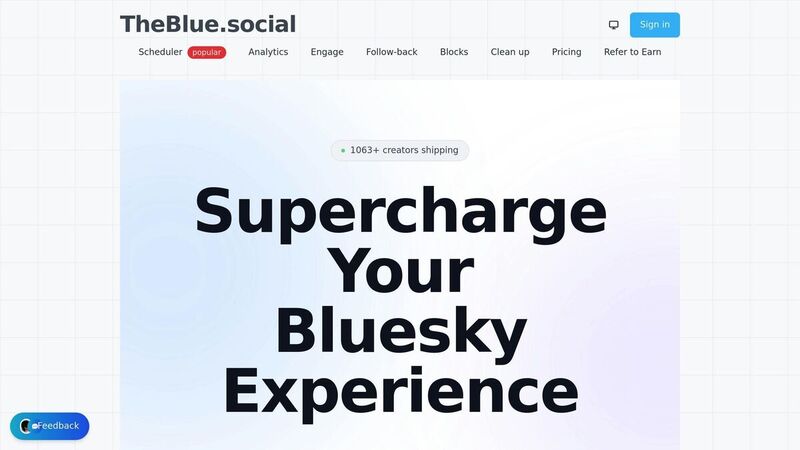
TheBlue.social builds on these essential features, offering a streamlined solution for cross-platform scheduling. Designed with creators in mind, it’s especially helpful for managing multiple accounts, including Bluesky, which still doesn’t have native scheduling support as of early 2026 [3]. The tool supports networks like X (Twitter), Threads, Instagram, Pinterest, LinkedIn, Bluesky, and Mastodon, all through a unified content calendar. Plus, it uses native atproto support for Bluesky to ensure your posts, threads, and link-card previews are published without formatting issues [1].
What makes TheBlue.social stand out is its combination of powerful scheduling features and free utility tools that enhance your content before it goes live. For example:
- The hashtag generator creates optimized tags for each platform.
- The alt-text creator makes your images more accessible.
- The Open Graph preview tool lets you see how your links will appear on different platforms.
- Tools like Is Bluesky Down? let you quickly check service status [2].
TheBlue.social offers a free plan with basic tools, while its Pro plan - priced at $20/month - unlocks advanced features like extended Bluesky analytics and higher scheduling limits. It’s perfect for creators who want to batch-create a week’s worth of content in one go, potentially saving 5–10 hours of work each week [3].
Setting Up TheBlue.social for Scheduling
Connecting Your Social Media Accounts
To get started, create a free account on TheBlue.social - no credit card required - and head to your dashboard.
The platform works with all major social networks, including Bluesky, which has a slightly different setup. Most platforms use standard OAuth authorization, where you simply log in and grant permissions. Bluesky, however, prioritizes security by requiring an app password. To set this up, go to Bluesky Settings > Advanced > App Passwords > Create New App Password, then copy the generated key and paste it into TheBlue.social. This method keeps your primary login credentials secure while allowing the scheduler to manage posts for you.
Once your accounts are connected, they’ll appear on your dashboard. You can toggle each account on or off for individual posts, making it easy to cross-post across platforms or tailor content for specific networks.
With your accounts linked, you’re ready to set up your posting schedule.
Building Your Content Calendar
The visual content calendar is where you can draft, schedule, and organize your posts. It’s designed with Bluesky in mind, ensuring that posts, including images, publish exactly as you draft them.
The scheduler gives you plenty of flexibility. You can post immediately, plan content for specific dates and times, or rely on smart send-time suggestions based on when your audience is most active. For lengthy updates, the thread stitching feature automatically breaks your text into a seamless thread - no need to manually number posts or add "(1/🧵)" indicators.
The calendar view provides a clear snapshot of your schedule. With over 1,063 active creators and an average of 82.7 posts per user, the system is built to handle even the busiest schedules with ease.
Before locking in your schedule, take advantage of TheBlue.social’s free tools to refine your content.
Using Free Tools to Improve Your Posts
TheBlue.social includes several free tools to help you elevate your content. The hashtag generator suggests optimized tags tailored to each platform, while the emoji adder recommends relevant emojis to make your posts more engaging.
For better accessibility, the alt-text generator creates descriptive text for your images, ensuring they’re inclusive for all audiences. If you’re sharing links, the Open Graph preview tool shows exactly how your link cards will appear on platforms like Facebook, Threads, X, LinkedIn, and Discord. This helps you achieve clean, professional previews that can improve click-through rates.
Best Way To Schedule ALL Social Media Posts For FREE
Advanced Scheduling Techniques
These strategies help fine-tune your content calendar, ensuring it runs smoothly and delivers the best results.
Finding the Right Posting Times
TheBlue.social's analytics dashboard offers real-time insights into when your followers are most active, moving beyond generic advice about the "best times to post."
To identify what works for your audience, try a two-week testing period. Experiment with posting at different times, like 9:00 AM, 1:00 PM, and 7:00 PM EST, and track engagement levels. One creator reported a 40% boost in engagement in just two weeks by adopting this targeted approach [1]. The platform even suggests optimal posting times based on your past performance, making it easier to focus on what works.
Don’t forget to consider time zones. For instance, posting at 6:00 AM PST in Los Angeles aligns with the 9:00 AM EST morning peak on the East Coast. With TheBlue.social, you can schedule posts across multiple time zones, ensuring your content reaches people when they’re actively online.
Consistency is key. Posting regularly - even just once a day - builds trust with your audience and improves your visibility on platform algorithms. The visual calendar feature helps you spot any gaps and maintain a steady posting rhythm.
Once you've nailed down the timing, you can take things further with recurring posts and campaigns.
Setting Up Recurring Posts and Campaigns
Not every post needs to be brand new. Evergreen content, like tips, tutorials, or insights, can be reused to engage new followers who may have missed it before. TheBlue.social’s re-queue feature takes the hassle out of this process by automatically spacing out non-time-sensitive posts, keeping your feed active without constant effort.
Organizing posts into themed campaigns - such as educational, promotional, or behind-the-scenes content - helps create a balanced strategy. A good starting point is the 3-2-1 Framework: post 3 value-driven pieces, 2 engagement-focused updates, and 1 promotional post each week [5]. This approach keeps your content diverse and avoids overwhelming followers with sales messages.
The "Add to Queue" feature spaces out posts according to your pre-set schedule, while thread stitching ensures that multi-part posts are published in the correct order, with intervals of 30–60 seconds between each part.
Managing Platform Outages
Social media platforms occasionally experience outages, ranging from brief disruptions to extended downtime. Before assuming your scheduler is broken, check if the platform itself is experiencing issues.
TheBlue.social offers free status checkers for major platforms, including Bluesky, X (Twitter), Pinterest, LinkedIn, and over 10 Mastodon instances like Mastodon.social, Fosstodon.org, and TechHub.social [2]. If a platform is offline, you can delay or reschedule your posts until it’s back up.
This is why scheduling across multiple platforms is so important. If one network goes down, your content can still reach your audience on other channels. Diversifying your posting strategy ensures your presence remains active, even during outages.
Scheduling Tips and Problem Solving
When it comes to managing your content, even the best-laid plans can hit a snag. Whether you're trying to save time or recover from unexpected hiccups, these tips and troubleshooting strategies can help keep your workflow on track.
Tips for Better Scheduling
Batch-create your posts instead of publishing daily. Dedicate one session each week to create 5–10 posts. This simple shift could save you anywhere from 5 to 10 hours weekly [5][3]. Plus, it frees up time to focus on engaging with your audience in real-time.
Stick to the 70/30 rule: Plan 70% of your content in advance (like tutorials, evergreen tips, or pre-scheduled posts) and leave 30% open for spontaneous updates or trending topics [5][3]. This mix keeps your content fresh and relevant while maintaining a consistent posting schedule.
Start with the most restrictive platform. Begin crafting your message with X (Twitter)’s 280-character limit in mind, then expand for platforms with higher limits like Bluesky (300 characters) or Mastodon (500 characters) [7]. This ensures your message fits everywhere, with room for extra context where possible.
Assign specific types of content to certain days. For instance, you might post educational updates on Mondays, behind-the-scenes glimpses on Wednesdays, and promotions on Fridays. A good framework to follow is the 3-2-1 approach: 3 posts offering value, 2 aimed at engagement (like polls or questions), and 1 promotional post per week [5].
Stagger your posting times by 15–30 minutes across platforms. This helps you catch any errors on one platform before they spread to others and ensures your audience on each platform gets your attention without competing all at once [7].
Fixing Common Scheduling Problems
Even with careful planning, things can go wrong. Here’s how to handle some of the most frequent scheduling issues.
Most problems fall into three categories: authentication errors, platform outages, and content constraint violations.
Authentication issues are a frequent headache, especially on Bluesky. If a post fails to publish, check whether your connection needs to be refreshed. For Bluesky, use an app password instead of your main login credentials [4][5][3]. App passwords are more secure and easier to reset. You can create one by navigating to Settings > Advanced > App Passwords.
Before assuming your scheduler is at fault, check the platform’s status using available tools. Decentralized platforms like Mastodon are often affected by individual instance outages, so knowing how to quickly check their status can save you time.
Media and character limit violations can also derail your posts. Double-check that your images are under 1MB for Bluesky and that your text meets each platform’s character limits [7][3].
If all else fails and the platform itself is operational, re-authorize your connection. This might mean generating a new app password or refreshing API permissions [4][3]. For urgent updates, especially during platform outages, bypass your scheduler and post directly on the platform [7].
Conclusion
Once you've got the setup and scheduling techniques down, it’s all about keeping things straightforward. Cross-platform scheduling doesn’t have to be complicated. The trick lies in using a tool that takes care of the nitty-gritty - like character limits, image formatting, and threading - so you can focus on creating great content.
TheBlue.social simplifies this by uniting seven major platforms into one calendar. With features like native AT Protocol support for Bluesky, automatic thread stitching, and an alt-text generator for accessibility, it ensures your posts look and function as intended on X, Threads, Instagram, Pinterest, LinkedIn, Mastodon, and Bluesky. You write once, pick the platforms, and let it do the rest.
You can start with the free plan to explore tools like the cross-platform scheduler, 7-day analytics, and community management features, including the follow-back manager. Want to ensure your links look right? Use the Open Graph preview tool. Need to troubleshoot? Check platform statuses with Is Bluesky Down?. For those needing more, the Pro plan offers higher limits and extended analytics for $20/month.
Whether you’re managing one account or several, sticking to a consistent schedule and leveraging automation can save you hours every week. Just connect your accounts with app passwords, batch your posts, and let TheBlue.social take care of the rest.
FAQs
How do I avoid duplicate or spammy posts when cross-posting?
To keep your posts fresh and avoid looking spammy or redundant, it’s important to tailor your content to match each platform's audience and style. Pay attention to things like character limits, user preferences, and the tone that works best for each space. Start with a clear core message, then tweak it for every platform to keep it relevant and engaging. Tools like TheBlue.social can help you plan your posting schedule and manage frequency, ensuring your content stays thoughtful, engaging, and aligned with each platform’s expectations - without feeling repetitive.
What should I customize per platform before scheduling the same post everywhere?
Before posting on multiple platforms, it's essential to tweak key elements so they align with each platform's unique style and preferences. Start by adjusting image dimensions, ensuring they fit the platform's recommended sizes. Pay attention to character limits and the use of hashtags, tailoring them to the platform's norms. Adapt your tone, language, and call-to-action to resonate with the specific audience you're targeting on each platform.
Don't overlook details like metadata optimization - this includes refining link previews and adding descriptive alt text. Also, make the most of platform-specific features, such as Instagram Stories or Twitter threads, to enhance engagement. Tools like TheBlue.social can help streamline these customizations while ensuring your core message stays consistent across all channels.
How can I schedule around time zones without missing peak engagement?
To make the most of different time zones and maximize engagement, consider using scheduling tools that offer smart send-time suggestions. These tools analyze follower activity and recommend the optimal times to post, helping your content land in front of your audience when they’re most active. By pre-scheduling posts, you can ensure your content goes live during peak hours across various time zones, no matter where you’re located.