Fix JSON Parsing Errors in Social Media APIs
Last updated: June 7, 2026
JSON parsing errors are boring until they break posting.
I run into them most when social APIs return something that looks like JSON in the happy path, then returns HTML, an empty body, or a slightly different payload during auth failures and outages. That matters when you schedule posts across platforms, because Bluesky has byte-offset facets, X shortens URLs, and every platform has its own error shape.
Start with these checks:
Unexpected token <usually means HTML came back instead of JSON.Unexpected end of JSON inputusually means an empty or truncated response.Unexpected token uusually means code tried to parseundefined.- Hand-built JSON is a bug farm. Use
JSON.stringify()or the native serializer in your language. - Check
Content-Type, status code, and raw response text before parsing.
How to fix the JSON parse error
Common Patterns of JSON Parsing Errors
JSON parsing errors often follow recurring patterns. Studies indicate that about 90% of these errors fall into three main categories: syntax violations, data type mismatches, and encoding problems [5]. Recognizing the error messages and their underlying causes can significantly reduce debugging time.
Common Error Messages and Their Causes
One of the most frequent errors is: SyntaxError: Unexpected token < in JSON at position 0.
"The message
SyntaxError: Unexpected token < in JSON at position 0almost always means you are not receiving JSON at all. Instead, your API or server is returning HTML - often a 404 page or a redirect." - jtools.app [4]
This error typically occurs when an API or server responds with an HTML error page instead of JSON. The < character in the error message comes from the opening tag of <!DOCTYPE html> or <html>, commonly seen in 404 error pages or authentication redirects.
Other frequent errors include:
Unexpected end of JSON input: This indicates the JSON response was incomplete, often caused by a network timeout or an empty response body.json.decoder.JSONDecodeErrorin Python: This error usually arises when single quotes or unquoted keys are used in JSON data. While valid in Python, these are not acceptable in JSON.
Encoding issues can be trickier. For instance, if a file is saved with a UTF-8 Byte Order Mark (BOM) - often the case when editing configuration files on Windows - it adds invisible bytes that lead to the error Unexpected token \uFEFF in JSON at position 0. Similarly, passing an undefined variable to JSON.parse() in JavaScript causes Unexpected token u, as undefined is converted into the string "undefined" before parsing.
Mapping Error Messages to Root Causes
Here's a quick reference table linking common errors to their causes and typical locations:
| Error Message | Likely Root Cause | Typical Location |
|---|---|---|
Unexpected token < in JSON at position 0 |
API returned HTML (404, 500, or auth redirect) | Browser console / server logs |
Unexpected end of JSON input |
Truncated response, network timeout, or empty string | API response handling |
Expected property name or '}' |
Trailing comma after the last item | Hand-edited JSON / config files |
Unexpected token u in JSON |
Parsing an undefined variable |
JavaScript logic |
Unexpected token ' |
Single quotes used instead of double quotes | Python-to-JSON conversions |
Unexpected token \uFEFF in JSON at position 0 |
File contains a UTF-8 Byte Order Mark (BOM) | Node.js / config file parsing |
JSON errors are predictable - the same malformed input will consistently trigger the same error message and position offset [1]. This consistency makes them easier to debug compared to random runtime issues. Recognizing these patterns is a key step in the diagnostic process covered in the next section.
How to Diagnose JSON Parsing Errors Step by Step
When I debug JSON parsing errors, I start before the parser. The parser only tells you where it choked. It does not tell you why the server returned that body.
Inspecting Request and Response Bodies
Start with the raw response. Instead of jumping straight to response.json(), use response.text() first and log a safe excerpt. That tells you whether the server returned JSON, HTML, plain text, or nothing.
"Reading the raw response immediately reveals if it is an HTML error page, plain text, or another unexpected format." - helloashish99, Dev.to [2]
Pay close attention to Content-Type and Content-Length. If the Content-Type isn't application/json, the response likely isn't JSON. Similarly, if Content-Length doesn't match the payload size, the response might have been cut off during transmission.
For a visual inspection, use browser DevTools. Open the Network tab, select the problematic request, and check the Response sub-tab to see exactly what the server returned. If you're working in a terminal, tools like curl -i can display both headers and the response body in one go, making it easier to identify mismatches.
Once you've reviewed the response, shift your focus to debugging the parsing logic in your code.
Debugging in JavaScript, Node.js, and Python
In JavaScript and Node.js, always wrap JSON.parse() in a try-catch block. This ensures that a malformed payload won't crash your entire process. A safe workflow involves checking response.ok, verifying the Content-Type header, logging the raw response, and only then attempting to parse it.
Also, be cautious with uninitialized variables. Passing an undefined variable to JSON.parse() converts it to the string "undefined", which triggers an error. Always confirm that your variable contains a valid string before parsing [2].
In Python, the json.JSONDecodeError exception provides more detailed feedback than JavaScript's error handling. It includes .lineno, .colno, and .msg attributes to pinpoint the exact issue. Tools like python -m json.tool or jq can also validate JSON strings quickly, saving you the trouble of writing extra code.
Keep in mind that error reporting varies by environment. For instance, Chrome (V8) provides byte offsets for errors, while Firefox (SpiderMonkey) reports line and column numbers [2]. If you're switching between browsers, remember this discrepancy when tracing error positions.
These debugging strategies set the foundation for tackling JSON issues systematically.
Quick Diagnostics Checklist
Use this checklist:
- Log the raw response using
response.text()to see what you're working with before parsing. - Verify the HTTP status code and confirm the
Content-Typeisapplication/json. - Run the response through a JSON validator to catch structural problems.
- Look for a BOM (Byte Order Mark) if you're working with files edited on Windows. Remove any UTF-8 BOM characters before parsing.
- For Bluesky users, double-check byte offsets in rich text facets. Emojis, for example, take up 4 bytes in UTF-8, which can shift offsets and cause issues with annotations [3].
"The position number in the message is your breadcrumb - count to that character offset in your raw string to find the offending syntax." - jsonindenter.com [1]
Fixing JSON Issues in API Requests
 Once you find the source of a JSON error, the fix is usually syntax, encoding, or mismatched data types.
Fixing JSON Syntax Errors
Syntax mistakes are among the most common culprits and include errors like missing commas, unquoted keys, using single quotes instead of double quotes, or leaving trailing commas. JSON is strict about these rules, so even a small mistake can break your payload.
Do not handcraft JSON payloads. Use native serializers like JSON.stringify() in JavaScript or json.dumps() in Python. Replace undefined values with null before serialization, because undefined is not valid JSON and can disappear or break parsing.
Understanding the error messages from your parser can also help you quickly identify and fix these issues. Once syntax errors are resolved, double-check that your payload properly encodes special characters.
Fixing Encoding and Escaping Problems
After syntax, check encoding and escaping. Special characters in JSON strings, including hashtags and post content, must be escaped correctly.
| Character | Escape Sequence |
|---|---|
| Double quote (") | \" |
| Backslash (\) | \\ |
| Newline | \n |
| Tab | \t |
| Unicode character | \uXXXX |
One common problem is the UTF-8 Byte Order Mark (BOM). Some text editors on Windows automatically insert invisible bytes (0xEF 0xBB 0xBF) at the start of a file, which can cause parsing errors. To avoid this, save files as UTF-8 without BOM. If you're reading files programmatically, check for and remove the BOM (character 0xFEFF) before parsing.
For platforms like Bluesky, encoding issues can also arise with rich text facets. These facets rely on UTF-8 byte offsets rather than character offsets, which means emojis (using 4 bytes in UTF-8) can shift subsequent offsets. To avoid misalignments, use a library that counts UTF-8 bytes instead of relying on string length [3].
Matching Data Types and Headers to API Requirements
Finally, ensure your JSON payload aligns with the API's data type and header specifications. Always set the Content-Type header to application/json. Double-check that data types match the API's requirements - for instance, user IDs should be sent as integers if that's what the API expects.
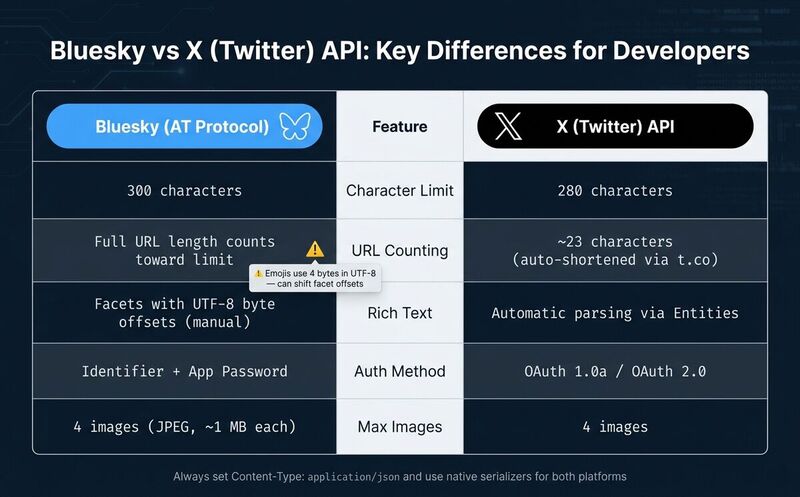
For X (formerly Twitter) API v2, a 403 Forbidden error might mean your Developer App isn't linked to a project or its permissions are set to Read-only when trying to post. On Bluesky, authentication requires a scoped App Password rather than your main account password. Keep in mind that Bluesky counts URLs at their full length when calculating its 300-character limit, unlike X, which shortens URLs to about 23 characters.
| Feature | Bluesky (AT Protocol) | X (Twitter) API |
|---|---|---|
| Character Limit | 300 characters | 280 characters |
| URL Counting | Full URL length | ~23 characters (shortened) |
| Rich Text | Facets with byte offsets | Automatic parsing / Entities |
| Auth Method | Identifier + App Password | OAuth 1.0a / OAuth 2.0 |
| Max Images | 4 (JPEG, ~1 MB each) | 4 images |
Fixing JSON Parsing Issues in API Responses
When working with APIs, one common challenge is dealing with problematic responses. Sometimes, the responses are empty, incomplete, or not even in JSON format. These issues can lead to frustrating parsing errors if not handled properly.
Handling Non-JSON Responses
One of the most unexpected problems is receiving HTML instead of JSON. This often happens with errors like 401 Unauthorized, 403 Forbidden, or 503 Service Unavailable. Instead of a JSON response, the server might send back an HTML error page. A clear indicator is the error message: Unexpected token '<' in JSON at position 0. This occurs because the parser encounters an HTML tag, like <!DOCTYPE html>, right at the start.
To handle this, check the Content-Type header. If it says text/html instead of application/json, skip parsing and log the raw response as plain text. Another tricky situation is a 204 No Content status, where the response body is intentionally empty. Trying to parse this with JSON.parse("") will throw an Unexpected end of JSON input error. Logging the raw response can help determine the best way to handle such cases.
| HTTP Status | Meaning | What to Do |
|---|---|---|
| 204 | No Content | Skip parsing; return null or undefined. |
| 401 / 403 | Auth failure | Log the raw response and verify credentials. |
| 429 | Rate limited | Check the x-rate-limit-reset header and wait before retrying. |
| 500 / 503 | Server error | Log the raw response (often HTML) and use exponential backoff for retries. |
Parsing Responses in JavaScript, Node.js, and Python
"JSON errors are rarely mysterious - they're usually quite specific once you know how to read them." [5]
In JavaScript or Node.js, use response.text() inside a try/catch block before parsing JSON.
In Python, call response.raise_for_status() first, then wrap response.json() in try/except. Do not convert Python dictionaries with str(), because that produces single-quoted strings. Use json.dumps() [6].
Dealing with Partial or Malformed JSON
Just as you validate request payloads, response payloads also need scrutiny. Truncated JSON responses can cause Unexpected end of JSON input errors. This often happens due to network timeouts, dropped connections, or API gateway restrictions. To detect truncation, compare the Content-Length header with the actual number of bytes received. If they don't match, the response was cut short [7].
For responses that are almost valid JSON, such as trailing commas or debug logs appended to the body, cleanup tools can help. If data is lost in a truncated response, it cannot be recovered.
Always log the raw response body with response.text in Python or response.text() in JavaScript before parsing. The raw output usually shows what went wrong [1][7].
How to Prevent JSON Parsing Errors Going Forward
Once you've tackled existing JSON parsing issues, the next step is making sure they don't pop up again. Taking proactive measures can save you a lot of headaches down the road. Here are some practical strategies to keep JSON errors at bay in your API integrations.
Validating Payloads with JSON Schema
Validation is your first line of defense. Use JSON Schema to define the exact structure, required fields, and data types for your payloads. This helps catch errors before they leave your application. Tools like jsonlint or prettier --check can be integrated into your CI/CD pipeline to automatically flag malformed payloads during development [1][8].
It's also important to stick with native serialization libraries instead of manually building JSON strings. And remember, JSON doesn't support comments. While some editors can handle JSONC (JSON with comments), APIs - especially social media ones - will reject any payload containing // or /* */ [4][1].
Adding Automated Tests
Automated tests catch JSON issues before users do. This is especially useful when one payload touches multiple APIs. Simulate common HTTP errors like 401, 404, and 500. Add schema mismatch checks so your code handles changed response shapes instead of assuming the happy path [2][8].
Centralizing JSON Handling in Reusable Functions
The best fix is boring: centralize JSON serialization, parsing, and error handling in shared functions. A safeParse wrapper with try/catch can stop a malformed response from crashing your app [1][5].
This matters when working with multiple platforms. Bluesky's AT Protocol requires facets to use byte offsets rather than character offsets. A single 4-byte emoji can throw off every later offset. A shared utility that calculates offsets correctly once is safer than recalculating them in every request [3].
The table below highlights why centralized handling is a better choice than manual approaches:
| Feature | Manual JSON Handling | Centralized Utility Functions |
|---|---|---|
| Error Resilience | High risk of unhandled crashes | Consistent try/catch protection [1][5] |
| Syntax Accuracy | Prone to trailing commas and quoting errors | Uses standard serializers for RFC compliance [1][8] |
| Maintenance | Must update logic in every API call | Update once, applies everywhere [3] |
| Complexity | Developer manually handles offsets and edge cases | Abstracted into simple, reusable inputs [3] |
Conclusion: Key Takeaways for Fixing JSON Parsing Errors
JSON parsing errors usually come down to the same few causes: wrong content type, empty body, malformed JSON, encoding problems, or a response shape your code did not expect.
What I keep in my own code:
- Read raw text first when debugging.
- Check status and
Content-Type. - Do not parse 204 responses.
- Use serializers for outbound payloads.
- Put parsing and validation in one shared helper.
For Bluesky specifically, do not forget byte offsets. A post can be valid JSON and still fail because rich text facets point at the wrong bytes after an emoji.
FAQs
How can I quickly tell if an API response is JSON or HTML?
Check the Content-Type header first. application/json means JSON. text/html means HTML. Then check the first character of the raw body: < usually means HTML, while { or [ usually means JSON.
Do this before calling JSON.parse() or response.json().
What should I do when the response is empty or cut off?
If the response is empty, do not parse it. First confirm whether it is a legitimate 204 No Content, a timeout, or a truncated response.
- Log the raw response to examine its content.
- Check the
Content-Lengthheader to see if the data was truncated. - Use a
try-catchblock when parsing to safely handle errors and prevent your application from crashing.
That gives you enough evidence to decide whether to retry, return null, or report a real API failure.
How do I avoid Bluesky facet byte-offset bugs with emojis?
Calculate byte offsets, not character offsets. Bluesky facets use UTF-8 byte positions. Emojis can take 4 bytes, so JavaScript string indexes can be wrong. Use a library or calculate offsets from UTF-8 bytes before sending links, mentions, or hashtags.