How to Schedule Instagram Posts for Maximum Engagement
Last updated: June 21, 2026
Scheduling Instagram posts saves time, boosts engagement, and simplifies your content strategy. Here's the essence of how you can do it effectively:
- Save Time: Batch-create and schedule posts in one session to avoid daily interruptions. Studies show it takes 25 minutes to refocus after a task switch.
- Boost Engagement: Instagram rewards consistent posting. Accounts posting 4–7 times weekly see engagement rates triple compared to irregular posters.
- Post at Peak Times: Use Instagram Insights to identify when your audience is most active. Schedule posts just before these times for early interactions.
- Use Scheduling Tools: Instagram's native scheduling feature works for Professional accounts. For broader workflows, use a scheduler only after checking exactly which Instagram formats and connected networks it supports.
- Plan Ahead: Batch-create content for 1–2 weeks. Include 20–30% flexibility for last-minute updates or trends.
- Maximize Hashtags: Research and use 20–30 relevant hashtags to increase reach. Tools can help automate this process.
- Engage Quickly: Respond to comments within the first 15–30 minutes to signal the algorithm and increase visibility.
Set aside 2 hours weekly to plan, create, and schedule posts. This approach saves time, ensures consistency, and helps you connect with your audience effectively.
How I Scheduled 30 Instagram Posts in 4 Hours ⏰
How to Find the Best Times to Post on Instagram
Finding the right time to post on Instagram can make a big difference in how your audience interacts with your content. By analyzing your followers' habits, you can tailor your posting schedule to match their activity patterns. Instagram Insights is a great tool for this, offering data specific to your audience's behavior, location, and preferences.
How to Use Instagram Insights
Instagram Insights is a free tool designed for Professional accounts, such as Business or Creator profiles [2][3]. To access it, open Instagram, tap the menu icon, and select "Insights" or "Professional Dashboard." From there, navigate to "Total Followers" or "Audience" for detailed analytics [2][7].
At the bottom of the audience section, you’ll find the "Most Active Times" chart, which shows when your followers are online, broken down by hour and day [2][7]. You can toggle between hourly and daily views to identify peak activity times. To make the most of this data, schedule your posts a few minutes before these peak times to capture early engagement [3][7].
"Instagram's algorithm now prioritizes 'sends per reach' (how often people share or DM your content to a friend). This is now the most critical signal, surpassing initial likes and comments." - Sophie Gonçalves, Content Manager, Iconosquare [8]
For instance, Emma Ward, Marketing Manager for The Juicery, a smoothie bar in New England, used Instagram Insights in October 2024 to adjust her posting schedule. She found that sharing menu updates at 7:30 a.m. on weekdays and just after 8:00 a.m. on weekends perfectly matched her audience’s morning routines. Even with fewer followers online at those times, her posts saw a significant boost in engagement [5].
Using this kind of analysis, you can align your strategy with your audience’s habits while also comparing it to broader timing trends.
General Timing Recommendations
If you’re new to Instagram or don’t have enough data yet, general timing guidelines can help you get started. A study of over 11 million posts revealed that 4:00 a.m. local time often achieves the highest reach [1]. Engagement tends to peak during these windows:
- Morning: Between 7:00 a.m. and 9:00 a.m.
- Midday: From 10:00 a.m. to 2:00 p.m.
- Afternoon: Weekdays from 3:00 p.m. to 6:00 p.m. [3][9].
Tuesdays through Thursdays are typically the busiest days for engagement, while weekends tend to see lower activity. However, posting around 6:00 p.m. on weekends can still yield decent results [9].
These general recommendations can serve as a starting point until you gather more specific data about your audience. By combining broad trends with insights from Instagram’s analytics tools, you can fine-tune your posting schedule for maximum impact.
How to Schedule Instagram Posts
 Keeping a steady flow of content on Instagram is easier when you schedule your posts in advance. Instagram provides native tools for this, and there are also cross-platform schedulers that help manage multiple social accounts at once.
Scheduling Posts in the Instagram App
Instagram’s built-in scheduling feature is available only for Professional accounts, which include Business and Creator profiles. If you’re using a Personal account, this option won’t be available to you [7].
Here’s how to schedule a post in the Instagram app:
- Open Instagram and tap the + icon.
- Choose Post or Reel and select your media.
- After making edits, go to Advanced Settings, toggle on Schedule this post, and set your preferred date and time - up to 75 days in advance.
- Confirm your schedule [7].
To manage your scheduled posts, head to your profile menu and select Scheduled Content. As of October 2025, Instagram added collaborative drafts and reminder prompts, which are great for teams working together on Reels or approving posts before they’re published [2].
Once your post is live, don’t forget to engage with comments. Early interaction helps signal to Instagram’s algorithm that your content deserves wider visibility [2].
If you’re managing accounts across multiple platforms, use a scheduler for the parts it supports and keep Instagram-specific checks in Instagram itself.
Using TheBlue.social to Schedule Posts
For those juggling several social media accounts, TheBlue.social is useful when Instagram is part of a wider publishing workflow. Use it for planning, drafting, and supported scheduling, then keep the final Instagram-specific details honest: format support, account permissions, collaborator settings, and native Instagram limits still matter.
That matters because Instagram is picky. A caption can be ready while the media format, aspect ratio, tagging, or account permissions still need review. TheBlue.social can help keep the post organized alongside other channels, but Instagram Insights remains the source to check for Instagram-specific performance.
To maximize efficiency, pair scheduling tools with content batching.
Creating and Scheduling Content in Batches
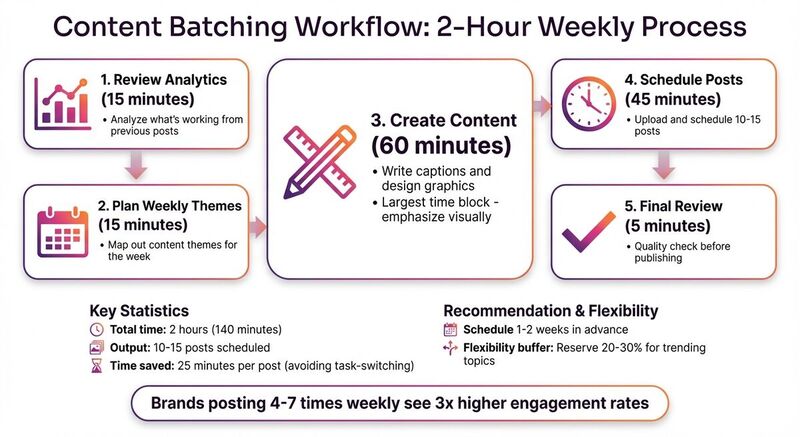
Batch-creating content is a smart way to keep your Instagram feed active without the daily grind. By dedicating a focused block of time to create 10–15 posts at once, you’ll save time and reduce stress. Studies show that interruptions can cost you an average of 25 minutes to refocus on your task. That means a quick 10-minute Instagram post could end up eating 35 minutes of your day [5].
Here’s a sample batching workflow:
- Spend 15 minutes reviewing analytics to identify what’s working.
- Use another 15 minutes to plan weekly themes.
- Dedicate 60 minutes to writing captions and designing graphics.
- Set aside 45 minutes to schedule posts.
- Use 5 minutes for a final review [4].
This method gives you a clear overview of your content strategy and ensures a healthy mix of posts - whether promotional, educational, or behind-the-scenes [3][4].
Aim to schedule 1–2 weeks in advance to stay organized while leaving room for flexibility. Reserve 20–30% of your calendar for last-minute updates or trending topics. Brands that post regularly - 4–7 times per week - tend to see 3x higher engagement rates compared to those who post sporadically [4].
Tips to Increase Instagram Engagement
Fine-tune your strategy with some thoughtful extras to help boost engagement.
How to Use Hashtags Effectively
Hashtags are one of the easiest ways to increase your reach and connect with new audiences. Using 20–30 relevant hashtags per post can help your content appear on the Explore page and in suggested posts for users who may not follow you but are interested in similar topics [1].
To get the most out of hashtags, choose ones that align closely with your content, target audience, and niche. Rotate your hashtag sets to reach different audience segments [2]. Planning posts ahead of time gives you the opportunity to research trending and highly-searched hashtags instead of scrambling to pick them at the last minute [1][7].
Tools like TheBlue.social's hashtag generator can make this process easier. Treat the output as a draft list, then cut it down to hashtags that match the post. If you want hashtags in the first comment, confirm your scheduler supports that Instagram behavior before relying on it [2][6].
How to Preview Your Instagram Grid
Your Instagram grid is like your digital storefront - it’s often the first thing visitors notice about your profile. A cohesive and visually appealing grid helps people quickly understand your brand and decide whether to hit that follow button [1].
Previewing your grid before publishing posts allows you to create a balanced, polished look. You can ensure variety in your content, avoid repetitive visuals, and maintain consistent colors and themes [1][5]. This "big picture" view also helps you spot gaps in your content plan or identify opportunities for future posts [1][3].
"You only have a few seconds to make a great first impression, so planning a visually appealing grid can help visitors understand who you are and what you do, right off the bat." - Monique Thomas, Content Marketing Manager, Later [1]
Many scheduling tools include visual planners that let you rearrange posts before they go live. If your grid is the main constraint, use a dedicated Instagram grid preview before publishing [1][2].
Tracking Performance and Adjusting Your Schedule
Once your posts are scheduled, keeping an eye on performance is key to refining your approach. Posting consistently is important, but posting strategically is what really makes the difference. This means tracking what works and adjusting your schedule based on the data.
Instagram’s algorithm favors posts that get quick engagement shortly after they’re published [3][7]. Use Instagram Insights to figure out your audience's "Most Active Times" and schedule posts to go live just before those peaks. Engage with comments in the first 15 minutes to boost visibility and signal to the algorithm that your post is worth showing to more people [4][7].
Experiment with A/B testing by scheduling posts at 3–5 different times over a couple of weeks. This will help you identify when your audience is most responsive [4]. Be flexible with your content calendar - review it regularly to ensure posts stay relevant. If a trending topic or major event comes up, you’ll want to adjust your schedule to stay in tune with your audience [3][7].
Conclusion
Scheduling Instagram posts not only helps maintain a steady flow of content but also ensures your audience sees your posts at the right time. This approach can significantly boost engagement while saving you 10–15 hours each week by cutting out the need for daily manual uploads [4].
The key to successful scheduling lies in leveraging data. Use Instagram Insights to guide your posting strategy, batch your content creation to keep it consistent and high-quality, and preview your grid to ensure your feed reflects a cohesive brand identity. While automation is a powerful tool, don’t forget the human touch - be active during the first 30–60 minutes after your posts go live. Engaging with your audience during this window helps amplify those crucial early interactions [4].
Tools like TheBlue.social can help when Instagram is only one part of your publishing routine. Use it to draft, organize, and schedule supported posts, then use Instagram Insights to decide whether the timing worked.
To get started, set aside 2 hours this week to batch-create and schedule 7 posts. Track how they perform and tweak your schedule based on what works best for your audience.
FAQs
What’s the best way to find the ideal times to post on Instagram?
To figure out the best times to post on Instagram, start by diving into your Instagram Insights. Head to Profile → Insights → Your Audience, where you'll find details about when your followers are most active. This gives you a solid starting point.
You can also compare this data with general posting guidelines, like weekdays from 3:00 PM to 6:00 PM or early mornings around 6:00 AM. Look for overlaps between these suggested times and your audience's activity patterns.
Next, test these time slots over a few weeks. Keep an eye on engagement metrics like likes, comments, and reach to see what works best. Fine-tune your posting schedule based on the results, and revisit it regularly to adapt to shifts in audience behavior or platform trends. By aligning your posts with peak activity times, you'll maximize visibility and interaction.
What are the advantages of using tools to schedule Instagram posts?
Using scheduling tools for Instagram posts turns a once time-consuming task into a smooth, strategic process. By planning your content in advance, you can stick to a regular posting schedule, keeping your audience engaged - even when you’re not actively online. This steady flow of content not only reinforces your brand’s look and voice but also works in harmony with Instagram’s algorithm, which tends to favor consistent posting at peak times. The result? Better reach and higher engagement.
These tools also save you valuable time. They let you batch-create captions, tweak images, and schedule posts all in one place. Many even offer built-in analytics to monitor performance and features for team collaboration, eliminating last-minute scrambles or accidental duplicate posts. With your content organized, you can focus on more strategic goals and building genuine connections with your audience.
For a cleaner workflow, TheBlue.social can sit alongside Instagram's own scheduling and Insights. Use it where it supports your connected accounts, and keep native Instagram checks for post formats, first-comment behavior, and performance data.
Why is it important to engage with comments right after posting on Instagram?
When you respond to comments shortly after posting, it sends a clear signal of activity to Instagram’s algorithm. This can boost your post’s visibility, leading to around 42% more engagement and potentially tripling your reach.
Quick replies don’t just help the algorithm - they also strengthen your relationship with your audience. Prompt responses encourage deeper conversations and build loyalty over time. Making timely interactions a priority is an easy but effective way to amplify the impact of your content.