How to Schedule Posts for Multiple Time Zones
Last updated: April 27, 2026
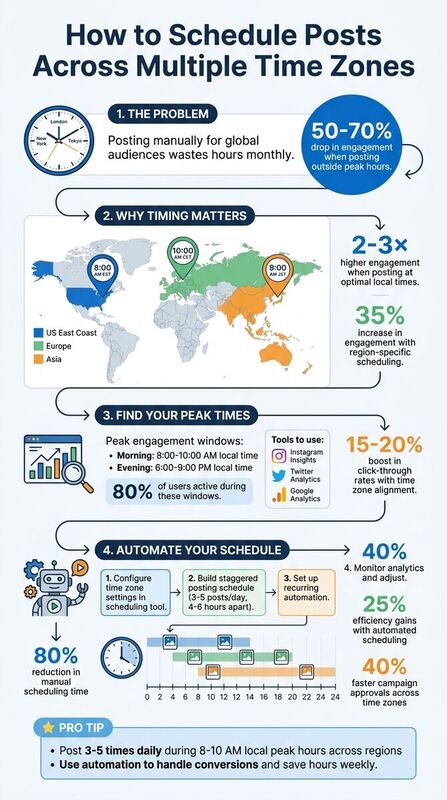
Scheduling posts across time zones can save time and improve engagement. Here's the problem: posting manually for a global audience wastes hours every month and risks missing key engagement windows. The solution? Use scheduling tools to automate posts, align with local peak times, and boost visibility.
Key Takeaways:
- Why Timing Matters: Posts shared during local peak hours can double or triple engagement.
- Analytics Help: Tools like Instagram Insights and Google Analytics pinpoint when your audience is most active.
- Automation Tools: Platforms like TheBlue.social simplify scheduling across X, Threads, Instagram, and more.
- Global Strategy: Stagger posts for different regions (e.g., 8:00 AM EST for the US, 10:00 AM CET for Europe).
Pro Tip: Use automation to handle time zone conversions and streamline your posting schedule. With the right setup, you can maximize reach and save hours every week.
How to Schedule and Optimize Your Content Across Different Time Zones
How Time Zones Affect Your Global Audience
Understanding time zones is essential for connecting with a global audience. The world operates across 24 standard time zones, ranging from UTC -12 to UTC +14. For example, when it’s 9:00 AM on the US East Coast (Eastern Standard Time), it’s 2:00 PM UTC and midnight in Sydney. These differences highlight the importance of timing when engaging with audiences in different regions. Knowing how these time shifts work can help you craft posting schedules that resonate with your audience worldwide.
Timing matters because it directly impacts engagement. Posts shared outside peak hours for your audience can see engagement rates plummet by 50–70%. For instance, scheduling a post at 9:00 AM Pacific Time for a California audience might miss the mark for users in Europe or Asia, where it could be the middle of the night or early morning. This highlights the need for a tailored approach to posting schedules, ensuring you reach your audience when they’re most active.
Social media platform algorithms prioritize posts that get immediate engagement. This makes posting at the right time even more critical. Research shows that hitting optimal local times can lead to 2–3× higher likes, shares, and comments, boosting visibility in users’ feeds. For example, LinkedIn sees its highest engagement during weekday mornings, typically between 9:00 AM and 12:00 PM.
How Time Zones Impact Social Media Engagement
Time zones play a key role in shaping user behavior on social media. People tend to check their feeds during predictable times, such as during commutes, lunch breaks, or evenings. These peak periods often fall between 8:00–10:00 AM or 6:00–9:00 PM in their local time zones, with about 80% of users active during these windows.
Aligning posts with time zones can significantly improve engagement. HubSpot data reveals that posts scheduled to match local time zones can boost click-through rates by 15–20%. A global brand like Nike saw a 35% increase in engagement by scheduling posts to target specific regions - 8:00 AM EST for the US, 10:00 AM CET for Europe, and 9:00 AM JST for Asia. In contrast, sticking to a flat UTC schedule caused a 40% drop in reach.
Finding When Your Audience Is Most Active
To maximize engagement, pinpointing when your audience is online is crucial. Tools like Instagram Insights, Twitter Analytics, and Bluesky Analytics can help you identify active periods. These platforms often provide heatmaps showing when your followers are most active. Pair this data with Google Analytics to understand where your audience is located geographically.
Segmenting your audience by time zone can reveal patterns, such as US users being most active between 7:00–9:00 PM or European audiences engaging more between 10:00 AM and 1:00 PM. Testing different posting times can help you refine these insights. Many analytics tools present this data in local time formats, making it easier to spot trends, such as higher engagement on Wednesdays from 11:00 AM to 1:00 PM. By tracking metrics like impressions per hour and iteratively adjusting your schedule, you can fine-tune your approach for maximum impact.
How to Schedule Posts Across Time Zones
Configuring Time Zone Settings in Your Scheduling Tool
Getting your time zone settings right is the first step to managing posts across global audiences. Start by logging into your scheduling tool and heading to the account settings. Most platforms allow you to choose a default time zone - either UTC for universal coordination or your local time zone, like EST for the US East Coast.
TheBlue.social takes it a step further with platform-specific time zone settings. From its content calendar dashboard, you can set different time zones for X (Twitter), Threads, Instagram, Pinterest, LinkedIn, Bluesky, and Mastodon. For example, you could schedule an Instagram post for 9:00 AM PST to target a California audience while setting a LinkedIn post for 10:00 AM GMT to engage professionals in Europe - no manual time conversions needed.
The platform also recognizes natural language inputs like "tomorrow at 3:00 PM" or "next Tuesday 2:00 PM", interpreting them based on your local time. This feature makes scheduling quicker and more user-friendly. Once you've configured your settings, test them by scheduling a preview post to ensure everything publishes at the desired times. With the right setup, you're ready to plan your content for a global audience.
Building a Posting Schedule for Global Audiences
To connect with a worldwide audience, use analytics data and a staggered approach to your posting schedule. Start by identifying key regions where your followers are most active. This ensures your posts align with peak engagement times in different areas.
For instance, a tech company might post at 8:00 AM EST to reach US audiences, 1:00 PM GMT for European followers, and 9:00 PM EST (which is 8:00 AM JST) for Asian markets. This staggered timing ensures your content appears when each audience is most active, without overwhelming any single group.
Keep your posting frequency reasonable - around 3–5 posts per day across platforms - to avoid overwhelming your audience. TheBlue.social’s visual calendar simplifies this process by showing all scheduled posts across time zones, helping you spot any gaps or overlaps. You can also rotate content themes by region, such as sharing industry news during European business hours and product updates as Asian markets begin their day. Once your schedule is set, automation tools can take care of the rest.
Using Automation to Save Time
Automation tools make managing time zones effortless. You can enter a single time, like "9:00 AM my time", and let the tool handle all the conversions for various platforms. This eliminates manual calculations and reduces errors.
Features like recurring and cross-post automation can cut down manual scheduling by as much as 80%. For example, you can set up weekly or monthly posts - like "Monday Motivation" - to publish automatically at 8:00 AM in each region's local time. Simply write your content once, select the platforms you want to target (X, Threads, Instagram, LinkedIn, Pinterest, Bluesky, and Mastodon), and the tool will take care of the rest. It even adjusts for platform-specific details, such as character limits or hashtag placement. With over 830 users already leveraging these features, automation frees up your time to focus on strategy and engaging with your audience.
Tips for Managing Time Zone-Based Scheduling
Using Analytics to Improve Your Posting Schedule
Analytics take the guesswork out of scheduling by showing you exactly when your audience is most active. By tracking metrics like likes, comments, shares, reach and impressions, and click-through rates, you can identify patterns and fine-tune your posting times. For instance, if your data shows posts at 8:00 AM EST get 30% more engagement from U.S. audiences compared to posts at 2:00 AM EST, it’s time to adjust your schedule.
Platforms like TheBlue.social's analytics features make this process easier by tracking engagement and follower growth across platforms such as Bluesky and X (formerly Twitter). These tools can also help you identify when your international audiences are most active. For example, if European audiences engage more around 2:00 PM UTC, you can schedule posts to align with those peak times.
Managing Post Frequency and Timing
Once you’ve gathered insights from your analytics, use them to optimize not just when you post, but how often. Posting during peak hours - typically between 8:00–10:00 AM local time - can boost engagement by 20–30% on platforms like Instagram and X. A good rule of thumb is to aim for 3–5 posts per day, spaced 4–6 hours apart, to cover various time zones without overwhelming your followers.
Keep an eye on oversaturation. If engagement drops by 15% after four daily posts, it might be a sign you’re posting too much. Stagger your content to avoid audience fatigue. Tools like TheBlue.social’s recurring queue feature can help by automating post spacing. Users have reported up to 25% efficiency gains when pre-loading weekly schedules with built-in time zone offsets. This kind of automation can make a big difference in refining your overall strategy.
Working with Teams or Clients in Different Time Zones
When managing global teams or clients, clear communication and unified tools are essential. Start by establishing a reference time zone - UTC often works well as a neutral standard - so everyone stays on the same page. Many scheduling tools interpret times like "9:00 AM" based on the user’s local time zone, so documenting schedules in UTC ensures consistency.
Shared tools such as Google Calendar or Asana can simplify collaboration by automatically converting time zones. Pair these with a RACI framework (Responsible, Accountable, Consulted, Informed) to streamline approval workflows. For example, the U.S. team drafts content at 10:00 AM EST (3:00 PM UTC), and the European team reviews it by 5:00 PM UTC. Teams using time zone-aware tools have reported 40% faster campaign approvals when working across three or more zones.
To maintain alignment, schedule daily stand-ups during overlapping hours, such as 9:00 AM–12:00 PM UTC. This overlap reduces confusion and keeps everyone moving forward without unnecessary delays.
Conclusion
Scheduling posts across time zones doesn’t have to be complicated. By tailoring your strategy to match local engagement patterns, you can ensure every post resonates with a global audience. Understanding when your followers are active, setting up your tools properly, and leveraging analytics to fine-tune your approach allows you to keep a consistent presence without being glued to your screen all day.
Tools like TheBlue.social make global scheduling easier than ever. Supporting platforms like X, Threads, Instagram, LinkedIn, Pinterest, Bluesky, and Mastodon, it simplifies the process with natural language inputs and automation. Instead of manually calculating time differences, you can just type commands like "tomorrow at 3 p.m." and let the platform handle the rest. Plus, it’s free to start, requires no credit card, and ensures compliance with official APIs while managing platform-specific details like character limits and media formatting.
Whether you’re managing a single account or coordinating posts across a global team, these tools turn time zone challenges into opportunities to connect with more people. Use real data to monitor what works and adjust your strategy accordingly. With the right tools and approach, reaching a broader audience becomes seamless. Start refining your global engagement strategy today.
FAQs
How do I handle daylight saving time changes?
To handle daylight saving time (DST) changes when scheduling social media posts, rely on tools that automatically account for these adjustments. This way, your posts will go live at the intended times without any manual intervention. Double-check your account's time zone settings and activate the automatic DST adjustment feature within your scheduling platform. Some tools even support natural language inputs like "tomorrow at 3 PM", making it easier to align with local time changes seamlessly.
Should I schedule one post per region or reuse the same post?
Scheduling a separate post for each region is often more effective than reusing the same post across multiple areas. Why? It allows you to match your posts with the peak activity times of each time zone. This way, your audience is more likely to see your content when they’re most active. Tools like TheBlue.social make it easier to plan region-specific schedules, helping you target local peak hours and boost both engagement and reach.
What’s the best way to test and adjust posting times?
To make the most of your social media efforts, start by using analytics tools to pinpoint when your audience is most active on each platform. Platforms like Instagram, Facebook, and Twitter often have built-in insights to help you understand user behavior.
Here’s how to get started:
- Schedule posts at different times of the day - think mornings, lunch breaks, and evenings.
- Track engagement metrics such as likes, comments, shares, and clicks for each time slot.
- Identify patterns in activity and focus on posting during periods when engagement is consistently higher.
This isn’t a one-and-done process. Keep an eye on performance data and adjust your schedule regularly to ensure your content reaches the largest and most engaged audience possible.