YouTube Verification vs. Account Verification
Last updated: June 14, 2026
YouTube uses similar words for two different things: account verification for feature access, and channel verification for the public badge.
- Account verification: Uses phone verification first. It gives access to intermediate features such as videos longer than 15 minutes, custom thumbnails, live streaming, and Content ID appeals [5].
- Advanced feature access: Requires phone verification plus enough channel history, or ID/video verification when available [4].
- Channel verification: Adds the public verification badge. YouTube says channels generally need 100,000 subscribers, a complete public channel, authenticity review, and 2-Step Verification on the Google Account before applying [1].
Quick Overview:
- Account Verification: Focuses on security and feature access. No visible badge.
- Channel Verification: Confirms authenticity with a visible badge but does not add extra creator features.
TheBlue.social cannot verify a YouTube account or get a YouTube badge for you. Use YouTube Studio and YouTube Help for that. TheBlue is useful around the identity work: checking matching handles, preparing profile assets, previewing links, writing alt text, and cross-posting supporting updates.
YouTube Account Verification Explained
What YouTube Account Verification Is
YouTube account verification is a straightforward process designed to confirm that you're a genuine user and not a bot or malicious actor. By linking your account to a phone number or valid ID, YouTube ensures a safer platform for everyone [4][2]. There are two levels of verification:
- Intermediate verification is achieved through phone verification.
- Advanced verification requires additional steps like ID verification, video verification, or maintaining a strong channel history over time [4].
Completing these steps does not grant a visible verification badge. Those badges are reserved for channels meeting stricter criteria, such as having at least 100,000 subscribers [2].
"These verifications keep the YouTube community safe by making it harder for scammers, spammers and other bad actors to cause harm." – YouTube Help [4]
Features You Get with Account Verification
Verification gives creators access to more features. Here is the practical split:
- Phone Verification: Enables intermediate features like uploading videos longer than 15 minutes, creating custom thumbnails, and live streaming [4].
- Advanced feature access: Grants more tools, such as pinned comments and higher daily upload limits. YouTube says creators can get access by completing phone verification and then building enough channel history, or by using ID/video verification when those options are available [4].
How to Verify Your Account
The verification process is simple and can be done through YouTube Studio:
- Navigate to YouTube Studio > Settings > Channel > Feature eligibility.
- Under "Intermediate features", click on Verify Phone Number and choose to receive a code via text or call [4].
For advanced verification, you have three options:
- ID Verification: Upload a scanned copy of your passport or driver’s license that matches the birth date on your Google Account. YouTube typically reviews these within 24 hours [4].
- Video Verification: Record a short, well-lit selfie video at eye level and submit it.
- Channel History: Maintain consistent activity and follow community guidelines over time to gain access [4].
Keep in mind that verification is limited to two channels per phone number each year. Only the primary channel owner can complete identity verification, and YouTube deletes your verification data within two years - or sooner, once your channel history is well established [4].
How To VERIFY YouTube Channel (Phone & ID Verification 2023)
YouTube Channel Verification and the Gray Badge
Now that we've covered account verification, let's dive into how YouTube handles channel verification.
What YouTube Channel Verification Is
The gray checkmark on YouTube is a marker of authenticity. It helps viewers easily identify the official channel of a creator, brand, or public figure, setting it apart from impersonators and copycats [1]. This badge is visible to everyone who visits your channel or watches your content [1].
However, it’s important to know that the badge doesn’t come with extra perks or features. YouTube Help clarifies:
"Verified channels don't get extra features on YouTube. They also don't represent awards, milestones, or endorsement from YouTube" [1].
In essence, it’s a trust signal - a way to reassure your audience that they’re engaging with the real deal.
Requirements for Channel Verification
To qualify for YouTube’s public badge, your channel usually needs 100,000 subscribers. YouTube may proactively verify some well-known channels below that threshold, but I would not plan around the exception [1]. The Google Account also needs 2-Step Verification turned on before applying [1]. Beyond that, YouTube evaluates three factors:
- Authenticity: Your channel must represent the person, brand, or entity it claims to be. YouTube may consider the age of your channel and could ask for additional documents to confirm your identity [1]. This step strengthens your credibility and builds trust with your viewers.
- Completeness: Your channel should be public and include a profile picture, banner, description, and active content [1].
- Policy Compliance: Violating YouTube’s Community Guidelines or Terms of Service can lead to losing your badge - or even your account [1].
How to Apply for the Gray Badge
If you meet the requirements, applying for the gray badge is straightforward. Start by signing in to the YouTube Help Center with your channel’s email. If eligible, you’ll see an "Apply now" link [1]. Before applying, double-check that your channel profile is fully complete, as YouTube’s review team will scrutinize every detail [1].
You’ll also need your Channel ID, which can be found in YouTube Studio under Settings > Advanced settings [1]. Submit your application through the Google Support portal and wait for YouTube to manually review your channel for authenticity and completeness. This process can take a few weeks [1].
A key point to remember:
"If your channel is verified, it will stay verified unless you change your channel name" [1].
Changing your channel name will remove the badge and force you to reapply, while updating your channel handle won’t affect verification status [1]. The badge is meant to help viewers identify the official channel.
Main Differences Between the Two Verification Types
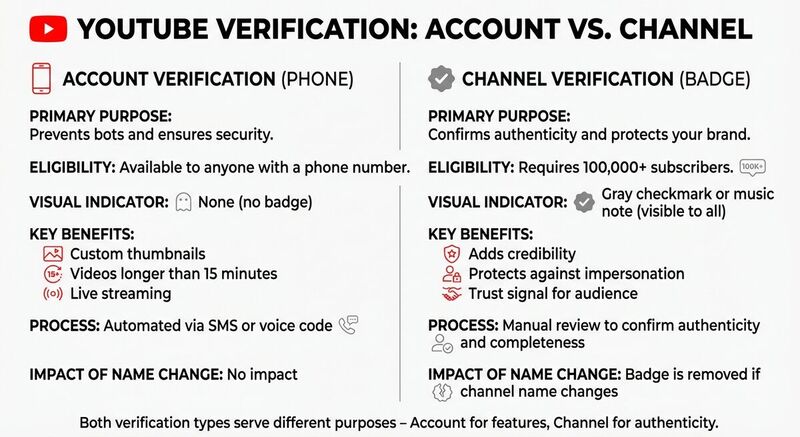 Let’s break down the key distinctions between YouTube's two verification methods. Understanding these differences is crucial for building a credible and secure presence on the platform.
Comparison Table: Account vs. Channel Verification
Here’s a side-by-side look at how these two verification types stack up:
| Feature | Account Verification (Phone) | Channel Verification (Badge) |
|---|---|---|
| Primary Purpose | Prevents bots and ensures security [2] | Confirms authenticity and protects your brand [1] |
| Eligibility | Available to anyone with a phone number [2] | Typically requires 100,000+ subscribers [1] |
| Visual Indicator | None | Gray checkmark or music note [1][2] |
| Key Benefits | Enables custom thumbnails, longer videos, and live streaming [2] | Adds credibility and protects against impersonation [2] |
| Process | Automated via SMS or voice code [2] | Manual review to confirm authenticity and completeness [1] |
| Impact of Name Change | No impact | Badge is removed if the channel name changes [1] |
Account verification gives creators access to practical publishing tools. Channel verification is more about recognition: it signals that your channel is the official representation of a brand or creator.
Common Misunderstandings
One common myth is that the gray verification badge improves video performance or provides extra features. YouTube has clarified:
"Verified channels don't get extra features on YouTube. They also don't represent awards, milestones, or endorsement from YouTube" [1].
The badge doesn’t affect algorithms, revenue, or video rankings. Its sole purpose is to confirm your channel’s authenticity and help distinguish it from imposters.
Account verification is invisible to viewers, but it is what opens practical creation features. The public badge only comes with channel verification, which usually requires the 100,000-subscriber threshold [1].
Which Verification Path to Choose
Choosing the right verification approach depends on where you are in your journey as a creator. Each type of verification serves a specific purpose and comes with its own benefits.
New Creators: Start with Account Verification
If you're just getting started, phone-based account verification is a must. It opens essential features like custom thumbnails, the ability to upload videos longer than 15 minutes, and live streaming. The process is simple: you'll receive a code via SMS or phone call to confirm your number[2]. This step lays the groundwork for future channel-specific verification as your audience grows.
Growing Creators: Prepare for Channel Verification
As your subscriber count approaches 100,000, it's time to gear up for channel verification. Make sure your channel profile is complete - this includes adding a banner, profile picture, and a detailed description. A polished profile not only boosts your legitimacy but also helps with discoverability. Consistency is key: upload regularly and stick to YouTube's Community Guidelines. Violating policies could lead to losing your verification status. Keep in mind that the review process can take several weeks, so plan ahead and apply early[2].
Once your YouTube identity is settled, clean up the surrounding profiles.
Where TheBlue.social Fits
TheBlue.social does not manage YouTube verification, YouTube Studio, Google identity checks, or YouTube badges.
I would use it after the YouTube-specific work is clear. Check whether matching handles are available on X, Threads, Instagram, Pinterest, LinkedIn, TikTok, and Bluesky. Prepare the profile image. Preview the links you plan to share. Generate alt text for launch images. Then use the scheduler for supporting posts across connected accounts, with Bluesky analytics for the Bluesky side of the campaign.
Conclusion
Key Takeaways
YouTube provides two distinct verification processes, and knowing the difference matters. Account verification is the starting point: a straightforward phone-based process that opens essential features like custom thumbnails, the ability to upload videos longer than 15 minutes, and live streaming. This step is useful for any creator who wants normal publishing capabilities from the beginning.
On the other hand, channel verification - signified by the gray checkmark badge - serves a different purpose. It confirms that your channel is the official representation of your brand or identity, helping your audience differentiate it from impersonators or fan accounts. As YouTube explains:
"Verified channels help distinguish official channels from other channels with similar names on YouTube" [1].
Keep in mind, channel verification doesn’t provide additional features or endorsements. It typically requires at least 100,000 subscribers, and changing your channel name will remove the badge, though updating your handle will not.
Keeping Your Identity Consistent
Beyond YouTube, matching profiles make it easier for people to find the right account. YouTube verification is one part of identity. TheBlue.social helps with the social work around it: handle checks, profile images, link previews, alt text, hashtags, scheduling, and Bluesky analytics.
The rule is simple: use YouTube for YouTube verification, then use TheBlue for the repeated social publishing work around the channel.
FAQs
What are the advantages of verifying your YouTube account as a new creator?
Verifying your YouTube account as a new creator opens up key features that can help you expand your channel's reach. Once verified, you’ll be able to upload videos longer than 15 minutes, design custom thumbnails to make your content stand out, and even use live streaming to connect with your audience in real time. Plus, verification adds a layer of security to your account, protecting it from impersonation attempts.
Verification does not mean YouTube endorses your channel. For new creators, phone verification is still worth doing because it opens features needed for normal publishing.
What is the impact of YouTube channel verification on credibility?
YouTube channel verification places a badge next to your channel name, signaling that YouTube has confirmed it as the genuine account of a creator or brand. This helps viewers recognize the official channel.
It does not add extra YouTube features, and YouTube says it is not an award or endorsement [1].
How can I prepare my YouTube channel for verification?
To get your YouTube channel verified, you need to meet the minimum requirement of 100,000 subscribers. Once you've hit that milestone, make sure your channel is polished and professional. This means adding a custom profile picture, an eye-catching channel banner, a detailed description, and a unique handle. Be careful not to use names or branding that could be confused with someone else’s, as YouTube takes authenticity and impersonation seriously.
Consistency matters, too. If you change your channel name after verification, you’ll lose the badge and have to apply again. Also, ensure your account is in good standing - no recent guideline violations - and that your email address is verified. Once everything is in place, you can submit your verification request directly through your YouTube account. A well-maintained and credible channel gives you a better shot at getting approved!