Best Times to Post on Bluesky: Data Insights for 2026
Generic best-time advice is only a starting point.
Bluesky still rewards timing because the feed is fast and chronological-feeling for many users. But your best window depends on who follows you, where they are, and what kind of post you are publishing.
I would start with three checks:
- your own Bluesky engagement history
- public network activity
- the post type
Then schedule from the pattern you see.
Start with a sane default
If you have no data yet, test weekday working hours first.
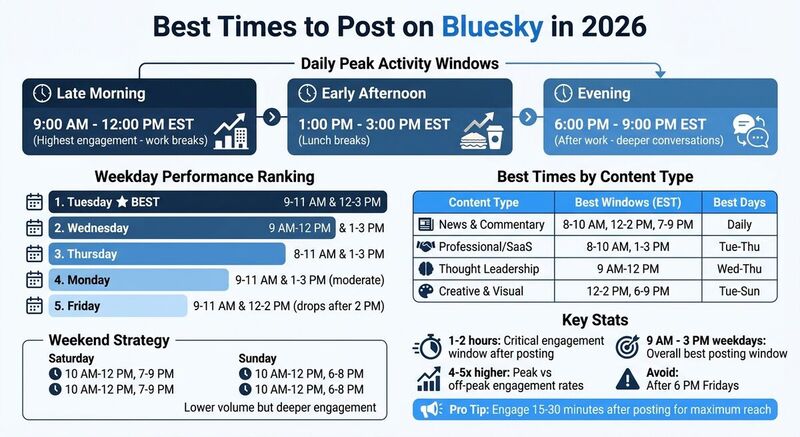
For many accounts, late morning and early afternoon work well because people check Bluesky between tasks. That does not mean every account should post at 9 a.m. Eastern. It means the first experiment should be narrow enough to measure.
Try this for two weeks:
- two weekday morning posts
- two weekday lunch or early afternoon posts
- one evening post
- one weekend post
Keep the post type similar when you test. A breaking-news post and a photo thread are not the same experiment.
Use your own heatmap
TheBlue.social Analytics is the useful product fit here.
It tracks Bluesky post engagement, follower growth, and the "When Posts Get Liked" heatmap for a connected Bluesky account. Use that heatmap to see when your posts get liked, replied to, reposted, and quoted.
I would look for repeatable patterns, not one lucky post.
For example:
- If three link posts get replies around lunch, test more link posts there.
- If visual posts get saves or reposts in the evening, keep that slot.
- If weekend posts get quiet likes but no replies, treat weekends as lighter publishing time.
TheBlue does not know the best time for every platform. It gives you Bluesky-specific data so you can make a better posting decision.
Check the network before important posts
Bluesky Stats gives public network context.
I use it before important posts because it shows recent public activity: posts and follows from the last hour, posts by hour, top languages, and top linked domains.
That helps answer a different question from your analytics.
Your heatmap tells you when your followers respond. Network stats tell you whether the wider network is unusually active or quiet right now.
If the public network is quiet, I may still post. I just expect less immediate reach. If posts by hour are climbing and linked domains are active, I am more comfortable publishing a link post.
Schedule from the decision, not the chart
Once you pick a time, use TheBlue.social's scheduler to queue the post.
The scheduler is for publishing workflow. It helps you adapt and schedule posts across connected accounts such as Bluesky, X, Threads, Instagram, LinkedIn, Pinterest, and Mastodon.
It does not replace analytics. The simple loop is:
- check Bluesky analytics
- check public network activity
- choose the time
- schedule the post
- review the result next week
That is enough.
What I would avoid
I would not treat a universal "best time" table as a permanent strategy.
Avoid these:
- changing time slots after one post
- mixing post types in the same timing test
- judging a post only by likes
- ignoring replies
- posting only when the network is busiest
Busy hours have more readers, but they also have more competition. Quiet hours can work if your followers are online and the post asks for a thoughtful reply.
A simple weekly routine
Every week, check:
- top posts by replies
- top posts by reposts
- follower growth around those posts
- the heatmap for repeated timing patterns
- public network activity for the slots you want to test
Then move one or two posts for the next week.
Small changes are easier to trust. If you move every post at once, you will not know what worked.
FAQs
Should I use Eastern time?
Use the time zone that matches your audience. If you do not know your audience yet, pick one time zone and test consistently for two weeks.
How often should I post on Bluesky?
Post often enough to learn, not so often that you flood your feed. For many accounts, one to three useful posts a day is easier to sustain than a rigid five-post schedule.
Can TheBlue automatically choose the best time?
Use TheBlue to see the pattern, then make the call. The heatmap is evidence. The schedule is still your decision.
Last updated: June 17, 2026