How to Build Accessible Multi-Language Content
Last updated: April 29, 2026
Creating content in multiple languages isn't just about translation. It's about connecting with diverse audiences while ensuring accessibility for everyone, including individuals with disabilities. Here's what you need to know:
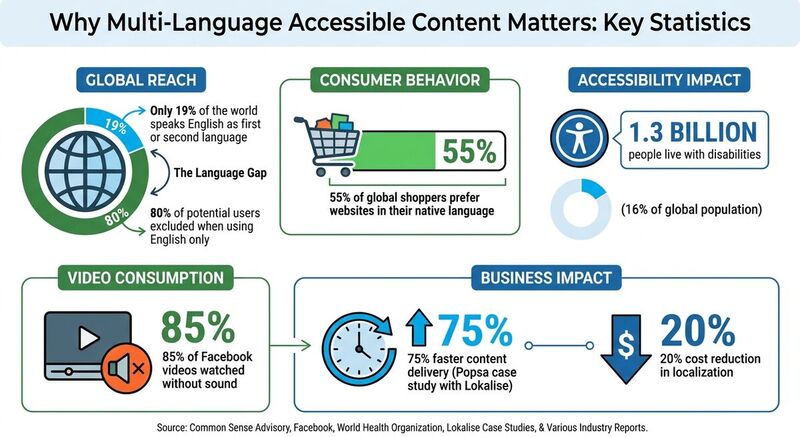
- Global Reach: Only 19% of the world speaks English as a first or second language. Ignoring other languages excludes 80% of potential users.
- Consumer Behavior: 55% of global shoppers prefer websites in their native language.
- Accessibility: Over 1.3 billion people live with disabilities. Following WCAG standards ensures content is usable for all.
Key Steps to Success:
- Plan Strategically:
- Identify target audiences and their preferred languages.
- Use transcreation for emotional or nuanced content.
- Respect Cultural Contexts:
- Adapt visuals, symbols, and colors to local norms.
- Avoid literal translations for idioms or humor.
- Choose the Right Platforms:
- Ensure Accessibility:
- Add alt text in all languages.
- Use proper language tags for screen readers.
- Test content with tools like contrast checkers and screen readers.
- Leverage Tools:
- Use platforms like Lokalise for translations.
- Automate workflows with tools like TheBlue.social for scheduling and accessibility features.
By combining thoughtful planning, cultural awareness, and accessibility best practices, you can create content that resonates with a global audience while being inclusive and user-friendly.
Practical Tips for Accessible Content and Multilingual Websites
Planning Your Multi-Language Content Strategy
Before diving into translations, it’s important to map out a solid plan. Choosing the right languages and platforms isn’t just a logistical step - it’s about knowing who your audience is and where they spend their time online.
Identifying Target Audiences and Key Languages
Start by figuring out where your audience lives and which platforms they prefer. Geography plays a big role here: Facebook is a dominant platform in Europe, while in China, WeChat and Douyin are the go-to choices[4]. Demographics also influence your decisions. For example, younger audiences are more active on TikTok, while LinkedIn is the platform of choice for B2B professionals[4].
Language selection is another critical piece of the puzzle. Did you know that only 19% of the global population speaks English as their first or second language? That means relying solely on English could alienate up to 80% of potential customers. Focus on languages that align with your audience’s purchasing habits and the nature of your content. Straightforward updates like product specs may just need basic translation. However, creative campaigns - especially those using humor, idioms, or emotional appeals - require transcreation. Transcreation goes beyond literal translation to ensure the message resonates culturally[2].
Once you’ve identified your audience and languages, it’s time to adapt your content to fit cultural nuances.
Understanding Cultural Differences
Translation alone isn’t enough. To truly connect, your content needs to reflect cultural contexts. This includes everything from visuals to messaging. For instance, images should feature models, clothing, and backgrounds that feel familiar to the local audience. Even small details like symbols and gestures can carry vastly different meanings. A thumbs-up emoji might seem friendly in the U.S. but could be offensive in parts of the Middle East[2]. Colors also send different signals - what represents good fortune in one culture might symbolize mourning in another[1].
A great example of cultural adaptation comes from IKEA. During Pride Month in June 2025, IKEA tailored their content to different regions. Their Indian account (@ikea_india) shared a video with English captions, while their Austrian account (@ikea_austria) posted a still photo with German text and the hashtag #Liebesmårt - a clever blend of the German word for love and Swedish branding[2]. These kinds of adjustments show how important it is to have native speakers review your content. They can catch subtle errors in tone, phrasing, or imagery that automated tools might miss[2].
Once cultural differences are addressed, the next step is pairing your content with the right platforms.
Selecting Social Media Platforms
Each platform serves different purposes depending on the region and audience. Choose platforms based on who you’re trying to reach and the type of content you’re producing. Shae Vian, Digital Marketing Specialist at Learndojo, explains it well:
"If you're creating content for youngsters, TikTok is great, but if you need to target a wider age range, you should try using Facebook. Need to target professionals? LinkedIn is better"[4].
Keep in mind the demands of each platform. Video-heavy platforms like TikTok and YouTube require more resources for production, while text-based platforms like X (formerly Twitter) are less labor-intensive[1]. Accessibility features are also crucial. Make sure the platforms you use support features like custom alt text, auto-captioning, and screen reader compatibility[5].
Streamlining your translation and localization processes can further simplify platform management. For example, in 2021, the photobook app Popsa used Lokalise to localize their marketing content in six languages. By centralizing translations and integrating tools like Figma and Storyblok, they sped up their social media localization by 75% and cut costs by about 20%[2]. Combining the right platform strategy with efficient tools makes managing multi-language content realistic, even for smaller teams.
Creating and Translating Content
Once your strategy is set, the next step is crafting and scheduling posts that truly connect with your audience. When translating content, it’s essential to retain the original meaning, tone, and brand voice while ensuring it feels natural and relatable to each audience.
Avoiding Literal Translations
Literal translations often fall flat on social media because they miss the nuance of tone, context, and cultural relevance. This is where transcreation comes in - it’s about adapting the essence of your message, not just the words. Transcreation is especially important for creating compelling posts or culturally sensitive content. On the other hand, straightforward translations are fine for simple updates like product specs, event dates, or announcements.
Take the 2020 Facebook auto-translation mishap as a cautionary tale - literal translations can lead to major blunders. On the flip side, Netflix nailed it in August 2024 when promoting "Emily in Paris" to Brazilian audiences. They used the slang term "safada" (meaning naughty or cheeky) in an Instagram caption, which struck a chord with local humor far better than a direct translation ever could.
Maintaining Consistent Branding
Your brand voice should remain recognizable no matter the language or platform. The tricky part is adapting your tone to suit the platform and audience while staying true to your identity. For instance, LinkedIn typically demands a professional tone, while TikTok thrives on casual, trend-driven content.
To maintain consistency across languages, keep a central repository of tone guidelines for translators. This repository should include examples of your brand voice, preferred phrases, and words to avoid. When it comes to hashtags, don’t just translate them - research what works for the local audience. The same goes for calls-to-action; adapt them to reflect how users in each region typically interact with social media.
Using Translation Tools and Services
The right tools can speed up your workflow without compromising quality. AI-powered platforms like Lokalise can help teams work faster and cut costs. For example, the photobook app Popsa used Lokalise to localize its marketing in six languages, delivering posts 75% faster and reducing costs by 20% [2].
For drafting content in European languages, tools like DeepL are reliable, but always have a native speaker review the output to ensure it sounds natural. Platforms like Figma and Canva let translators see how text fits into graphics in real time, avoiding layout issues caused by varying text lengths. Finally, proofreading tools like Grammarly or LanguageTool can serve as a final check for grammar and style.
A hybrid approach works best - use technology for efficiency, but rely on native speakers or cultural reviewers for the final touch. Always ask yourself: Does this sound like something a real person would say on this platform in that language? This balance ensures your content feels genuine and aligns seamlessly with your multi-language content strategy. For more platform-specific tips, explore our Bluesky guides.
| Content Type | Use Translation | Use Transcreation |
|---|---|---|
| Straightforward info (dates, updates) | Yes | No |
| Emotionally engaging content | No | Yes |
| Jokes, idioms, or pop culture | No | Yes |
| Time-sensitive/Simple posts | Yes | No |
| Casual/Trendy platforms (TikTok, X) | No | Yes |
Making Multi-Language Content Accessible
Creating content in multiple languages is only part of the job. To truly connect with your audience, you need to make sure your content is accessible to everyone, including the 1.3 billion people worldwide (16% of the population) living with significant disabilities [5]. Accessibility isn’t just a good practice; it’s a legal requirement for some. For example, under ADA Title II, government entities serving populations of 50,000 or more must meet WCAG 2.1 Level AA standards by April 2026 [5].
Implementing Language Tags and Standards
Proper language tagging is a crucial step to ensure screen readers can accurately interpret and pronounce your content. By setting the HTML lang attribute or configuring platform-specific settings, assistive technologies can adjust pronunciation and other features to match the content’s language.
Meeting WCAG 2.1 Level AA standards often involves adhering to the "Understandable" principle, which ensures content is clear, logically structured, and predictable. This is especially important for users with cognitive disabilities or non-native speakers [5]. Different platforms provide tools to help with accessibility:
- Instagram: Add custom alt text for images through advanced settings.
- X (formerly Twitter): Supports extended image descriptions (up to 1,000 characters).
- YouTube: Allows you to upload caption files like
.SRTor.SBVfor precise multi-language captions.
For hashtags, use CamelCase (e.g., #SocialMediaAccessibility) to help screen readers distinguish words. Avoid using emojis as structural elements since they can create confusing or disruptive alt descriptions for users relying on screen readers [5]. Tailor these practices to each platform’s specific features to enhance your translation efforts.
Adding Alt Text for Images in Multiple Languages
Alt text is just as important as translating written content. It ensures that your visual elements communicate effectively, no matter the language. Alt text should reflect the same level of detail and cultural relevance as the image itself. For example, if an image highlights regional clothing or local models, the alt text should describe those specifics rather than offering a generic explanation [4].
Tools like Figma can help teams create precise alt text by providing visual context [2][4]. For high-volume workflows, automated tools like Generate Alt Text for Images from TheBlue.social can save time while maintaining quality. Keep in mind that some languages, such as German, tend to require more characters than English. Plan for this text expansion when designing layouts [2].
Testing Accessibility Features
Testing is essential to ensure your accessibility features work as intended. Here are some ways to test your content:
- Screen Readers: Use tools like VoiceOver, TalkBack, or NVDA to experience content from the perspective of visually impaired users.
- Contrast Checkers: Verify that text meets the minimum contrast ratios (4.5:1 for standard text, 3:1 for large text).
- Color Blindness Simulators: Tools like Coblis or Color Oracle can show how your visuals appear to users with color deficiencies [3][5].
- Video Testing: Perform muted testing to ensure captions convey the full message. Auto-generated captions often miss technical terms or accents, so manual review is key.
Automated tools like the WAVE browser extension, WebAIM Contrast Checker, and Lighthouse can help identify accessibility gaps [3]. Additionally, have native speakers review your translated content to ensure it feels natural and that formatting, such as line breaks and punctuation, remains consistent [2].
| Testing Category | Tool/Method | Purpose |
|---|---|---|
| Color Contrast | Contrast Checker, Adobe Color | Verify WCAG contrast ratios [3] |
| Color Blindness | Coblis, Color Oracle | Simulate visuals for color-deficient users [3] |
| Video Accessibility | Kapwing, Descript, YouTube | Ensure accurate closed captions [3] |
| Visual Layout | Figma, Smartling, Lokalise | Check that translated text fits designs [2][4] |
| Linguistic Quality | Native Speaker Review | Confirm natural phrasing and cultural fit [2] |
Testing your content thoroughly ensures your accessibility efforts are effective and that your multi-language materials resonate with all users.
Managing Content with TheBlue.social
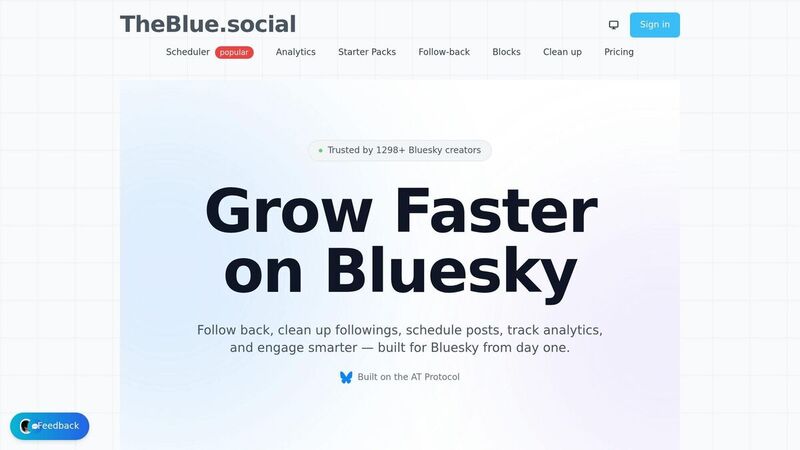
Handling multi-language content across various platforms can feel overwhelming. It's not just about scheduling posts - it’s about keeping your content accessible and relevant across diverse audiences. TheBlue.social simplifies this process by offering scheduling, accessibility tools, and analytics in a single, user-friendly platform.
Cross-Posting Scheduler for Multiple Languages
With TheBlue.social, you can schedule posts for X (formerly Twitter), Threads, Instagram, Pinterest, LinkedIn, Bluesky, and Mastodon - all from one dashboard. Each post can be tailored to meet the specific needs of each platform. This saves time and ensures your messaging stays consistent. For instance, you can schedule a product announcement in English for LinkedIn, queue up a Spanish version for Instagram, and a French version for X - all without hopping between platforms.
But it’s not just about timing. The platform also includes free tools designed to improve accessibility and engagement, making your content more impactful.
Free Tools for Accessibility and Engagement
TheBlue.social offers several tools that integrate directly into your content creation process. For example:
- Generate Alt Text for Images: Create alt text to make images accessible, but always double-check the generated text for accuracy, especially when dealing with technical terms or proper names.
- Generate Hashtags: Quickly create hashtags, and remember to use CamelCase (e.g., #AccessibleContent) for multi-word hashtags so screen readers can pronounce them correctly.
- Add Emojis: Boost engagement with emojis, but use them sparingly - one or two per sentence - and place them at the end to avoid disrupting screen reader users.
These tools are designed to ensure your content is both engaging and accessible to a wider audience.
Tracking Multi-Language Content Performance
Analyzing performance is key to improving your strategy. TheBlue.social's Bluesky Network Statistics lets you monitor engagement and audience growth on Bluesky, which boasts 35.2 million users. Metrics like likes, shares, comments, conversion rates, and link clicks help you understand what’s working.
The analytics tools also provide insights into who interacts with your content, their location, and their language preferences. This data helps you identify which languages bring in the most engagement and which platforms deserve more focus. By leveraging these insights, you can fine-tune your multi-language content strategy for better results.
Conclusion
Creating multi-language content isn't just about translating words - it’s about adapting to cultural contexts, ensuring accessibility, and managing content wisely. With 55% of consumers choosing to buy only from websites that provide product information in their native language [4], offering content in multiple languages is no longer optional.
To succeed, start by identifying your target audiences and the languages they speak. Pay close attention to cultural subtleties, avoid word-for-word translations for emotional or persuasive messages, and consider using transcreation for better resonance. Don’t forget the technical details: include alt text for images in all languages, localize hashtags and calls-to-action, and have native speakers review your work before publishing. As Mia Comic from Lokalise points out:
"The thing is, your global audience can feel when a post doesn't feel right, but they won't let you know. They'll simply disengage or unfollow" [2].
Accessibility is just as important. Around 1.3 billion people - 16% of the global population - live with significant disabilities [5]. This means every image should have descriptive alt text, videos need captions, and hashtags should use CamelCase to work with screen readers. And since 85% of Facebook videos are watched without sound [3], captions are a must-have.
For smoother content management, platforms like TheBlue.social simplify the process. They offer cross-posting tools for platforms like X, Threads, Instagram, Pinterest, LinkedIn, Bluesky, and Mastodon. Plus, their free tools, such as Generate Alt Text for Images and Generate Hashtags, make it easier to create accessible and culturally relevant content efficiently - without sacrificing quality.
FAQs
How do I choose which languages to support first?
When deciding which languages to support initially, start by looking at your target audience. Focus on the primary languages spoken in the regions where your audience is most active. It’s a smart move to prioritize languages that align with your current customer base, areas of highest engagement, or regions where you’re aiming to grow.
Don’t forget to account for platform-specific details, like character limits or formatting preferences, to make sure your content connects effectively with the audience. Begin with the languages that offer the greatest potential for reach and engagement, and then expand your offerings as your strategy develops.
When should I use transcreation instead of translation?
Transcreation is the go-to approach when you need to adapt content in a way that connects emotionally and culturally with a specific audience. Unlike straightforward translation, which prioritizes accuracy, transcreation involves creatively reworking content to maintain its original intent, tone, and cultural subtleties. This method is particularly important in areas like marketing, branding, and social media, where striking the right emotional chord and ensuring cultural relevance are crucial for capturing the attention of diverse audiences.
What are the must-have accessibility checks for each language?
Creating content that's accessible to everyone means ensuring it’s easy to perceive, navigate, and understand, no matter the user's abilities or language. Here are some important steps to follow:
- Write descriptive alt text for images: Make sure alt text clearly describes the image’s content and purpose, keeping the platform and audience in mind.
- Use plain language: Avoid complicated words, jargon, or acronyms that might confuse readers.
- Check color contrast: Ensure text and background colors meet readability standards for users with visual impairments.
- Provide captions or transcripts for videos: This helps users who are deaf or hard of hearing to access audio content.
- Respect cultural differences and ensure accurate translations: Tailor your content to reflect local nuances and verify that translations convey the intended meaning.
By addressing these areas, your content can reach and resonate with a broader audience.