How to Schedule Threads Posts Easily
Last updated: January 14, 2026
Scheduling Threads posts can save you time, keep your content consistent, and help you reach your audience when they're most active. You can use Threads' built-in scheduling tool for basic needs or opt for third-party tools like TheBlue.social for advanced features. Here's a quick breakdown:
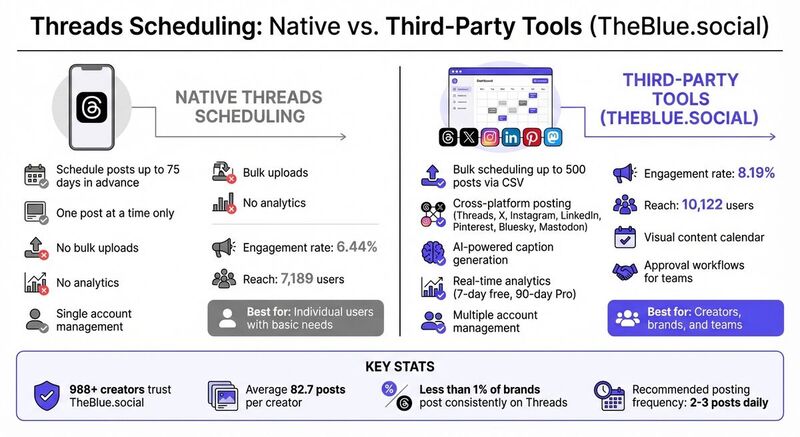
- Threads' Built-In Tool: Schedule posts up to 75 days in advance, but limited to one post at a time. No bulk uploads or advanced analytics.
- Third-Party Tools (e.g., TheBlue.social): Offers bulk scheduling (up to 500 posts), cross-platform posting, AI-powered caption generation, and detailed analytics.
Why Schedule Posts?
- Save time: Creators report saving 4–5 hours weekly.
- Maximize reach: Post when your audience is most active (e.g., weekdays, 7–9 AM).
- Maintain consistency: Aim for 2–3 posts daily to stay visible.
Key Features of TheBlue.social:
- Cross-platform scheduling for Threads, Instagram, X, and more.
- AI tools for captions, alt text, and engagement.
- Free plan available; Pro plan costs $20/month with extra features like 90-day analytics.
Scheduling posts ensures you stay consistent and grow your Threads presence without the stress of manual posting.
How To Schedule Posts on Threads (Easiest Way)
Threads Scheduling Options Explained
 When it comes to scheduling posts on Threads, you’ve got two main choices: stick with the platform's built-in tools or explore third-party scheduling options. Each comes with its own set of features, so let’s break down how they compare.
Native Threads Scheduling Features
Threads makes scheduling straightforward with its built-in scheduling tool available in the mobile app. Here’s how it works: draft your post, tap the three-dot menu, choose "Schedule", and set the desired date and time. You can plan posts up to 75 days ahead, and they’ll be stored in a "Drafts" folder where you can review, edit, or delete them before they go live [3][6].
This option is ideal for managing a single account, but it has its limitations. You can only schedule one post at a time, and it doesn’t support bulk uploads, analytics, or advanced tools like AI-powered features. Plus, if you’re managing multiple platforms, you’ll need to log in to each one separately.
Third-Party Scheduling Tools
If you’re juggling multiple accounts or platforms, third-party tools are where things get exciting. These tools offer far more flexibility and advanced features that go beyond what the native Threads app can handle.
In June 2024, Meta opened Threads’ API to external platforms, making it easier to integrate scheduling tools [3]. Tools like TheBlue.social take scheduling to the next level with features such as bulk scheduling (upload up to 500 posts via CSV), cross-platform posting to platforms like X, Instagram, LinkedIn, Pinterest, Bluesky, and Mastodon, and even AI-powered caption generation [3].
The numbers back up the benefits: posts scheduled through third-party tools achieved an 8.19% engagement rate and reached 10,122 users, compared to 6.44% and 7,189 users for posts scheduled natively [5]. This data challenges the myth that third-party tools reduce reach - what matters most to the algorithm is content quality, not the method of posting [5].
Third-party tools also bring features you won’t find in the Threads app. These include automated triggers for follow-up posts based on engagement, visual content calendars to plan your feed’s look, and real-time analytics to track likes, replies, and views [2][1]. For teams, approval workflows allow managers to review and approve posts before they go live [6].
Considering that fewer than 1% of brands are currently posting consistently on Threads [4], leveraging these advanced tools can help you maintain the recommended 2 to 3 daily posts to stay visible in follower feeds [3].
How to Schedule Threads Posts with TheBlue.social
TheBlue.social is a secure platform, trusted by over 988 creators, each averaging 82.7 posts[1]. It allows you to manage Threads alongside platforms like X, Instagram, LinkedIn, Pinterest, Bluesky, and Mastodon - all from one dashboard[1]. By using official APIs, the platform ensures your account’s security and keeps your scheduled content private until it’s published[9].
Connecting Your Threads Account to TheBlue.social
To get started, sign up for a TheBlue.social account and access the scheduling dashboard. Since Threads is linked to your Instagram username, any changes to one will impact the other[8]. Once connected, you’re ready to start creating and scheduling posts with ease.
Creating and Scheduling Your Posts
Head to the post scheduling section where you can compose your message and upload images. Enter scheduling cues like "9am" or "tomorrow 3pm", and the platform will set the post according to your local timezone[9]. If you want to publish immediately, simply type "now" to skip the queue. Once scheduled, your post is added to the queue and can even be shared across multiple platforms simultaneously, ensuring a consistent presence on Threads and beyond[1][9]. You can then manage these posts directly from your content calendar.
Managing Your Scheduled Posts
Your scheduled posts are displayed in a sidebar for easy access to your content calendar. Click on any post to edit it, or use the three-dot menu to delete it before it goes live. This feature allows you to refine your strategy and ensure your content maintains high quality[9].
"You can enter this link and follow/unfollow people with a single click. It's an extremely comfortable app. It has statistics, auto-posting features, etc. ✌🏼" - OZOzy06[1]
TheBlue.social offers a free plan that includes 1 connected account total and 7-day analytics. For more advanced needs, the Pro plan, priced at $20/month, provides 5 total connected accounts, 90-day analytics, and priority support[1].
Key Features of TheBlue.social for Threads Scheduling
Cross-Platform Scheduling
TheBlue.social brings multiple platforms under one roof, making cross-platform posting a breeze. You can craft a single post and share it across Threads, X (Twitter), Instagram, LinkedIn, Pinterest, Bluesky, and Mastodon all at once. Prefer customized content for each platform? No problem - everything can be tailored individually from a single, unified dashboard[1].
Content Calendar and Bulk Scheduling
To keep your posting strategy organized, TheBlue.social offers a centralized content calendar. This visual timeline lets you see all your scheduled posts in one place, making it easy to identify gaps and maintain a steady online presence. For Pro users, the platform takes it up a notch with AI-powered bulk alt text generation. This feature ensures your images are more inclusive and searchable, especially when scheduling multiple Threads posts at the same time[1].
AI Tools and Analytics
TheBlue.social goes beyond scheduling with robust AI tools and analytics designed to fine-tune your content strategy. Real-time analytics help you adapt based on audience engagement, while Pro users gain access to 90 days of historical data for a deeper look at long-term trends (free users are limited to 7-day analytics). The Smart Engagement tool, exclusive to Pro plans, lets you reply to 20 posts in about 2 minutes - a massive time-saver for growing your community on text-driven platforms like Threads. Plus, weekly growth reports are sent straight to your inbox, making it easier to track your performance[1].
On top of these features, TheBlue.social includes handy tools like a follow-back manager and account clean-up options. These extras help you maintain healthy follower relationships and streamline your workflow - offering capabilities that native Threads scheduling simply doesn’t provide.
Best Practices for Scheduling Threads Posts
Posting Consistency and Timing
Timing plays a critical role in how many people see your posts on Threads. The best time to post is between 7 AM and 9 AM on weekdays, with Tuesday through Friday being particularly effective. For most accounts, Wednesday at 7 AM tends to deliver the highest engagement. Missing this window can significantly impact your reach - by as much as 57% - so it's not something to leave to chance[11].
Posting frequency is just as important as timing. Threads moves quickly, and posts have a shorter lifespan compared to other platforms. To stay visible without overwhelming your audience, aim for 2 to 3 posts daily. If you're in the early stages of building your presence, consider starting with 5–10 posts per day to gain momentum, then adjust as needed[10]. For instance, between January and March 2025, Sendible boosted their views by an incredible 30,000% over three months by maintaining a consistent posting schedule and actively engaging with their audience[4].
Once you've nailed down your timing, pre-planning your content ensures that your posts remain consistent and of high quality.
Content Planning and Preview
Batch planning your content - whether a few weeks or even a month ahead - can help you avoid gaps during busy periods[3]. Scheduling posts in bulk ensures your feed stays active, even when you’re juggling other responsibilities. Before anything goes live, preview each post to catch typos, formatting errors, or broken links that could hurt your credibility.
For those using Pro features, TheBlue.social offers an AI-powered tool for bulk alt text generation. This not only saves time but also makes your images more accessible when scheduling multiple posts simultaneously[1].
Using Analytics to Improve Your Strategy
Once you’ve scheduled your posts, analytics can help you refine your approach. By tracking metrics like likes, replies, views, reach, and reposts, you can pinpoint what content resonates most with your audience[7]. TheBlue.social provides valuable insights, offering 7-day analytics on its free plan and 90-day historical data for Pro users. Weekly growth reports are also sent directly to your inbox, so you can keep tabs on performance without needing to log in constantly.
"Consistency is key to building and retaining an audience on social accounts. Social media scheduling ensures that you stick to a regular posting schedule, helping your followers and the algorithm know when to expect new content from you." – Sendible[4]
Use your analytics to identify which formats - whether text, images, videos, or GIFs - drive the most engagement. Adjust your posting strategy to focus on those formats. Keep in mind that the Threads algorithm favors posts that receive early engagement, so content that quickly garners likes and replies is more likely to be shown to a broader audience[11]. By following these practices, you can also leverage TheBlue.social's cross-platform tools to streamline your strategy across Threads and other social networks.
Conclusion
Scheduling Threads posts is a game-changer for maintaining a consistent presence on this rapidly expanding platform without the hassle of manual posting. By planning your content in advance and scheduling it to go live at the best times - even while you're offline - you can connect with a global audience effortlessly. This approach not only saves you hours each week but also ensures your productivity and peace of mind remain intact.
With TheBlue.social, managing your Threads posts becomes even simpler. The platform's user-friendly dashboard lets you schedule or publish posts instantly, using easy-to-set time cues to keep your content relevant and timely. Plus, it offers a free plan with upgrade options, making it accessible whether you're just starting out or scaling up.
FAQs
How do I connect my Threads account to schedule posts with TheBlue.social?
Connecting your Threads account to TheBlue.social is a breeze and lets you schedule posts effortlessly. Start by logging into your TheBlue.social account and navigating to the Cross-platform Scheduler on the dashboard. Click on “Connect account”, select Threads, and follow the steps to log in using your Instagram credentials (since Threads operates through Instagram). Once you've completed the authorization, your Threads account will show up among your connected accounts.
With your account linked, you can dive right into crafting and scheduling posts. Simply set the date and time you want your content to go live, and TheBlue.social will take care of publishing it automatically.
Why use third-party tools instead of Threads' built-in scheduler?
Third-party scheduling tools bring a range of features that can simplify managing your social media strategy, offering much more than Threads' built-in options. For instance, they let you plan and schedule posts ahead of time using a unified calendar, making it possible to map out weeks - or even months - of content without constantly logging into the Threads app. Many of these tools also enable cross-posting across platforms like Instagram, X, Pinterest, Bluesky, and Mastodon, ensuring consistency while saving you from duplicating efforts.
Beyond scheduling, these tools often come with advanced analytics to monitor how your posts are performing and to pinpoint the best times to share content, helping you maximize your reach. Features like bulk media uploads, AI-powered caption suggestions, and hashtag recommendations make content creation faster and easier. Even if you're offline, these tools can keep your posting schedule on track. By integrating a third-party scheduler into your workflow, you can save time, work more efficiently, and enhance engagement across all your social channels.
How does TheBlue.social create AI-powered captions?
Currently, there isn't any detailed information available on how TheBlue.social's AI-driven caption generation operates. If you happen to have access to any documentation or additional insights about this feature, sharing it could help clarify things. In the meantime, the best way to understand its capabilities is to dive into the platform yourself and see how its tools can enhance your social media content.