Top Tools for Generating Alt Text Automatically
Last updated: January 23, 2026
Alt text is critical for making images accessible to users with disabilities and optimizing content for search engines. Yet, over 50% of websites still lack proper alt text, limiting their reach and accessibility. Automated tools now make it easy to generate alt text quickly, saving time and improving content quality.
Here are two standout options:
- TheBlue.social Alt Text Generator: A free tool that uses AI to create alt text for individual images. It’s simple to use but lacks bulk processing and integrations.
- AltText.ai: Designed for high-volume tasks, this tool supports bulk uploads, API usage, and integrates with platforms like Shopify and WordPress. It offers advanced features like multilingual support and SEO-focused descriptions.
Quick Comparison:
| Tool | Free Tier | Bulk Processing | Key Integrations | Supported Formats |
|---|---|---|---|---|
| TheBlue.social | Unlimited | No | None | JPG, PNG, GIF, WebP, BMP |
| AltText.ai | 25 credits/month | Yes | Shopify, WordPress, Magento | JPG, PNG, GIF, WebP, BMP |
Automated alt text tools save hours of manual work and improve both accessibility and SEO. Choose the tool that fits your needs based on volume, integrations, and features.
How to use AltText AI to Write Better Image Alt Text to get more SEO Traffic
TheBlue.social Alt Text Generator
TheBlue.social's Alt Text Generator is a free AI-driven tool created to assist social media managers in crafting accessible content. It scans images to produce descriptions compatible with screen readers, making content more inclusive for the 1.3 billion people worldwide living with disabilities [2].
This tool is especially handy for social media posts that lack proper descriptions. As user hs4man21 puts it: "This bot is not perfect. However, it is helpful when images are posted without alt text" [8].
Let’s take a closer look at the technology behind this tool.
How TheBlue.social's Alt Text Generator Works
The generator leverages the power of the Google Cloud Vision API to analyze images, identifying elements like people, scenes, products, and other visuals [8][1]. It uses AI to interpret visual details and embedded text, creating descriptions that are both functional and relevant [3].
One standout feature is its OCR (Optical Character Recognition) capability, which extracts text from images like screenshots, social media posts, or documents. This eliminates the need for manual transcription [6][7].
It’s important to review the generated descriptions for accuracy and make adjustments before publishing [4][8].
Other Tools from TheBlue.social
Beyond alt text generation, TheBlue.social offers additional tools to simplify social media content creation. The Text Extraction Tool (OCR) turns handwritten notes or printed documents into searchable digital text [6][7]. The Hashtag Generator helps improve post visibility, while the Emoji Tool suggests relevant emojis for your content.
Together, these tools make managing accessible and engaging content easier. Plus, TheBlue.social’s cross-posting scheduler lets you efficiently organize your content calendar across multiple platforms.
Other Alt Text Generation Tools
AltText.ai is a standout option among alt text generators, thanks to its advanced natural language processing capabilities. Unlike tools that rely solely on basic object detection, AltText.ai dives deeper by interpreting products, people, and even complex scenes[1][5]. This makes it particularly useful for e-commerce sites, where detailed and accurate descriptions can make a big difference.
The platform is designed for efficiency, supporting bulk processing through its web interface, CSV imports, and plugins[1]. It also caters to a global audience by generating alt text in over 130 languages[2]. Users can further tailor the output with preset tones or custom prompts to match their brand's voice[1].
AltText.ai integrates directly with platforms like Shopify, WooCommerce, and Magento, pulling in product data, SKUs, and other attributes to create precise descriptions. Its SEO-focused features aim to improve image search rankings, with some reports suggesting that properly implemented alt text can increase clicks by as much as 70%[2].
Feature Comparison Table
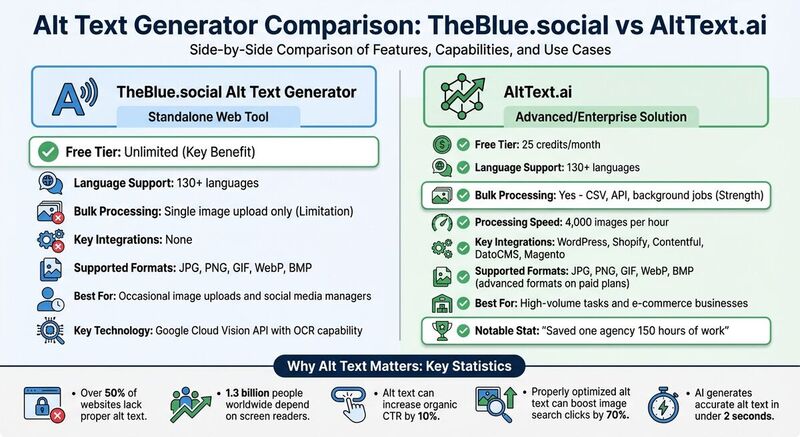 Here's a quick look at how two popular alt text generators stack up, helping you decide which one fits your image processing and integration needs.
Whether you're handling just a handful of images or managing thousands across various platforms, the right tool makes all the difference. Below is a side-by-side comparison of the leading options.
| Tool | Free Tier | Language Support | Bulk Processing | Key Integrations | Supported Formats |
|---|---|---|---|---|---|
| TheBlue.social | Unlimited | 130+ languages | Single image upload | None (standalone web tool) | JPG, PNG, GIF, WebP, BMP |
| AltText.ai | 25 credits | 130+ languages | CSV, API, background jobs | WordPress, Shopify, Contentful, DatoCMS, Magento | JPG, PNG, GIF, WebP, BMP (advanced formats on paid plans) |
Key Takeaways:
- TheBlue.social is ideal for occasional image uploads with its unlimited free tier, though it lacks integrations and bulk processing.
- AltText.ai shines for high-volume tasks, processing up to 4,000 images per hour[5]. It supports advanced workflows like CSV uploads and API usage, making it perfect for businesses managing large-scale operations.
One agency owner shared that using AltText.ai saved them 150 hours of work[2][5]. The tool can process over 200 images in less than five minutes through its API[2]. However, advanced formats like SVG and AVIF require 2 credits per image, so keep that in mind if these formats are essential to your workflow.
Automated alt text generators like these not only save time but also enhance accessibility and improve SEO efforts, making them a smart choice for content creators and businesses alike.
How to Use Alt Text Generators Effectively
To get the best results from alt text generators, it's important to guide the AI toward creating clear and meaningful descriptions. Focus on the image's purpose and context rather than just listing objects. For example, instead of saying "a laptop, coffee cup, and notebook", you could describe the scene as "a workspace setup for remote work with an open laptop displaying code." This kind of description provides screen reader users with helpful context about the image's relevance.
Skip phrases like "image of" or "picture of" at the start of your descriptions. Screen readers already inform users that an element is an image, so it's better to jump straight into the details. For decorative images that don't carry any informational value, use a null alt attribute (alt="") to let assistive technology ignore them.
Different platforms may require slightly adjusted approaches. On X (Twitter), keep descriptions short and to the point to match the platform's fast-moving style. On Bluesky, you can take advantage of enhanced formatting options to provide more detailed context, especially for complex visuals. Mastodon allows for content warnings alongside alt text, which is helpful when dealing with sensitive images. Always tailor your descriptions to fit each platform's character limits and engagement norms.
It's crucial to review AI-generated text before posting. While modern tools are generally reliable, they can sometimes miss subtle details or make mistakes, like misidentifying someone's gender or age. Incorporate keywords naturally into the text - this not only improves accessibility but can also boost engagement by making descriptions more relevant.
For workflows that involve a large number of images, consider using threshold controls with AI APIs to ensure only high-quality captions are published. Tools like TheBlue.social's Alt Text Generator offer free, unlimited generation, allowing you to experiment with multiple descriptions until you find the perfect one. This aligns with TheBlue.social's focus on combining accessibility with SEO benefits. The primary goal is to prioritize accessibility, with SEO advantages being a natural outcome of writing clear, descriptive alt text. This strategy supports broader efforts to create content that is both accessible and optimized for search engines.
Conclusion
Incorporating automated alt text tools into your workflow can greatly improve both accessibility and performance across digital platforms.
With over 1.3 billion people depending on screen readers and more than half of websites missing alt text, automated tools have become essential for creating inclusive and effective content. Managing thousands of images across platforms like X, Bluesky, Mastodon, and others manually is simply unrealistic. AI-powered tools now generate accurate alt text in under 2 seconds, making it possible to maintain accessibility at scale. Social media managers who’ve adopted these tools have not only cut down on tedious manual tasks but also freed up time for strategy and creativity.
Alt text doesn’t just improve accessibility - it can significantly boost engagement. Adding alt text has been shown to increase organic click-through rates by 10%, and well-optimized descriptions can drive up clicks from image searches by as much as 70%. As search evolves toward AI-driven assistants like ChatGPT and Perplexity, which rely heavily on alt text to interpret visual content, these descriptions are becoming even more critical for securing visibility in search results.
For a hassle-free solution, TheBlue.social's Alt Text Generator offers unlimited, free alt text creation - no registration required. Pair it with TheBlue.social's cross-posting scheduler for platforms like X, Threads, Instagram, Pinterest, Bluesky, and Mastodon to ensure your content remains accessible while keeping your workflow efficient.
FAQs
How do automated tools for alt text benefit SEO and accessibility?
Automated alt text tools are a game-changer for improving both SEO and accessibility. These tools leverage AI to analyze images and generate descriptive alt text that aligns with the image's context. This not only helps search engines better understand and rank your content but also makes your website more user-friendly.
From an accessibility standpoint, alt text is essential for users relying on screen readers, as it provides them with critical visual information. Automating this process allows content creators to manage large media libraries efficiently while maintaining consistent, high-quality descriptions. This approach ensures compliance with accessibility standards and boosts SEO efforts at the same time.
What makes TheBlue.social's Alt Text Generator stand out?
TheBlue.social's Alt Text Generator makes it simple to create detailed, accessible, and SEO-friendly alt text for images. Powered by AI, it delivers descriptions that are not only accurate but also tailored to the image's context, going beyond just identifying objects. This ensures your content aligns with accessibility standards like WCAG.
It also offers bulk processing capabilities, letting you generate alt text for extensive image collections effortlessly. Whether you use CSV imports or platform plugins, handling large libraries becomes a breeze. On top of that, the tool emphasizes privacy and security by processing images without storing them, so your data stays safe. Whether you're working on a personal project or managing a large-scale content update, TheBlue.social's Alt Text Generator streamlines the process of crafting inclusive and optimized image descriptions.
Why should you review AI-generated alt text before publishing it?
Reviewing AI-generated alt text is crucial because, while these tools can be time-saving, they often miss the mark when it comes to capturing the full context or finer details of an image. For instance, AI might struggle with complex visuals like charts, infographics, or abstract designs, leading to descriptions that are either inaccurate or incomplete. By ensuring alt text is precise, you not only uphold accessibility standards but also create a better experience for users who depend on screen readers.
Taking the time to manually review and refine AI-generated alt text allows for the inclusion of any missing details and clears up vague or unclear descriptions. This process ensures the text accurately reflects the image's purpose, supports accessibility, and even enhances SEO. While AI is a helpful tool, human oversight remains essential to ensure the final output is both accurate and meaningful before it goes live.