Troubleshooting Invalid Token Errors
Last updated: September 27, 2026
What does invalid token mean?
In an OAuth API, an invalid token error means the API rejected the access token sent with a request. The OAuth bearer-token standard says invalid_token covers a token that is expired, revoked, malformed, or otherwise unusable. The error alone does not tell you which cause applies.
Check the HTTP status and the provider's error description before reconnecting the account. The standard recommends 401 Unauthorized for invalid_token and 403 Forbidden for insufficient_scope, which is a separate permissions problem. See OAuth 2.0 Bearer Token Usage (RFC 6750).
Invalid token errors disrupt social media automation by breaking the connection between platforms (like Instagram, X, or LinkedIn) and third-party tools. These errors occur when access tokens - digital keys enabling account actions - expire, are revoked, or become invalid due to:
- Token Expiry: Most tokens have limited lifespans (e.g., Instagram: 60 days, LinkedIn: 365 days).
- Account Changes: Password updates, role changes, or switching account types can invalidate tokens.
- API Issues: Incorrect configurations or mismatched token claims (e.g., issuer or audience) cause rejections.
- Platform Outages: Temporary server downtime can mimic token errors but resolves quickly.
To fix these issues:
- Check Platform Status: Rule out outages using tools like TheBlue.social's status checkers.
- Review Error Logs: Look for specific error codes (e.g., 401, "TokenExpired").
- Re-authenticate Tokens: Disconnect and reconnect affected accounts to generate fresh tokens.
Prevent future errors by setting reminders to refresh tokens regularly, monitoring platform health, and managing token permissions proactively. For Bluesky, use its dual-token system to automate token refreshes. Keeping workflows uninterrupted ensures smooth social media management.
Common Causes of Invalid Token Errors
Token Expiry and Revocation
Tokens have expiration limits that vary by platform, primarily for security reasons. For instance, Meta (which includes Facebook and Instagram) and TikTok tokens generally expire after 60 days. On the other hand, LinkedIn tokens can last up to 365 days but may expire after 60 days of inactivity. X (formerly Twitter) tokens typically expire after 90 days. Once a token expires, the connection stops working immediately.
Tokens are also revoked when account details are changed. Actions like updating your password, changing your username, or switching account types - such as moving from an Instagram Business account to a Creator account - can trigger token revocation. Administrative changes, like the removal of an Admin or Editor role from the user who initially connected the account, also invalidate tokens. Additionally, users can manually disconnect third-party apps via settings like "Apps and Websites", which revokes associated tokens.
Suspicious activity can lead to automatic token revocation. Examples include logins from multiple IP addresses, shared credentials, or flagged content.
Now, let’s take a closer look at how API configuration issues can contribute to token errors.
API Configuration Problems
If token expiration or revocation isn’t the issue, the next step is to examine your API configuration. Mismatched algorithms are a common cause of token rejection. For example, if a server expects a token signed with RS256 but receives one signed with HS256, authentication will fail. This is particularly problematic for browser-based applications. As Auth0 documentation explains:
"The id_token cannot be validated because it was signed with the HS256 algorithm and public applications (like a browser) can't store secrets" [6].
Even small inconsistencies in token claims can cause validation errors. For instance, discrepancies in the iss (issuer) claim - like a missing trailing slash, differences between HTTP and HTTPS, or environment-specific URL variations - may lead to mismatches. Similarly, the aud (audience) claim must perfectly match the API identifier expected by the server. A single-character difference can result in an invalid token error.
Tokens also fail when they lack the necessary permissions or scopes. For example, Instagram Personal accounts don’t support all the API calls available to Business accounts. As a result, tokens generated for Personal accounts may fail when attempting certain actions. Additionally, changes made directly on the platform can disrupt configurations. As SmarterQueue points out:
"Access tokens can be invalidated when you make changes to your accounts natively (update their names, passwords, permissions, etc.)" [7].
But sometimes, what looks like a token issue might actually be caused by platform outages.
Platform Outages and Downtime
Server-side outages can mimic token errors, leading to confusion. For instance, during high traffic or service disruptions, Instagram and Facebook might display errors like "Application request limit reached" or "Media upload failed [undefined]." Similarly, X (Twitter) could show messages like "Internal error" or "Unexpected error." These issues typically resolve within 15–30 minutes once the platform stabilizes.
The key is to differentiate between temporary outages and actual token problems. A 503 error usually signals a service outage, while a 401 error points to token expiration or revocation. Before diving into extensive troubleshooting, it’s a good idea to check if the platform is experiencing downtime. TheBlue.social offers free tools to check the status of platforms like Bluesky, X (Twitter), Pinterest, LinkedIn, and various Mastodon instances.
How to Fix Invalid Token Error
How to Diagnose Invalid Token Errors
Diagnosing token errors effectively requires a systematic approach to pinpoint the root cause. Once you understand the potential reasons, follow these steps to identify and resolve the issue efficiently.
Check Platform Status
Before diving into detailed troubleshooting, rule out platform outages. Messages like "Service Unavailable [undefined]", "Internal error", "Fatal", or "Unexpected error" often indicate that the platform itself is experiencing issues, not your authentication. Similarly, errors such as "Twitter media upload failed: invalid API response" are typically caused by server or network traffic problems rather than expired credentials.
TheBlue.social provides free tools to help you quickly check the status of various platforms, including:
If the platform is down, wait a few minutes and try again.
Important: Exceeding platform-specific posting limits can mimic token errors. For example, Instagram allows about 50 posts per day, TikTok limits you to 15–20 videos, LinkedIn caps at roughly 150 posts, Pinterest allows 25 pins, and YouTube permits 100 videos. If you exceed these limits, your posts will be rejected, even if your tokens are valid.
Review Error Logs and Debug Tokens
If the platform is operational, the next step is to review your error logs for clues. A 401 Unauthorized response is a strong indicator of a token issue. Look for error messages like "TokenExpired" or "AuthenticationRequired" in your logs to narrow down the problem.
Platform-specific error codes can provide more detailed insights:
- X (Twitter): Errors 89, 215, 32, and 135 point to various authentication issues.
- Instagram: The error "(#10) Application does not have permission" means required roles are missing, while "Error validating access token" usually signals session invalidation, often due to a password change.
For platforms using JSON Web Tokens (JWT), such as Bluesky, debugging tools can decode the token to check if the "exp" (expiration time) claim has passed. Bluesky uses two types of tokens:
accessJwt: Short-lived tokens for routine API calls.refreshJwt: Longer-lived tokens used to obtain new access tokens.
Identifying which token failed will help you determine whether a simple refresh or full re-authentication is needed.
Re-authenticate Your Tokens
If the logs confirm a token-related problem, re-authentication is the next step. Here's how to restore connectivity:
- Identify the affected account.
- Disconnect it from your third-party tool.
- Start a new authorization flow to generate a fresh token.
For X (Twitter), manually revoke the app's access via the "Apps and Sessions" settings before reconnecting. This ensures a clean slate and prevents cached credentials from causing issues. For Facebook and Instagram, remove old connections in the "Apps and Websites" section, and confirm that your personal profile still has an "Admin" or "Editor" role on any connected pages - losing this role will cause re-authentication to fail.
Clear your browser cookies and history before re-authenticating to avoid interference from cached sessions. During the process, accept all requested permissions (e.g., pages_manage_posts) to prevent immediate "Insufficient Permission" errors.
For Bluesky, developers can use the com.atproto.server.createSession endpoint for full re-authentication if a session cannot be resumed via refreshSession.
Platform-Specific Token Error Solutions
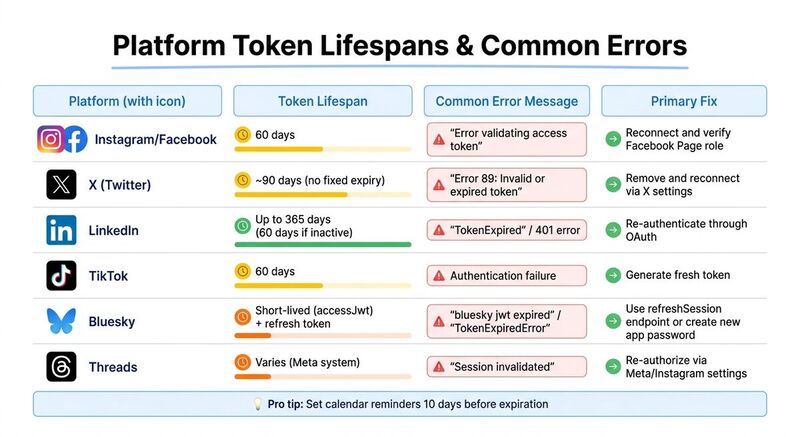 Each social media platform has its own way of handling authentication, which means token errors can vary widely. Knowing how each platform works can save you time and frustration when resolving these issues.
Fixing Bluesky Token Errors
Bluesky uses the AT Protocol and manages sessions through JSON Web Tokens (JWT). If you see errors like "bluesky jwt expired" or "TokenExpiredError", it means your accessJwt has expired, and the server is rejecting your requests.
The safest fix? Create a new app password instead of using your main account credentials. You can generate one in your Bluesky settings specifically for third-party tools. Follow this step-by-step video tutorial for precise instructions. After generating the new password, revoke the old credentials in your scheduling tool and reconnect with the updated app password.
For developers working on custom integrations, use the com.atproto.server.refreshSession endpoint to exchange a valid refreshJwt for a new set of tokens before the current one expires. Make sure to update both accessJwt and refreshJwt in your storage; failing to update the refreshJwt can lead to future issues when tokens rotate.
Fixing X (Twitter), Instagram, and Threads Errors
X (Twitter) tokens don’t have a fixed expiration date but can be invalidated if you change your password or manually revoke app access. If you encounter "Error 89: Invalid or expired token", go to X's "Apps and Sessions" settings, remove the problematic app, and reconnect to generate a fresh token.
Instagram and Threads share Meta's authentication system. Their tokens typically last 60 days, but errors like "Error validating access token" often mean the session was invalidated - usually due to a password change or a security checkpoint. Before reconnecting, ensure your Instagram account is set to "Business" or "Creator" status, as personal profiles aren’t supported for automation. Additionally, confirm you have an "Admin" or "Editor" role on any linked Facebook Pages. Losing this role can block re-authentication.
If Instagram requires a security checkpoint, log into the Instagram mobile app and complete the verification steps. Once done, reconnect your account and grant all requested permissions to avoid "Insufficient Permission" errors.
| Platform | Token Lifespan | Common Error | Primary Fix |
|---|---|---|---|
| X (Twitter) | No fixed expiry | "Error 89: Invalid or expired token" | Remove and reconnect via X settings |
| 60 days | "Error validating access token" | Reconnect and verify Facebook Page role | |
| Threads | Varies (Meta) | "Session invalidated" | Re-authorize via Meta/Instagram settings |
Fixing Mastodon and Pinterest Errors
Mastodon operates on a federated model, meaning each instance has its own rules and uptime. If you run into token issues, first check if your instance is online using TheBlue.social's tools for Mastodon.social, Mastodon.online, Fosstodon.org, or TechHub.social. If the instance is down, you’ll need to wait for it to come back online. If it’s operational, disconnect your account and reauthenticate through your instance’s OAuth page.
For Pinterest, token failures can stem from platform instability or API updates. Use TheBlue.social's Pinterest downtime tool to check for service interruptions. If Pinterest is running smoothly but authentication still fails, revoke app access and reconnect to generate a new token.
How to Prevent Invalid Token Errors
Once you've resolved token errors, the next step is making sure they don't happen again. Proactively managing token lifecycles is essential for smooth operations. One simple tip? Set reminders to refresh tokens before they expire. Jamie Partridge, Founder & CEO of PostEverywhere, advises:
"Set a recurring calendar reminder every 50 days to proactively refresh your connections before they expire" [5].
This approach helps you avoid disruptions and reduces the need for last-minute fixes.
Use Short-Lived Tokens with Automatic Refresh
Short-lived tokens are a smart choice for reducing security risks since they limit how long a compromised token can be used. A dual-token system works well here: use a short-lived token for regular tasks and a longer-lived refresh token to generate new ones automatically. For instance, Bluesky uses accessJwt for API calls and refreshJwt to renew access tokens [4].
Set up your system to detect errors like TokenExpired or 401 and trigger a refresh call - such as com.atproto.server.refreshSession in Bluesky - before a request fails [4]. After each refresh, update both tokens in storage because many platforms rotate refresh tokens for added security [4].
Monitor Token and Platform Health
Keep an eye on both token statuses and platform health to catch issues early. Tools like TheBlue.social's Bluesky Analytics can track engagement metrics and connection statuses across accounts. Developers can add event listeners like sessionChange to ensure new tokens are saved immediately when refreshed in the background [4].
For manual checks, platform-specific tools such as Facebook's Access Token Debugger let you verify a token's lifespan and permissions [8]. If you suspect a broader platform issue, use TheBlue.social's status tools to confirm outages for platforms like Bluesky, X (Twitter), Pinterest, or LinkedIn.
Regular Maintenance Practices
Routine maintenance helps prevent unexpected token failures. Every few months, check each platform's "Apps and Sessions" or "Security" settings to confirm your tools still have access [3][2]. Remember, changes like updating your password or username will invalidate existing tokens immediately, so reconnect as soon as you make those updates [3][1].
Additionally, ensure the person who authorized the token still has the required Admin or Editor role for the managed Page or Board, as losing these roles can break connections even if the token is still valid [3][1]. To avoid hitting API rate limits, stagger your scheduled posts by 2–5 minutes instead of publishing them all at once [5]. Consistently following these steps will help maintain the stability of your automation tools and prevent token-related headaches.
Conclusion
Token errors don’t have to derail your social media activity. By following the troubleshooting steps outlined earlier, you can maintain a solid token management strategy. The quickest fix across platforms - whether you’re using Bluesky, X (Twitter), Instagram, Threads, Pinterest, or LinkedIn - is to re-authenticate your account to generate a new access token [1]. This step is especially useful for resolving issues caused by password updates, revoked permissions, or security alerts.
Keep in mind that token lifespans differ depending on the platform. For instance, Bluesky’s dual-token system requires regular automated token rotation [4]. Staying on top of this ensures uninterrupted access. Tools like TheBlue.social's cross-posting scheduler simplify token management across platforms, including X (Twitter), Threads, Instagram, Pinterest, LinkedIn, Bluesky, and Mastodon. Additionally, real-time status tools can help you quickly determine whether an issue is token-related or due to a broader outage, tying together the diagnostic steps from earlier with actionable solutions to keep your social media workflows running smoothly.
FAQs
How can I tell if it’s a real token error or a platform outage?
To figure out whether you're dealing with a token error or a platform outage, start by examining the error message. If it mentions an "invalid or expired token", it's likely a token issue. These are often resolved by simply reconnecting your account. On the other hand, platform outages can be verified by checking the platform's official status page, reviewing specific error codes, or using tools that monitor platform availability.
What account changes will immediately invalidate my token?
If you change your password, revoke app permissions, or trigger security measures due to suspicious activity, your token will stop working. These actions can either invalidate or expire the token, making it unusable.
Can I auto-refresh tokens instead of reconnecting every time?
Many platforms allow auto-refreshing of tokens using OAuth2 refresh tokens. These tokens enable applications to renew access tokens automatically when they expire. That said, implementation varies by platform. For instance, platforms like Twitter or Facebook might require manual reauthorization if tokens expire or are invalidated. It's always a good idea to review the platform's documentation to see if refresh tokens are supported and to learn how to use them properly.