Ultimate Guide to Food Content Scheduling
Last updated: April 7, 2026
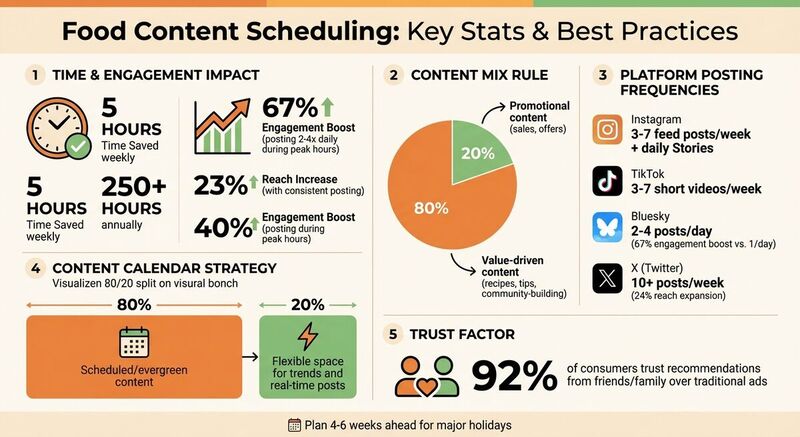
Food content scheduling simplifies your social media strategy, saves time, and boosts engagement. By planning posts in advance, you can maintain consistency, reach peak engagement times, and focus on creating high-quality content. Here's what you need to know:
- Time Savings: Scheduling can save up to 5 hours weekly (250+ hours annually).
- Engagement Boost: Posting 2–4 times daily during peak hours increases engagement by 67%.
- Content Mix: Use an 80/20 rule - 80% value-driven posts (recipes, tips) and 20% promotional.
- Weekly Themes: Assign daily themes (e.g., "Menu Spotlight Mondays") to keep content organized.
- Platform Tips: Tailor content for each platform - Instagram, TikTok, Bluesky, and more - for better results.
Tools like TheBlue.social streamline scheduling across multiple platforms, ensuring your posts are consistent and effective. Start by setting clear goals, planning key dates, and using scheduling tools to stay ahead.
Setting Goals and Planning Key Dates
Defining Content Goals
When setting content goals, aim for targets that deliver measurable outcomes. Think about objectives like increasing table reservations, boosting online orders, or growing your email list by 15% before summer arrives [4].
Choose one or two main goals to focus your efforts. For example, if you're launching a seasonal menu or trying to attract more weeknight diners, you could showcase new dishes with prep videos or highlight special offers during peak times [4]. A great example comes from Shane's Rib Shack in Glendale, AZ - they use behind-the-scenes content like staff spotlights and kitchen moments to connect with their audience on Instagram. This approach centers on a single goal: building relatability through "community content" [4].
Track metrics that matter. Instead of just counting likes, pay attention to actions that reflect real interest, like clicks to your ordering page, direct orders linked to social posts, and engagement metrics such as shares or saves [4]. For instance, if you're promoting a Father's Day brunch, measure how many reservations came from the link in your post versus walk-ins.
"Your restaurant's social media strategy should support these bigger business goals - not just fill up your feed." - Louise Dalangin, Author [4]
Once your goals are clear, you can move on to planning key dates that align with these objectives.
Mapping Key Dates
With your goals in place, map out important dates to make the most of your content strategy. Plan 4–6 weeks ahead for major holidays like Memorial Day, Father's Day, or seasonal menu updates [4]. Start by listing fixed holidays (Thanksgiving, Valentine's Day), then add key business events such as a summer menu launch or your restaurant's anniversary. Don’t forget community-specific happenings like local food festivals, farmers markets, or sporting events that can tie your brand to the local vibe [4].
Here’s a quick way to organize your year with themes and key dates:
| Month | Theme Example | Key Dates/Events |
|---|---|---|
| January | New Year, New You | Healthy options, resolutions |
| February | Food is Love | Valentine's Day, romantic specials |
| March | Spring Flavors | St. Patrick's Day, seasonal dishes |
| May | Grill Season | Mother's Day, Memorial Day, BBQ |
| September | Fall Flavors | Labor Day, pumpkin/spice launches |
| November | Gratitude | Thanksgiving, Black Friday deals |
For example, you can extend the life of your best-performing content by repurposing it across multiple platforms to maximize engagement [4].
Leave room in your calendar - about 20% - for unexpected opportunities. This could include a surprise visit from a local food blogger, hopping on a viral trend, or responding to breaking local news that aligns with your brand. Balancing planned content with flexibility ensures your posts stay relevant while maintaining consistency [2][3].
How to create a restaurant marketing calendar in minutes (literally)
Developing a Weekly Content Strategy
Creating a themed weekly calendar can take the guesswork out of daily content planning. By assigning each day a specific content theme, you can build content buckets that make planning easier while keeping your feed fresh and engaging [4]. A good rule of thumb is to dedicate about 80% of your posts to community-building, storytelling, and entertainment, leaving just 20% for promotions or sales-focused content [4][7]. This balance ensures your audience stays engaged without feeling overwhelmed by sales pitches.
"Consistency is critical to your social media marketing success, but by using a content calendar, you can ensure your content is helping you reach your larger goals to drive sales and growth." - ChowNow [4]
To maintain consistency, consider batching your content weekly. Spend 2–3 hours creating and organizing images and captions in a shared folder, such as Google Drive or Canva [4]. This approach allows you to allocate content to your daily themes efficiently, ensuring every post serves a clear purpose.
Daily Themes for Engagement
Assigning specific themes to each day helps your audience know what to expect while giving you structure to avoid repetitive content. For example:
- Menu Spotlight Mondays: Feature a signature dish or seasonal cocktail with eye-catching photos and a bit of backstory.
- Educational Tuesdays: Share cooking tips, ingredient sourcing insights, or food hacks to position your brand as knowledgeable and helpful [4][5].
- Customer Review Wednesdays: Showcase user-generated content, like photos from diners or glowing testimonials. This taps into social proof, with 92% of consumers trusting recommendations from friends and family over traditional ads [6].
- Behind-the-Scenes Fridays: Humanize your brand with staff spotlights or "day in the life" videos showing your team preparing for the weekend [4][5].
- Saturdays: Focus on promotional content, like weekend specials or direct links to online ordering.
- Sundays: Use this time to highlight your rewards program or encourage email signups [4][5].
This schedule provides structure while leaving room for spontaneity - whether it’s a surprise visit from a food influencer, a trending topic, or a fun team moment worth sharing [4].
To streamline your efforts, use tools like Meta’s crossposting feature to automatically share Instagram content to Facebook, reducing your workload while keeping both platforms active [4]. For businesses juggling multiple channels, tools like TheBlue.social (https://theblue.social) make it easy to cross-post between social platforms like X (Twitter), Threads, Instagram, Pinterest, LinkedIn, Bluesky, and Mastodon. These tools ensure your themed content reaches your audience wherever they are, without extra hassle.
Platform-Specific Content Best Practices
When crafting your weekly content strategy, it’s essential to customize your posts for each platform's unique style and audience. Every social platform has its own vibe, and what clicks on Instagram might not hit the mark on TikTok or Bluesky. By understanding these differences, you can boost engagement without overextending yourself. The key is to adapt your core content to fit each platform's expectations.
Optimal Posting Frequencies
How often you post matters, and it varies depending on the platform. Here's a quick breakdown:
- Instagram: Post 3–7 feed updates per week, plus daily Stories to maintain visibility [1].
- TikTok: Upload 3–7 short videos weekly to stay in sync with the algorithm [1].
- Bluesky: Posting 2–4 times daily can increase engagement by 67% compared to posting just once a day [2]. The platform has grown to 30 million users, making consistency crucial.
- X (formerly Twitter): Aim for at least 10 posts per week to expand your reach by 24%. However, keep in mind that engagement tends to drop by half within 86 minutes of posting [8].
Using tools like TheBlue.social, you can streamline this process. It lets you manage your content calendar across platforms like X, Threads, Instagram, Pinterest, LinkedIn, Bluesky, and Mastodon - all from one dashboard. Batch-creating and scheduling posts can save you about 5 hours each week [1].
Once your posting schedule is set, focus on tailoring your visuals to meet each platform’s specific requirements.
Visual Content Tips by Platform
Visuals are the backbone of social media, but each platform has its preferences. Here’s how to optimize for the most popular ones:
- Instagram: Stick to high-quality vertical (4:5) or square (1:1) images. Adding 3–10 relevant hashtags per post can significantly improve visibility [3].
- TikTok: Use 9:16 vertical videos with an attention-grabbing hook in the first 1–2 seconds. Think dramatic visuals, like a steak sizzling on a grill or a cake being sliced to reveal its layers. For example, in 2025, restaurant Simpang Asia repurposed a successful Instagram Reel into a TikTok video, reaching a new audience without creating fresh content [4].
- X (Twitter) and Threads: Keep text short - under 280–300 characters - and limit hashtags to 1–2 to avoid appearing spammy [8].
- Bluesky: With a 300-character limit, adopt a conversational tone. Always include alt text for images; it’s a standard expectation within the community [2][8].
- Mastodon: Alt text is non-negotiable here, and using Content Warnings (CW) for promotional posts is highly recommended [8].
For platforms like Pinterest, pins perform best at a 2:3 aspect ratio [3]. This format is perfect for tall plating shots or step-by-step recipe visuals. On Bluesky, timing matters too - engagement peaks on Tuesdays and Wednesdays between 8–10 AM, 12 PM, and 6–9 PM EST [2]. Scheduling your most eye-catching content during these windows can make a big difference.
Building and Managing Your Food Content Calendar
Once you've figured out your platform-specific strategy, it’s time to create a content calendar that keeps your posts organized while leaving room to react to trends. Think of this calendar as the backbone of your plan - it provides structure but stays flexible enough for spontaneous, timely updates.
Template Design for Food Content
Start with a straightforward yet detailed calendar template. Make sure it includes essential columns like:
- Post ideas
- Visual assets
- Captions
- Links
- Deadlines
- Team responsibilities
These elements help your team stay on the same page and ensure nothing falls through the cracks.
"The key to social media marketing success is consistency... That combination - consistency plus goal-driven content - requires a plan." - Louise Dalangin, ChowNow
Stick to the 80/20 rule: plan out 80% of your evergreen and scheduled content, while leaving 20% of your calendar open for spur-of-the-moment posts, trending audio, or real-time customer interactions[2]. This reserved space gives you the flexibility to stay relevant without overhauling your schedule.
For visual planning, tools like Trello or Asana work wonders, but even a shared Google Sheet can do the trick for team-wide collaboration. Don’t forget to include a "Pause Protocol" column in your template. This ensures you can quickly halt scheduled posts in case of a sensitive news event or crisis[2]. Once your template is ready, use scheduling tools to make execution seamless.
Using Scheduling Tools
Managing posts across multiple platforms manually can eat up a lot of time - time better spent engaging with your audience or experimenting with new menu ideas. Tools like TheBlue.social simplify this process by letting you schedule and oversee posts for X (Twitter), Threads, Instagram, Pinterest, LinkedIn, Bluesky, and Mastodon all from one place. On average, this approach saves creators about 5 hours weekly - or roughly 260 hours a year[1].
When connecting third-party tools to platforms like Bluesky, prioritize security by using app-specific passwords instead of your main login credentials[2]. To maximize efficiency, batch-create content in one go. For example, brainstorm 20–30 post ideas at once, then draft and design them separately. This method frees up your daily schedule, so you can focus on spotting viral food trends or engaging with comments without scrambling to create new posts.
Timing is everything. On Bluesky, for instance, the best times to post are Tuesdays and Wednesdays between 8–10 AM, at noon, and from 6–9 PM EST. Posting 2–4 times a day can boost engagement by up to 67%[2]. Before hitting "publish", take 15 seconds to double-check the account, timing, and content. Consistency trains the platform’s algorithm and keeps your audience coming back for more.
Tools and Resources for Food Content Scheduling
When it comes to executing your food content strategy, having the right tools can make all the difference. Platforms like TheBlue.social simplify the process, allowing you to plan, post, and analyze your content from one place. This eliminates the need for manual posting and turns your workflow into a much smoother operation.
TheBlue.social Features for Food Businesses
TheBlue.social is designed to help food businesses manage their content across multiple platforms. Its cross-posting scheduler allows you to update platforms like X (Twitter), Threads, Instagram, Pinterest, LinkedIn, Bluesky, and Mastodon all at once. For example, announcing a new seasonal menu is a breeze when you can post it everywhere simultaneously, saving you hours of time.
The platform also offers Bluesky analytics, which help you understand what content connects with your audience. Whether it’s a recipe post or a behind-the-scenes kitchen video, you can track which ones drive the most engagement and clicks to your online ordering page. With Bluesky’s user base projected to hit 30 million by early 2026, knowing what works on this platform is becoming increasingly important.
Other handy features include the hashtag generator and emoji adder, which boost the discoverability of your posts. For instance, hashtags like #VeganRecipes or #LAeats can help you tap into trending food conversations. The OG preview tool ensures that your blog links or menu pages look polished and appealing before they go live.
For Bluesky users, TheBlue.social emphasizes security by recommending the use of a unique app password, which you can generate in your Bluesky settings. This keeps your account safe while still allowing full scheduling functionality.
Free Tools for Better Content
TheBlue.social also offers free tools to tackle common challenges in food content creation. The image alt text generator automatically creates descriptive text for your food photos, which is essential for accessibility and aligns with platform etiquette on Bluesky and Mastodon[2][8]. Another useful tool is the text extractor, which pulls text like ingredient lists or instructions directly from images, making it easier to repurpose visual content into text-based posts.
If you’re launching a new food brand, the username availability checkers for platforms like Instagram, Bluesky, X, Threads, TikTok, Pinterest, and LinkedIn can help you secure consistent handles across platforms. This consistency strengthens your brand identity and makes it easier for customers to find you online.
With these tools, you can simplify and enhance every part of your food content creation process, from planning to publishing.
Conclusion
Scheduling food content can completely change how you manage your social media. Instead of scrambling for last-minute posts, a structured plan can save you 5–8 hours each week while improving both the quality of your posts and audience engagement. Consistent posting can increase your reach by 23%, and sharing content during peak hours might boost engagement by up to 40%.
Striking the right balance is crucial. Stick to the 80/20 rule - schedule 80% of your content for evergreen and planned posts, while leaving 20% open for spontaneous, real-time updates. This mix ensures you stay consistent (a big win with modern algorithms) while still creating genuine connections that turn followers into loyal customers.
Platforms like TheBlue.social make this process easier by letting you manage scheduling across X, Threads, Instagram, Pinterest, LinkedIn, Bluesky, and Mastodon - all in one place.
Start by building a two-week content plan and focus on 3–5 content pillars to batch-create posts during dedicated time slots. Check your analytics monthly to see what’s working and tweak your approach as needed. With the right tools and strategy in place, you’ll spend less time stressing over content and more time connecting with your audience and growing your brand.
FAQs
How do I choose the right 3–5 content pillars?
When deciding on the best 3–5 content pillars, start by considering your goals, audience, and brand identity. Focus on themes that reflect your values and connect with your followers. These could include topics like product features, industry trends, or customer success stories. Aim for pillars that are broad enough to allow flexibility but still specific enough to ensure consistent messaging. Sticking to 3–5 pillars helps keep your content strategy clear and focused, making it easier to create engaging posts and maintain alignment across different platforms.
What should I schedule vs. leave unscheduled?
Planning your content is key to staying consistent. Schedule posts that fit your strategy, like evergreen content, promotional campaigns, or recurring themes. Think product launches, educational tips, or seasonal updates - these are great for maintaining a steady flow of content.
At the same time, leave room for unscheduled posts that need to go live quickly. Trending topics, real-time updates, or unexpected announcements keep your feed dynamic and relatable.
By blending scheduled and spontaneous content, you can stay efficient while keeping your audience engaged with timely, authentic updates.
What metrics best show that social posts drive orders or reservations?
Tracking key metrics is essential to understand how your social media efforts are driving customer behavior. Focus on measuring online ordering conversions, loyalty program signups, and engagement metrics connected to your promotional posts. These numbers provide a clear picture of how effectively your campaigns are influencing customer actions.