Ultimate Guide to Social Media Workflow Automation
Last updated: March 28, 2026
Social media automation saves time, boosts engagement, and simplifies managing multiple platforms. By automating tasks like scheduling posts and tracking analytics, you can reclaim hours each week for higher-priority work. Here’s what automation can do for you:
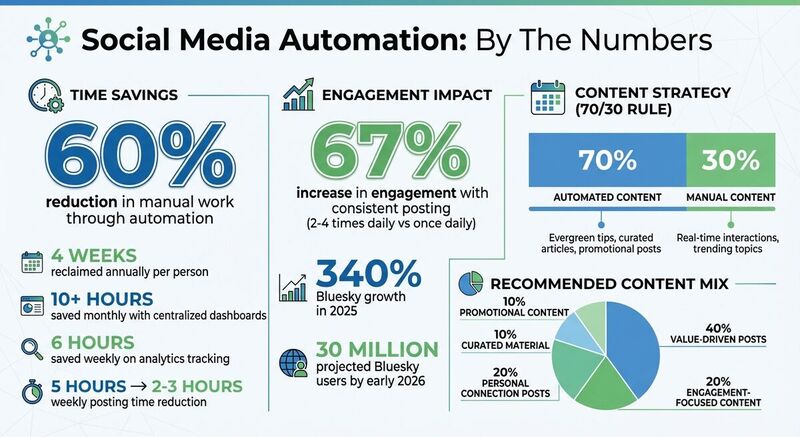
- Save Time: Automating posts across platforms can reduce manual work by up to 60%, freeing up nearly 4 weeks annually.
- Improve Focus: Avoid productivity loss from constant interruptions by automating repetitive tasks.
- Boost Engagement: Consistent posting (2–4 times daily) can increase engagement by 67%.
- Simplify Analytics: Automated tools provide clear performance insights, saving hours on manual tracking.
- Centralized Management: Use tools like TheBlue.social to handle multiple accounts from one dashboard.
Automation helps you achieve consistency, manage content calendars, and maintain meaningful interactions without overloading your schedule. Whether you're scheduling posts, analyzing performance, or customizing content for platforms like Threads or Bluesky, tools like TheBlue.social make the process easier and more efficient.
Key takeaway: Automate 70% of your content (like evergreen tips) while keeping 30% manual for real-time interactions. Use analytics to refine your strategy and maintain strong audience connections. Ready to save time and grow your social media? Start automating today.
This Workflow Auto-Posts to 9 Different Socials (free template)
Core Elements of Social Media Automation
Social media automation revolves around three main components that work together to simplify your workflow. These elements not only improve individual tasks but also create a system that helps scale your social media efforts. By understanding these components, you can save time and still maintain meaningful interactions with your audience.
Scheduling and Publishing Posts
Batching your content creation is the backbone of effective scheduling. Instead of posting manually throughout the day, you can dedicate a single session to prepare and schedule posts for the week [2]. This method protects your focus and keeps your creativity flowing.
The real advantage lies in posting consistently at regular intervals, which helps train platform algorithms to show your content more frequently to your followers [2]. Research shows that accounts posting 2-4 times daily experience 67% more engagement compared to those posting only once a day [2]. Automation tools make this level of activity manageable without overwhelming your team.
Modern tools also adapt posts for different platforms automatically. For instance, Threads allows up to 500 characters, while Bluesky limits posts to 300 [3]. Smart cross-posting ensures 80% of your core message stays the same, while 20% is tailored to fit each platform's style - like Threads' "Casual Authority" tone versus Bluesky's unfiltered, raw approach [3].
On top of that, automated analytics simplify the process of measuring how well your posts perform.
Tracking Engagement and Performance
Automated analytics take the hassle out of manually checking metrics across platforms. By connecting directly to social media APIs, these tools automatically gather data on engagement, reach, and follower growth [4][5]. This can save marketing teams up to six hours each week [4].
Standardized reporting makes it easy to compare performance across platforms. For example, you can quickly determine whether LinkedIn posts generate more engagement than Instagram content [4]. Some tools even offer anomaly alerts, letting you know if engagement drops by more than 30% or if a post goes viral with five times the usual interaction [4].
Tagging posts by category, or content pillar analysis, helps identify which themes resonate most with your audience [5]. This approach replaces guesswork with hard data, giving you clear insights into what works best.
Managing Content Calendars
Once you’ve gathered engagement insights, a centralized content calendar helps you strategically plan your posts. Managing everything from one place reduces the chaos of juggling multiple platforms. Visual planning tools provide a clear overview of your schedule, ensuring a balanced mix of content types: value posts (40%), engagement posts (20%), personal posts (20%), and promotional content (10%) [2].
Features like bulk uploads and automatic hashtag suggestions speed up the process [1]. Tools also handle platform-specific image resizing, saving you the trouble of manually adjusting visuals for each network or generating accessible alt text for every image [1]. For example, TheBlue.social's scheduler allows you to manage content for platforms like X (formerly Twitter), Threads, Instagram, Pinterest, LinkedIn, Bluesky, and Mastodon all in one place.
The 70/30 rule is key: automate 70% of your content (such as evergreen tips, curated articles, and promotional posts) while keeping 30% manual for real-time interactions and trending topics [1]. This balance ensures efficiency while preserving the authenticity and spontaneity that foster genuine audience connections.
How to Schedule Cross-Platform Content with TheBlue.social
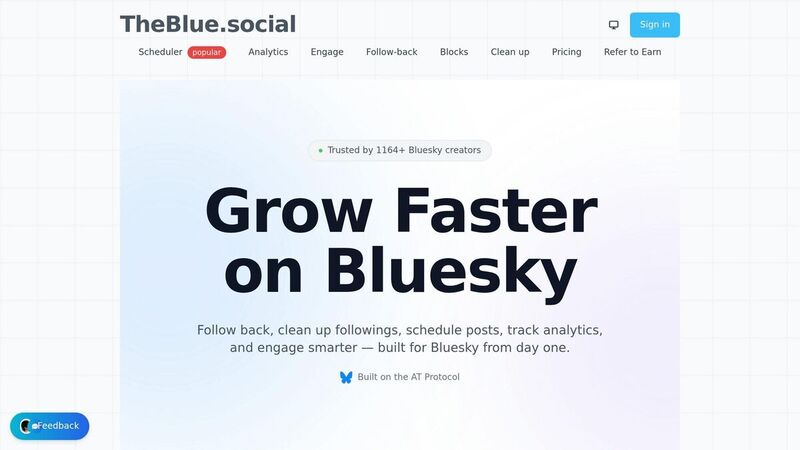
Getting Started with TheBlue.social Scheduler
TheBlue.social simplifies managing your social media by combining all your accounts into one easy-to-use dashboard. Whether you're posting on X (Twitter), Threads, Instagram, Pinterest, LinkedIn, Bluesky, or Mastodon, there's no need to juggle multiple tabs or apps. This streamlined approach can save you over 10 hours each month compared to manually posting across platforms [2].
For Bluesky, the setup process has an extra step due to its security framework. Instead of your main password, you'll need to generate an App Password using Bluesky's AT Protocol. Head to your Bluesky account's "Privacy and Security" section to create this unique password for TheBlue.social. If you need help, check out the step-by-step video guide for detailed instructions.
Once your accounts are connected, you're ready to start scheduling posts with ease.
Scheduling Posts Step-by-Step
After syncing your accounts, scheduling posts is a breeze. Start by drafting your main message, and apply the 80/20 rule: keep 80% of the content consistent across platforms while customizing 20% to match the unique preferences of each audience [3].
TheBlue.social takes care of platform-specific adjustments. For example, it shortens longer posts for Bluesky while allowing more detailed formats for Threads. It also helps you adapt hashtags - using standard inline tags (e.g., #Topic) for Bluesky and hidden topic tags (without the # symbol) for Threads [3].
Timing matters when it comes to maximizing your reach. For U.S. audiences, aim to schedule posts at 8:00 AM EST to engage with the morning crowd, 3:00 PM EST to connect with European evening users, and 10:00 PM EST to capture Asian morning activity [2]. By spreading posts across these key times, you can increase visibility across multiple time zones.
Bluesky Tools and Features
TheBlue.social includes tools specifically designed for Bluesky, making your workflow even more efficient. One standout feature is the follow-back functionality, which automatically follows new followers, helping you build connections without extra effort.
For deeper insights, Bluesky Analytics provides data on engagement trends and follower growth, helping you understand what works best. Additionally, the starter packs feature is a quick way to find and join relevant communities, which is crucial on Bluesky, where discovery often happens through community feeds.
These Bluesky-specific tools are seamlessly integrated into TheBlue.social, letting you grow your audience while saving time through automation.
Using Analytics to Improve Campaign Performance
Measuring Campaign Success with Metrics
When it comes to understanding how well your campaigns are performing, tracking key metrics like replies, reposts, and likes is essential. On platforms like Bluesky and Threads, replies often hold more weight than likes because they show active engagement rather than passive acknowledgment[3]. A post sparking a higher number of replies is generally more impactful than one that simply racks up likes.
Another important area to monitor is follower growth and engagement trends[1]. If your follower count is climbing but engagement rates are dropping (consider cleaning up your followings to improve your feed quality), it might mean your content isn’t connecting with your audience as it should.
For a broader perspective, consider metrics tied to your business goals, such as lead generation, website traffic, and direct sales driven by social media[1]. On Bluesky, platform-specific features like being included in "Starter Packs" or appearing in custom feeds like Skyfeeds can significantly boost your visibility[3]. These insights are invaluable for fine-tuning your content strategy and posting schedule.
Pay attention to engagement velocity, or how quickly your posts gain traction. Posts that don’t generate quick interactions risk getting buried in algorithm-driven feeds[3]. To make informed decisions, analyze patterns over a substantial number of posts - ideally 50 or more[2].
These metrics form the backbone of actionable insights, which can be further explored using analytics tools.
TheBlue.social Analytics Features
To help you dive deeper into these metrics, TheBlue.social Analytics provides advanced tools tailored to Bluesky’s ecosystem. This platform tracks trends in follower growth and engagement, helping you identify what types of content resonate most with your audience. With Bluesky projected to hit 30 million users by early 2026 and experiencing a 340% growth in 2025[2], having access to reliable analytics is more important than ever.
The analytics dashboard highlights critical metrics, particularly the “Reply Graph,” which underscores the value of replies over passive likes[3]. Armed with this data, you can refine your content strategy, aiming for a balanced mix like:
- 40% value-driven posts
- 20% engagement-focused content
- 20% personal connection posts
- 10% curated material
- 10% promotional content[2]
Timing is another key factor. The dashboard reveals when your audience is most active, helping you schedule posts for maximum impact. While general high-engagement windows on Bluesky are weekday mornings (8–10 AM) and evenings (6–9 PM)[2], your audience’s specific activity patterns should guide your final decision. Additionally, the platform compares the performance of automated versus manual posts, ensuring your automation efforts maintain strong engagement.
Bluesky’s open AT Protocol provides an added advantage by making post distribution more predictable compared to closed platforms[2]. This transparency ensures you can trust the analytics and adjust your strategy based on accurate, real-world data.
Advanced Techniques for Scaling Social Media Campaigns
Automating Audience Interactions
As your audience grows, managing every interaction manually becomes nearly impossible. That’s where automation comes in. A practical approach is the 70/30 rule: automate 70% of your content while reserving 30% for real-time engagement[1].
One effective tactic is "warming the graph", which involves interacting with your audience for about 10 minutes before and after posting. This method can increase algorithmic visibility, especially on platforms like Bluesky, where replies hold more value than passive likes[3].
To streamline interactions, consider setting up conditional auto-responses. For example, you can automatically thank users for mentions or use pre-written templates for common questions[1]. However, as SocialRails emphasizes:
Automation should improve your social media presence, not replace authentic interaction with your audience.[1]
These strategies help balance efficiency with genuine engagement, ensuring your content reaches a broader audience without losing its personal touch.
Improving Content with Hashtag and Emoji Tools
Crafting content that stands out often comes down to using the right hashtags and emojis. These elements can significantly impact how your posts perform across different platforms. For instance, Bluesky uses inline hashtags (e.g., #Marketing) to make content searchable and relevant for custom "Skyfeeds", while Threads relies on hidden topic tags without the # symbol[3]. Misusing these formats can make posts seem overly automated and reduce their reach.
Tools like TheBlue.social's hashtag generator can help you identify niche keywords to enhance visibility, especially on decentralized platforms like Bluesky, where you can find more Bluesky guides and FAQs to optimize your presence. Similarly, the emoji tool can ensure your posts align with each platform’s tone. For example, Threads tends to reward visually engaging, conversational posts that encourage users to spend more time on the platform[3].
Here’s a quick breakdown of tagging conventions and content styles across platforms:
| Platform | Tagging Convention | Content Style |
|---|---|---|
| Bluesky | Inline hashtags (#Topic) | Raw, text-heavy, frequent[3] |
| Threads | Hidden topic tags (no #) | Polished, visually appealing, conversational[3] |
| X (Twitter) | Inline hashtags (#Topic) | High-frequency, casual[1] |
By fine-tuning your hashtags and emojis, you can better align your content with platform-specific preferences, improving engagement and discoverability.
Free Tools for Better Productivity
Scaling social media campaigns doesn’t have to break the bank. TheBlue.social offers several free tools designed to boost productivity and streamline your workflow.
- Open Graph Preview Tool: This tool lets you see how links will appear on platforms like Facebook, Threads, X (Twitter), LinkedIn, and Discord before posting. Since many algorithms suppress posts with outbound links, a common workaround is to include links in the first reply instead of the main post[3].
- Generate Alt Text Tool: Accessibility matters, especially on community-driven platforms like Bluesky. This tool automates alt text creation, making your content more inclusive.
- Username Availability Checker: Secure consistent handles across platforms like Bluesky, X (Twitter), Threads, Instagram, and more before launching campaigns.
For troubleshooting, tools like Is Bluesky Down? and Is X (Twitter) Down? help identify whether posting delays are platform-wide or specific to your process. Another handy resource is the Extract Text from Images (OCR) tool, which allows you to repurpose visual content into text-based posts for different platforms.
With these tools, you can save time, maintain consistency, and ensure your campaigns run smoothly across multiple platforms.
Best Practices for Effective Workflow Automation
Building on earlier discussions, following these practices can help ensure your automation processes remain efficient, secure, and adaptable.
Checking Platform Compatibility
Every platform has its quirks, so your automation setup should accommodate these differences. For instance, decentralized networks like Bluesky and Mastodon require App Passwords instead of standard login credentials. To set this up, go to Settings > Privacy and Security > App Passwords, and generate a unique code. This method allows you to revoke access for a single tool without disrupting your main account [2].
Another factor to consider is how platforms handle external links. Many algorithms deprioritize posts with outbound URLs to keep users on the platform. To counter this, share links in the first reply or as a quote-post instead of embedding them directly in your main post [3].
To ensure your content appears as intended, use tools like TheBlue.social's Open Graph Preview. These tools can help you catch formatting errors before publishing.
Once your automation is aligned with platform requirements, make it a habit to review and refine your setup regularly for peak performance.
Monitoring and Adjusting Your Workflows
Automation isn't a "set it and forget it" solution. Weekly reviews of posting consistency, error rates, and engagement metrics can help you spot and resolve issues early [1] [2].
Keep in mind that platform algorithms are always changing. For example, as of 2026, replies carry more weight than likes or reposts, signaling stronger engagement [3]. If you notice a drop in interaction, it might be time to adjust your approach. Selina Lynn from Schedulala highlights the importance of consistency:
Consistency trains both the algorithm and your audience. [2]
Plan quarterly strategy sessions to revise your content templates and automation rules. Use these reviews to A/B test different elements, like opening lines or visuals, to see what resonates most under current conditions [2].
Also, be prepared to pause automated posts during breaking news or crises. Include a manual review or "pause" function in your workflow to prevent posts from appearing out of touch during sensitive times [2].
While refining workflows is essential, securing your automation processes is just as important.
Security and Privacy Best Practices
Protecting your automation tools starts with controlling access. Implement role-based permissions: Content Creators can schedule posts, Managers can approve them, and Administrators handle configuration [1].
For Bluesky, TheBlue.social uses API-based authentication through the AT Protocol, ensuring secure interactions [2] [3]. When integrating new tools, test them with low-priority content first to confirm reliability before using them for critical announcements [2].
Always double-check the target account, timing, and content before publishing. Regularly audit your account settings to remove outdated credentials and unused integrations [2]. For delicate situations, like customer complaints or crisis communication, handle these manually rather than relying on automation [1].
Conclusion
Automation transforms how you manage your social media, cutting manual posting time from 5 hours to just 2–3 hours per week. For businesses, this can mean reclaiming 10–15 hours while achieving up to 67% higher engagement through consistent posting [1] [2].
Platforms like TheBlue.social bring these time-saving tools into one place. From a single dashboard, you can schedule posts across X (Twitter), Threads, Instagram, Pinterest, LinkedIn, Bluesky, and Mastodon. Plus, you can track performance with Bluesky Analytics and refine your content using free tools like the Hashtag Generator, Alt Text Generator, and Open Graph Preview.
The key to success lies in staying consistent. As Selina Lynn puts it, "Consistency trains both the algorithm and your audience" [2]. By batch-creating and scheduling content, you stay in the creative zone and avoid the 23-minute productivity loss caused by manual posting interruptions [2].
Consider the 70/30 approach: automate 70% of your evergreen content while keeping 30% for real-time interactions [1]. Enhance security by using app passwords for Bluesky and dedicate 10 minutes to engaging with others' posts around your scheduled times. This activity signals your presence to the algorithm and strengthens your online impact [3].
Take back your time and energy. Check out TheBlue.social's scheduler and its suite of free tools to create a streamlined, effective social media strategy that works for you.
FAQs
How do I decide what to automate vs post manually?
Deciding whether to automate or manually post on social media comes down to balancing efficiency, engagement, and the type of content you're sharing. Automation works well for repetitive tasks like scheduling posts, cross-posting across platforms, and tracking analytics. It saves time and ensures a consistent presence. On the other hand, manual posting shines when real-time interaction is needed, such as responding to comments, engaging with followers, or sharing personal, time-sensitive updates. Striking a balance between the two allows you to enjoy the time-saving perks of automation while keeping strategic interactions authentic and engaging.
What metrics should I track besides likes to measure success?
To truly understand social media success, you need to look beyond just likes. Pay attention to comments, shares, saves, and click-through rates - these metrics give a clearer picture of how people are engaging with your content and whether it’s driving traffic.
Also, keep an eye on your follower growth, how actively your community participates, and overall engagement trends. These factors help you evaluate your reach and influence over time. Digging into analytics, like when your audience is most active, can also guide you in fine-tuning your strategy.
The best way to measure success? Use a mix of these metrics to get a well-rounded view of your social media impact.
How can I schedule cross-posts without losing each platform’s tone?
When scheduling cross-posts, it’s important to balance automation with customization for each platform. Tools like TheBlue.social make this easier by letting you manage everything from one dashboard. You can adjust elements like tone, hashtags, and media formats for each platform before scheduling.
The key is to avoid directly copying messages across platforms. Instead, tweak your content to match the preferences of each audience. For example, take a more casual approach on Bluesky, while maintaining a professional tone for LinkedIn. This way, your posts feel more genuine and resonate better with users on different platforms.